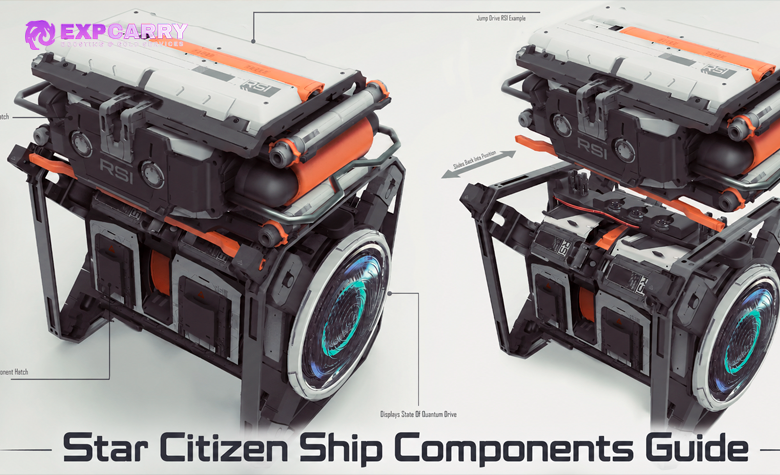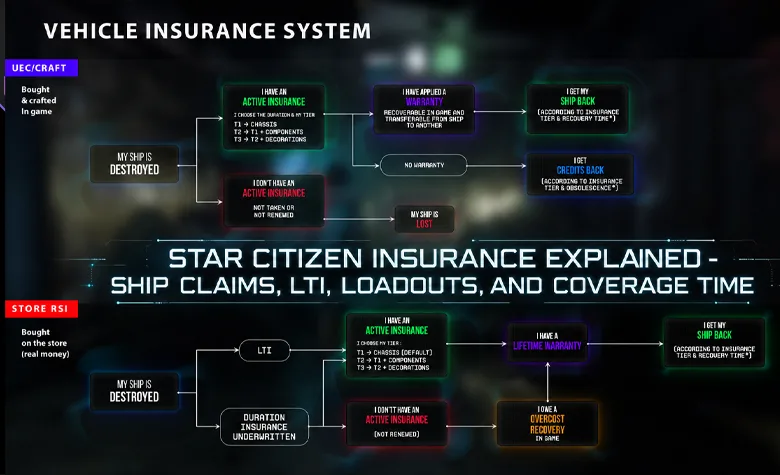
Ship insurance in Star Citizen covers several different systems: basic ship replacement, registered equipment loadouts, insurance claims, pledge insurance, Lifetime Insurance (LTI), and the planned warranty model. These systems should not be treated as interchangeable. In the current LIVE game, players can recover lost ships through ASOP terminals and register supported custom equipment for recovery, while insurance durations attached to RSI pledges remain future-facing benefits.
This guide explains the insurance and claim mechanics available in Star Citizen Alpha 4.10.2 LIVE, along with the official rules for pledge insurance, ship upgrades, Warbond offers, and pledge reclamation. It also separates working features from the longer-term insurance and warranty plans associated with the eventual commercial release.
Short answer: ships and vehicles receive non-expiring basic loss coverage during Alpha testing. A free manufacturer claim returns the default configuration after a longer cooldown, while a paid insured-loadout claim can recover the last registered supported equipment setup with a shorter cooldown. Pledge insurance periods and LTI do not replace the current claim system, and normal ship insurance does not automatically recover trade cargo or loose personal inventory.
Star Citizen Insurance Types Explained
Insurance terminology refers to several forms of protection with different purposes. Basic hull coverage allows a player to recover a ship, registered loadout insurance protects supported equipment, and pledge insurance describes the duration of coverage included with a particular RSI pledge after the game launches.
Other recovery features, such as pledge-item claims and bricked-item handling, are related to insurance but use separate interfaces and rules.
| System | Purpose | Current status | Main limitation |
|---|---|---|---|
| Basic ship insurance | Recover a ship or vehicle with its manufacturer configuration | Available with non-expiring basic coverage during Alpha | Does not automatically restore unregistered modifications or trade cargo |
| Loadout insurance / imprint | Register supported equipment and recover the last saved configuration | Available through ASOP | Requires a paid, up-to-date registration; consumables have exclusions |
| Ship insurance claim | Replace a lost, destroyed, stolen, or stranded vehicle | Available through ASOP | Replacement time, configuration, and aUEC cost depend on the claim option |
| Pledge insurance | Provide a specified future insurance duration through a particular RSI pledge | Included with eligible pledges; its duration has not started | Does not automatically cover other ships or cargo |
| Lifetime Insurance (LTI) | Maintain the included insurance policy without periodic renewal payments | Future-facing benefit on eligible pledges | Does not eliminate claim costs or repair expenses |
| Pledge-item recovery | Recover eligible lost pledge items through a separate interface | Limited implementation through Freight Manager | Not all pledge items or in-game purchases are eligible |
| Warranty | Planned distinction between insurance payouts and receiving a replacement item | Part of the announced long-term ownership model | The complete warranty system is not active in LIVE |
| Cargo insurance | Potential future protection for transported goods | Not a standard feature of current ship claims | Purchased commodities remain at risk |
The main operational difference is between recovering the ship itself and recovering the equipment registered with it. The main pledge-related difference is between the insurance duration included with an account entitlement and the claim mechanics currently available in game.
The official RSI Ship Insurance FAQs explain the current insurance model and its relationship to pledge benefits.
How Basic Ship Insurance Works in Current LIVE
During Alpha and PTU testing, ships and vehicles receive basic insurance that does not expire. Players do not need to renew a normal hull policy to continue participating in the current testing environment.
That does not mean every recovery option is free or instant. The current manufacturer-configuration claim is free but has a longer cooldown. Registering and recovering a custom loadout requires aUEC payments.
Alpha 4.8 introduced the vehicle loadout recovery system. It remains available in Alpha 4.10.2, whose official LIVE release notes explicitly remind players to imprint their ship loadouts before traveling.
What Basic Insurance Returns
A standard manufacturer claim returns the ship or vehicle with its baseline equipment configuration.
Depending on the vehicle, that configuration may include:
- manufacturer-installed ship weapons;
- standard shield generators;
- default power plants and coolers;
- the standard quantum drive;
- factory-installed mining or industrial equipment;
- other supported equipment included in the manufacturer's configuration.
The baseline is determined by the applicable manufacturer configuration, which may reflect the ship's RSI web-hangar entitlement or its in-game default.
Do not assume that a standard replacement duplicates every modification made during the previous session.
What Basic Insurance Does Not Normally Return
Basic coverage is not a complete inventory-restoration service.
Items that should not be assumed to return with a manufacturer claim include:
- aftermarket components that were not registered through loadout insurance;
- trade commodities;
- refined ore and raw materials carried as cargo;
- salvaged commodities;
- mission freight;
- unregistered loose objects inside the ship;
- personal armor, weapons, and backpacks;
- unregistered vehicles carried inside another ship;
- equipment installed after the last insured loadout was saved.
There are important exceptions for supported items deliberately included in a registered loadout snapshot. Those are explained in the loadout insurance section below.
For cargo and inventory, the safest approach is to treat the physical contents as separate from the insured ship hull.
How to File a Ship Claim
An insurance claim creates a replacement when a ship is lost, destroyed, stolen, stranded, or otherwise unavailable for normal retrieval.
Claims are managed through the ASOP system. The key decision is whether the player wants the standard manufacturer configuration or an eligible saved loadout.
Star Citizen Claim Process
To recover a lost ship or vehicle:
- Visit an ASOP terminal at a supported station, landing zone, or hangar.
- Find the unavailable vehicle in the ship list.
- Select Claim.
- Review the location, status, and available recovery options.
- Choose the manufacturer configuration or insured loadout when both are offered.
- Review the displayed cost and waiting time.
- Confirm the claim.
- Wait for the replacement to become available.
- Retrieve the new ship through the applicable ASOP controls.
- Inspect the equipment and cargo state before returning to gameplay.
The manufacturer claim is free and uses a longer replacement cooldown. The insured-loadout claim restores registered equipment and costs aUEC based on the hull and saved configuration, with a shorter cooldown. Under the Alpha 4.8 system, insured-claim cooldowns are calculated from when the ship was spawned rather than simply from the moment of destruction.
Older insurance guides sometimes describe paying separately to expedite every standard claim. Alpha 4.8 removed the separate paid standard-claim acceleration option as part of the insured-loadout recovery redesign.
RSI's general support documentation still contains references to claim fees and expedite options that do not fully reflect the newer release notes. Follow the choices and prices displayed by the current LIVE ASOP terminal. If the terminal fails to show a valid claim or delivery option, consult the current Known Issues list.
Manufacturer Claim vs. Insured-Loadout Claim
The correct claim option depends on the equipment you want to recover and the value of the registered configuration.
| Feature | Manufacturer claim | Insured-loadout claim |
|---|---|---|
| Ship hull | Replacement provided | Replacement provided |
| Equipment configuration | Manufacturer default | Last registered supported loadout |
| aUEC cost | Free under the current manufacturer-claim model | Paid claim based on the insured hull and configuration |
| Replacement time | Longer standard cooldown | Shorter cooldown under the insured-loadout model |
| Aftermarket components | Not automatically recovered | Recovered when properly registered and supported |
| Consumable ammo and missiles | Not protected as previously carried consumables | Excluded from saved-loadout recovery |
| Trade cargo | Not restored by the claim | Not restored by the claim |
The insured-loadout option is most valuable after installing expensive weapons, power plants, shields, mining heads, or other replaceable equipment.
A player operating a completely stock starter ship may have little reason to pay for custom equipment recovery.
Claim Included Vehicles Before the Parent Ship
Some ships include or transport a smaller vehicle or snub craft. These vehicles may have their own recovery state even when they are associated with a larger ship.
RSI recommends claiming the smaller included vehicle first and the parent ship afterward.
Nested ships can also be part of a registered parent-ship snapshot if they were present when that configuration was saved. Eligible nested craft can maintain their own independent snapshots.
That does not mean any unrelated vehicle placed inside a cargo hold automatically becomes a permanent account entitlement. Stolen AI-controlled ships cannot be registered through the normal snapshot system.
Before claiming the parent ship, inspect the state of the smaller craft and determine whether it has its own claim or registration record.
Claims as a Technical Workaround
Claiming a ship can sometimes resolve problems involving inaccessible doors, broken component states, unusable seats, or other vehicle-specific issues.
However, claims should not be the first option when a ship can be stored, retrieved, repaired, or otherwise recovered normally.
Before filing a claim as a workaround, consider whether it will affect:
- the currently installed custom loadout;
- the last saved loadout snapshot;
- unretrieved cargo;
- nested vehicles;
- the state of the original ship;
- the required replacement cost and waiting time.
A claim can make the previous ship unusable through the bricked-item system after a short grace period, even if the original vehicle still physically exists somewhere in the game world.
Explore services related to this guide, selected from our Star Citizen catalog.
View All Star Citizen Services

Star Citizen Loadout Insurance and Imprints
Loadout insurance protects supported equipment registered to a particular ship. The current implementation is commonly described using the terms imprint, snapshot, or insured loadout.
The essential rule is that the game needs an up-to-date record of the configuration you want to recover. Installing a new component does not automatically include it in the previously registered setup. Saving a new snapshot requires a separate registration action.
Equipment Covered by Loadout Insurance
The Alpha 4.8 vehicle loadout recovery implementation supports more than just major ship components.
Depending on the vehicle and registration interface, a snapshot can include:
- equipped ship weapons;
- shield generators;
- power plants and coolers;
- quantum drives;
- supported mining heads and modules;
- other recognized installed components;
- supported contents of designated onboard lockers;
- poster decorations placed in their supported attachment slots;
- eligible nested vehicles present when the snapshot was created.
Missiles and ammunition are consumables and are excluded from insured-loadout recovery. They must be replenished through the appropriate rearming or ship-service process after a claim. Registered snapshots also cannot contain bricked items, and consumable exclusions should not be confused with the recovery of the underlying installed equipment.
Other objects may not be eligible even when they are physically present aboard the ship. A cargo box in the hold is not automatically covered simply because a snapshot exists.
Review the registered equipment and supported items rather than treating the entire ship interior as insured storage.
How to Insure a Custom Ship Loadout
Register the configuration after installing and checking the desired components. This process uses the ASOP terminal, not the Vehicle Manager App's ordinary customization interface.
- Install the weapons, components, and other supported equipment you intend to keep.
- Confirm that the components are correctly attached and usable.
- Visit an ASOP terminal.
- Select the modified ship.
- Open the Insure Loadout or snapshot control provided by the current interface.
- Review the equipment and other supported items listed for registration.
- Check the displayed aUEC price and confirmation warning.
- Confirm the new insured configuration.
- Verify the registration status before leaving.
RSI's insurance support article describes a green check indicator when a loadout is insured, although the indicator may sometimes display incorrectly.
The registered configuration and the confirmation screen matter more than the presence of a single status icon.
Alpha 4.10.2 continues to remind players to imprint their loadouts before heading into the Persistent Universe.
Insuring a New Loadout Overrides the Previous One
A new registration replaces the previously recorded configuration for that ship.
Items omitted from the new snapshot lose their registered protection through that ship's record unless they are also included in another supported vehicle snapshot.
For example, if you replace a shield generator, remove a weapon, and then create a new snapshot, the insured setup reflects the current configuration rather than the earlier version.
RSI also warns that the loadout insurance interface can allow repeated purchases even when nothing has changed.
Avoid paying again for an identical configuration unless the game actually requires a new registration.
What Happens After Changing One Component?
Any meaningful equipment change should trigger a review of the insured configuration.
A practical workflow is:
- Complete all intended component upgrades.
- Confirm the ship functions with the new equipment.
- Check that the equipment appears correctly in the ship-management interface.
- Return to the appropriate ASOP terminal.
- Save or insure the updated configuration.
- Verify the registration before beginning a dangerous mission.
Saving a new configuration is particularly important before operating a heavily upgraded combat ship, an expensive mining vessel, or a ship using specialized components that would be difficult to replace.
What Happens to an Uninsured Custom Loadout?
If a ship is lost without current loadout insurance, the manufacturer replacement returns with baseline equipment instead of the unregistered aftermarket configuration.
The outcome depends on which claim option is selected and what was included in the last registered snapshot.
| Ship state before loss | Expected recovery result |
|---|---|
| Stock ship without modifications | Manufacturer claim returns the standard configuration |
| Modified ship with current insured loadout | Eligible insured-loadout claim restores the last registered supported configuration |
| Modified ship without registered loadout | Manufacturer claim returns baseline equipment; unregistered modifications can be lost |
| Ship modified after its previous snapshot | The previous registered configuration remains the relevant insured record |
| Ship carrying purchased trade cargo | Claim does not create a replacement shipment of commodities |
| Ship with consumable missiles and ammunition | Consumables are not restored through the insured-loadout snapshot |
| Ship with an eligible nested vehicle in its snapshot | Nested vehicle handling follows the supported registration and recovery rules |
Insurance and registration reduce the intended economic consequences of losing a ship, but they do not prevent technical problems with persistence, inventory state, or equipment recovery.
For an expensive configuration, inspect the result after a claim rather than assuming every installed or stored item was reproduced.
What Are Bricked Ships and Items?
A bricked ship or item is a previous instance that has become inert and unusable because a replacement has been claimed or an associated pledge has been reclaimed or refunded.
This system prevents players from continuously generating working duplicates of registered equipment and vehicles through claims.
When a replacement is issued, the previous copy can enter the bricked state after a short grace period.
A bricked ship may remain physically present or appear in the ship-management interface, but it is no longer a functioning replacement for the active claimed vehicle.
How to Handle a Bricked Ship
RSI provides a cleanup process through ASOP:
- Open an ASOP terminal.
- Find the bricked ship in the list.
- Check whether the vessel contains cargo that should be recovered.
- Retrieve any accessible remaining cargo before removing the ship.
- Use the available Scrap option when appropriate.
- Confirm that the unwanted bricked entry has been removed.
A bricked vehicle may still contain physical cargo that can be recovered before it is scrapped. This does not mean the insurance claim duplicated that cargo.
The normal ship claim replaces the vessel, while recovering remaining contents from the original location is a separate physical salvage or inventory task.
For the official explanation, see RSI's Bricked Items and Ships guide.
Are Ship Paints and Customizations Covered?
Ship customization has several different categories, and their recovery behavior should not be treated as identical.
RSI states that supported customizations obtained through its ship customizer are generally intended to remain associated with the ship after a claim.
However, known issues can cause customization or item-attribution problems, and those technical limitations remain relevant during Alpha.
Separate these categories:
- Installed functional components: use the current loadout registration system.
- Manufacturer customizer options: intended to persist through normal ship recovery, subject to technical issues.
- Paints and modules provided through pledges: account-linked items with their own attribution and recovery behavior.
- Loose decorations: not automatically insured merely because they were placed inside a ship.
- Supported decorations attached to snapshot slots: may be included where the registration system explicitly supports them.
Before changing or reclaiming a pledge containing a rare customization, review the contents of that pledge through the RSI website.
The current Alpha 4.10.2 Known Issues list includes cases where certain pledge items, including paints, modules, and other non-ship items, may not be properly attributed to players.
That problem should be distinguished from ordinary insurance coverage. An account entitlement failing to appear is not necessarily the same as an uninsured in-game item being lost.
Cargo, Vehicles, and Personal Items
Ship insurance does not operate as general-purpose insurance for everything transported, stored, or carried by the player.
A vehicle claim and an inventory recovery are different actions, even when they involve the same lost ship.
Cargo Is a Separate Economic Risk
Standard ship claims do not automatically replace:
- purchased commodities;
- mined and refined ore;
- salvaged materials;
- mission cargo;
- loose SCU containers;
- items inside ordinary cargo crates;
- other physical goods that were being transported.
This is particularly important for commodity trading, mining, salvage, and industrial hauling.
The replacement value of the ship is not the same as the value of the cargo it was carrying.
When a bricked original remains accessible, some physical contents may be recovered before it is scrapped. That possibility should not be confused with insurance replacing the lost merchandise.
Future cargo coverage has been discussed as part of the longer-term insurance economy. It is not a standard feature of the current hull or loadout claim.
Vehicles Carried Inside Another Ship
A ground vehicle, snub craft, or smaller ship carried inside a parent vessel may have separate ownership, registration, and claim information.
The current loadout snapshot system supports eligible nested vehicles that are present when the parent's snapshot is saved.
However, players should not assume that every transported vehicle is automatically included in all recovery options. Stolen AI ships cannot be registered, and included pledge craft may have separate claim requirements.
Verify which vehicle is registered, whether it has its own claim, and whether it was present in the applicable saved configuration.
Personal Equipment Is Not Ship Loadout Insurance
Personal armor, FPS weapons, backpacks, medical supplies, and character inventory are separate from the normal ship hull policy.
Supported items in registered onboard storage may qualify for a ship's loadout snapshot, but loose objects and personal inventory should not be assumed to have the same protection.
Recovering certain account-linked pledge items also follows a separate process.
How In-Game Pledge Item Recovery Works
RSI introduced an initial recovery system for certain lost pledge items through the Freight Manager.
It is distinct from reclaiming a pledge on the RSI website and distinct from filing a ship insurance claim through ASOP.
The officially documented process is:
- Visit the Freight Manager kiosk in your personal hangar.
- Interact with the kiosk.
- Lower the freight elevator so the recovery controls become available.
- Select Claim Mode.
- Review the list of eligible pledge-related items.
- Select the item you need to recover.
- Confirm the claim.
- Check local inventory for the replacement.
RSI's current support article describes this as a limited implementation covering eligible ship-related pledge items. It does not provide universal recovery for all FPS gear or items purchased or looted in-game.
Claiming a replacement bricks the earlier copy of the item, just as a ship claim bricks an earlier vehicle. RSI Support also states that its agents cannot manually recover lost pledge items through support tickets.
For the supported categories and steps, see RSI's In-Game Pledge Item Recovery guide.
Pledge Insurance Explained
A pledge is a contribution made through the RSI Pledge Store in support of Star Citizen's development. In return, the account receives the items and entitlements explicitly listed in that pledge.
RSI distinguishes Game Packages, Standalone Ships, Ship Upgrades, and other pledge products.
A Game Package normally includes Star Citizen game access together with a ship and other listed benefits. A Standalone Ship is a separate pledge item and does not automatically include a copy of the game.
The insurance duration shown in the pledge details is a benefit attached to that particular pledge. It is not the same as the non-expiring basic coverage temporarily provided to all ships during Alpha testing.
RSI pledges may include durations such as:
- three months;
- six months;
- twelve months;
- twenty-four months;
- 120 months;
- Lifetime Insurance (LTI).
The precise insurance duration depends on the purchased pledge or included upgrade. Players should inspect their own My Hangar entry instead of assuming a particular ship model always comes with the same insurance.
When Does Pledge Insurance Start?
RSI confirms that the duration included with a pledge does not start counting down until Star Citizen is live and fully out of testing.
Because the Persistent Universe remains in Alpha, a pledge with six months of insurance has not begun consuming that six-month period.
The exact post-release policy-management process and any future renewal costs remain subject to the final insurance implementation.
Pledge Insurance Is Not Account-Wide
The included insurance applies to the relevant pledge and does not automatically extend to every ship owned by the account.
It should not be assumed to cover:
- unrelated standalone pledges;
- other ships purchased with aUEC;
- every vehicle carried inside another ship;
- trade cargo;
- unregistered custom components;
- all personal equipment.
RSI plans for ships obtained after commercial launch to use individual insurance policies purchased with in-game UEC.
For the distinction between account entitlements and in-game vehicles, consult the official RSI Pledges FAQ.
Lifetime Insurance Explained
Lifetime Insurance (LTI) is a specific insurance benefit attached to eligible pledges. Its main purpose is to maintain the included insurance coverage without requiring periodic in-game renewal payments after release.
LTI is not the only way a player will be able to insure a ship. Ordinary insurance is intended to remain available through the in-game economy.
What LTI Provides
The confirmed benefit of LTI is the absence of recurring UEC payments to maintain the included policy.
It offers:
- non-expiring included insurance coverage for the eligible pledge;
- no need to renew that specific policy periodically;
- long-term convenience for ships the player expects to retain.
The scope of that coverage should be understood according to the actual pledge terms and the final insurance rules when commercial release occurs.
What LTI Does Not Guarantee
RSI explicitly distinguishes the cost of maintaining a policy from the costs associated with using it.
LTI does not automatically guarantee:
- free insurance claims;
- instant ship replacement;
- free repairs;
- free refueling or rearming;
- automatic recovery of transported cargo;
- unlimited coverage for unrelated ships;
- automatic recovery of every custom component;
- immunity from bugs or persistence problems;
- exemption from future claim restrictions or policy rules.
RSI states that owners of LTI ships will still have to pay relevant claim and repair costs once the full insurance economy is implemented.
Should You Pledge for a Ship Only Because It Has LTI?
LTI should not be the primary reason to choose a ship that does not fit the player's intended activity.
Role, crew requirements, operating costs, cargo capacity, and the ability to use the vehicle in the current game are more important practical considerations.
A ship with LTI can still be expensive to operate or poorly suited to a solo player.
For ordinary purchases, inspect the included insurance benefit but evaluate the complete pledge rather than treating LTI as an essential requirement.
Star Citizen Warranties Explained
Warranty is part of CIG's announced long-term ownership and recovery model for Star Citizen's eventual release economy.
It should not be confused with the current Alpha process in which all ships receive testing coverage and eligible vehicles can be replaced through ASOP.
Insurance and Warranty Are Not the Same
In the Star Citizen 1.0 model presented by CIG, insurance without a warranty would provide a monetary payout based on the insured ship's condition and value. Combining insurance with a warranty would instead provide a replacement ship, with additional equipment covered according to the applicable insurance tier.
CIG outlined three planned insurance tiers: Tier 1 for the ship chassis, Tier 2 for the chassis and components, and Tier 3 for the chassis, components, and decorations. The presentation also described permanent warranties for pledge-store ships, but these details remain development plans rather than fully implemented LIVE mechanics.
Details still requiring confirmation include:
- how warranties are attached to ships and other items;
- which items can receive permanent or limited warranties;
- how recovery works for crafted ships and equipment;
- the final relationship between warranties and insurance tiers;
- the treatment of stolen or transferred property;
- replacement costs and applicable restrictions;
- how future warranties interact with existing pledge benefits.
Older presentations and explanations of the intended warranty system should be treated as development plans rather than complete instructions for current gameplay.
Is the Warranty System Active in LIVE?
Not as the complete independent warranty and ownership model intended for the long-term economy.
The practical current workflow remains:
- Use the basic insurance available during Alpha.
- Register supported customized loadouts through ASOP.
- Choose the applicable claim option if the ship is lost.
- Recover the replacement and verify its equipment.
- Handle cargo and eligible pledge-item recovery separately.
Do not make a pledge purchase based on an assumption that an unfinished warranty feature will remove all future loss, fees, or restrictions.
CCU and Insurance Rules
A Ship Upgrade, formerly called a Cross Chassis Upgrade (CCU), changes the ship or vehicle within an eligible pledge.
RSI now uses Ship Upgrade as the primary official term, although CCU remains common community shorthand.
Upgrades generally apply to eligible ships of higher value. They do not automatically copy every benefit of a standalone pledge for the new model.
Standard CCU Insurance Rule
A standard Ship Upgrade changes the eligible ship while retaining the other contents of the original pledge.
For example, an upgrade from a ship with six-month insurance to a model normally sold with 120-month insurance does not automatically grant the longer policy.
The upgraded pledge retains its original insurance unless the upgrade itself explicitly includes an additional insurance benefit.
The same principle applies to other standalone-package items, such as special paints or digital game access: they are not automatically transferred merely because they belong to the destination ship's ordinary standalone offer.
Warbond CCU Insurance
Some Warbond Ship Upgrades explicitly include extended insurance coverage.
When a qualifying upgrade includes a longer policy, the resulting pledge can display both the original and new insurance entries, with the highest duration taking precedence.
This is not a benefit attached to every Warbond upgrade. The exact product description determines what is included.
Before purchasing a Ship Upgrade, inspect the target model, price difference, included insurance, and other items.
The official Ship Upgrades support page describes these rules.
Insurance Inside Multi-Ship Packages
When an insurance-bearing upgrade is applied to an eligible ship within a package, RSI's support documentation states that a longer included insurance benefit can affect the package's insurance as a whole.
The resulting pledge details should be checked after the upgrade is applied.
Do not assume that modifying one package ship automatically changes every other entitlement in every possible way. The displayed package contents remain the authoritative account record.
Warbond, Melting, and Buy Back Risks
RSI's pledge terminology distinguishes new-money promotions, ship upgrades, reclaiming pledges for store credit, and purchasing eligible reclaimed pledges again.
These account-level actions are separate from in-game ship insurance claims.
Warbond refers to eligible pledges or upgrades requiring new payment rather than store credit. These offers may include discounts, extended insurance, paints, or other promotional items, but only the benefits listed in the product are included.
Reclaiming a pledge, commonly called melting, removes that pledge from the account and provides applicable store credit under RSI's reclaim rules.
Reclaiming an upgraded pledge removes the applied Ship Upgrades. If the original pledge is eligible for Buy Back, the recovered version is the base pledge, not the upgraded configuration.
Buy Back is a separate system that may allow eligible previously reclaimed pledges to be purchased again. Not every pledge qualifies. Purchasing with store credit requires an available Credit Buy-Back Token, which RSI normally issues every three months and which does not accumulate indefinitely.
Before reclaiming a pledge, check:
- the original pledge and ship model;
- its insurance duration or LTI;
- applied Ship Upgrades;
- any Warbond-specific benefits;
- whether it includes Star Citizen game access;
- special paints, flair, or other digital items;
- physical merchandise or limited entitlements;
- Buy Back eligibility;
- the store credit that will actually be returned.
Reclaiming the only Game Package that grants access to Star Citizen can remove the account's ability to enter the Persistent Universe until suitable access is restored.
Do not use pledge reclamation as a casual way to test insurance mechanics. Certain discounted, limited, physical-item, or other restricted pledges cannot be bought back, and RSI Support does not guarantee restoration of reclaimed packages or their previous upgraded configurations.
Refer to the official Reclaim a Pledge and Pledge Buy Back Tool documentation before making account-level changes.
Common Insurance Mistakes
Most costly mistakes involve misunderstanding which objects have actually been registered or confusing the current Alpha recovery process with future pledge insurance benefits.
Installing Expensive Components Without Registering the Loadout
New weapons and components are not automatically part of an earlier insured configuration. Update the registration after completing the installation.
Assuming Cargo Is Included
A replacement ship does not automatically contain the purchased commodities, refined ore, or salvage materials that were aboard the lost original.
Repeatedly Registering the Same Loadout
RSI warns that players can pay repeatedly for the same unchanged configuration. Review the existing insured state before registering it again.
Changing Components After Insuring the Ship
The last saved configuration is the relevant insured record. Newly installed equipment should be registered before risking the ship.
Assuming Ammunition and Missiles Return
Consumable ammunition and missiles are excluded from insured-loadout recovery. Plan to rearm after claiming a replacement.
Claiming a Parent Ship Before an Included Vehicle
For included craft, RSI recommends claiming the smaller vehicle first and the parent afterward. Review nested registrations and individual claim states before proceeding.
Confusing a Bricked Original With a Working Replacement
The old instance of a claimed ship may still physically exist but become unusable. Check it for recoverable cargo before scrapping it.
Using Insurance Claims to Duplicate Valuable Items
Registered items and vehicles are subject to bricking when a replacement is claimed. Insurance should not be treated as an unlimited item-generation method.
Buying an Unsuitable Ship Only for LTI
LTI removes future policy renewal costs. It does not make an unsuitable ship cheaper to operate or guarantee free recovery.
Assuming Every Warbond Upgrade Improves Insurance
Only an upgrade explicitly listing an additional insurance benefit changes the included insurance.
Confusing Melting With an In-Game Claim
Reclaiming a pledge removes the account entitlement for store credit. An in-game insurance claim replaces the eligible ship or item without reclaiming its website pledge.
Assuming Every Pledge Item Can Be Recovered
The current in-game pledge recovery feature supports a limited selection of eligible ship-related items. It does not recover every lost FPS item or in-game purchase.
Treating Warranty Plans as Final LIVE Rules
The planned 1.0 warranty system and its proposed insurance tiers remain subject to implementation. Current ASOP behavior and official pledge terms should guide present-day decisions.
Star Citizen Insurance FAQ
These answers summarize the practical differences between current insurance, registered equipment, pledge benefits, and future ownership systems.
Does Ship Insurance Expire During Alpha?
No. Basic ship and vehicle insurance is non-expiring during Alpha and PTU testing.
Does Filing a Claim Cost aUEC?
The current manufacturer-loadout claim is free and uses a longer cooldown. An insured-loadout claim has an aUEC cost and a shorter cooldown. Registering a new loadout also costs aUEC. Review the available options in the current ASOP interface.
Will My Upgraded Ship Components Return After a Claim?
Supported components can return when they are included in the current registered loadout and the player uses the appropriate recovery option. Without that registration, expect the baseline configuration.
What Does Imprint Mean in Star Citizen?
Imprinting or saving a snapshot registers supported ship equipment and other eligible items for insured-loadout recovery. It is performed through ASOP rather than the ordinary Vehicle Manager customization workflow.
Do Missiles and Ammunition Return?
No. The vehicle loadout recovery system excludes consumable ammo and missiles from registered-loadout replacement.
Does Insurance Replace Lost Cargo?
Normal ship claims do not replace trade commodities, ordinary cargo containers, or their contents. Cargo remains a separate loss risk.
What Happens to the Old Ship After a Claim?
The previous copy can enter the bricked state and become unusable. If it remains accessible, retrieve any remaining cargo before scrapping it.
When Does Pledge Insurance Begin?
The included insurance period begins after Star Citizen is live and out of testing, not during the current Alpha.
Is LTI Necessary?
No. LTI is a future policy-maintenance benefit. RSI intends ordinary insurance to be available through in-game UEC as well.
Does a Standard CCU Improve Insurance?
No. A standard Ship Upgrade preserves the original pledge insurance unless the upgrade explicitly includes a longer policy.
What Is the Difference Between a Pledge and a Ship Upgrade?
A pledge is an RSI account entitlement provided in return for a contribution. A Ship Upgrade changes an eligible ship within an existing pledge while preserving other included contents unless the upgrade specifies additional changes.
Can I Recover Lost Pledge Items?
Some eligible ship-related pledge items can be recovered through the Freight Manager Claim Mode. The feature is limited and does not provide universal recovery for all items.
Is the Warranty System Already Active?
Not as the complete planned commercial-release system. Current gameplay uses basic insurance, loadout registration, ASOP claims, and separate limited pledge-item recovery.
Does Alpha 4.10.2 Change Pledge Insurance Duration?
No. The Alpha 4.10.2 release information does not announce any change to pledge-insurance timers. The current RSI support rule remains that the included period does not begin until the game is fully out of testing.
Final Insurance Checklist
Before operating an expensive ship or changing a pledge, verify which protection applies to the vehicle and which items remain exposed to loss.
- Use basic insurance to recover the ship with its manufacturer configuration.
- Register the loadout after installing custom components.
- Review supported equipment, locker contents, decorations, and eligible nested vehicles before confirming a snapshot.
- Do not register the same unchanged loadout repeatedly without a reason.
- Remember that consumable ammunition and missiles are not recovered through the insured-loadout snapshot.
- Assume ordinary trade cargo and loose inventory are not covered by ship claims.
- Check included craft and claim the smaller vehicle before the parent where applicable.
- Review claim costs and waiting times before selecting a recovery option.
- Recover accessible cargo from a bricked original before scrapping it.
- Remember that pledge insurance durations have not started during Alpha.
- Treat LTI as a policy-maintenance benefit rather than free ship replacement.
- Read the full contents of every Ship Upgrade and Warbond pledge.
- Check Buy Back eligibility, Credit Buy-Back Token availability, and game access before reclaiming a pledge.
- Use Freight Manager Claim Mode only for supported pledge-item recovery.
- Do not treat announced warranty mechanics or future insurance tiers as finalized LIVE gameplay.
The practical insurance rule in Star Citizen is to distinguish the hull, registered equipment, physical cargo, and website pledge benefits. Basic coverage provides a way to recover the ship, while loadout registration protects supported equipment through the appropriate claim. Cargo and ordinary personal inventory remain separate risks, and pledge insurance or LTI does not remove future claim costs. Understanding those distinctions prevents avoidable equipment loss and reduces confusion between current Alpha mechanics and future insurance plans.