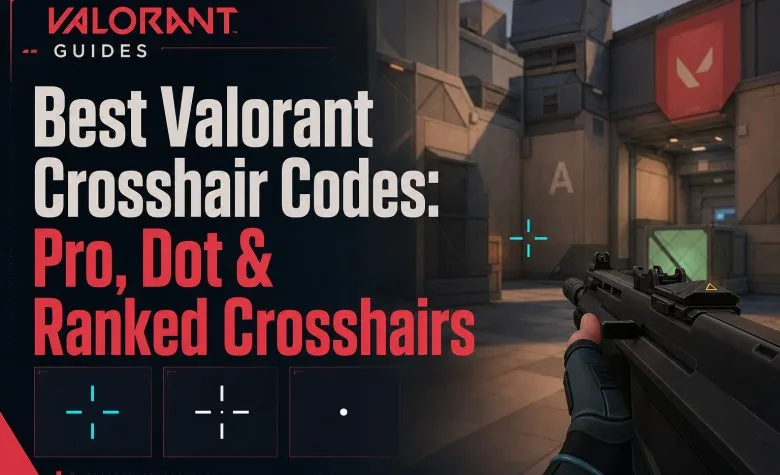
The best VALORANT crosshair is usually a small, static and clearly visible crosshair that lets you place the center of your screen precisely on an enemy's head without covering the target. You do not need a complicated design: many high-level players use short inner lines, little or no gap, no movement error and no firing error.
If you want a strong starting point instead of changing your crosshair every match, try the small cyan TenZ-style crosshair, the compact white aspas-style crosshair or a simple dot. Test one for several matches before making small adjustments.
| Crosshair | Best for | Style |
|---|---|---|
| TenZ | General rifle play | Small cyan static cross |
| aspas | Minimal visual obstruction | Small white cross with no gap |
| Derke | Players who prefer outlines | White cross with visible outline |
| Boaster | Precise center aiming | Green dot |
| Simple Dot | Tap shooting and head-level focus | Compact center dot |
| Small Circle | Players who dislike traditional lines | Minimal circular reticle |
Best Valorant Crosshair Codes
These codes give you several genuinely different styles instead of dozens of almost identical profiles.
TenZ Crosshair Code
Style: small cyan static cross.
0;s;1;P;c;5;o;0;f;0;0l;2;0v;2;0g;1;0o;1;0a;1;0f;0;1b;0This is our best general starting point if you do not yet know what you prefer. The cross is small enough for precise headshots but remains easier to track than an extremely tiny dot.
aspas Crosshair Code
Style: compact white cross with no outline and essentially no visual clutter.
0;P;h;0;0l;4;0o;0;0a;1;0f;0;1b;0This style works well for players who want the crosshair to cover as little of the target as possible.
Derke Crosshair Code
Style: white cross with outline and a small gap.
0;P;o;1;0t;1;0l;4;0o;2;0a;1;0f;0;1t;0;1l;1;1o;0;1a;1;1m;0;1f;0The outline can make the reticle easier to track when moving between bright and dark parts of a map.
Boaster Dot Crosshair Code
Style: small green dot with outline.
0;s;1;P;c;1;o;1;d;1;0l;0;0o;2;0a;1;0f;0;1t;0;1l;0;1o;0;1a;0;S;c;1;o;1A dot removes line clutter completely. It can feel excellent for precise taps, but some players find it harder to track during fast movement.
Simple Dot Crosshair Code
0;s;1;P;h;0;d;1;z;3;f;0;0t;3;0l;1;0o;1;0a;1;0f;0;1t;0;1l;0;1o;0;1a;0;1f;0Use this if you specifically want to train keeping one exact point at head height.
Small Circle Crosshair Code
0;P;c;7;h;0;f;0;0t;3;0l;1;0v;1;0g;1;0o;1;0a;1;0f;0;1t;0;1l;0;1o;0;1a;0;1f;0A circle is less common in high-level play, but some players find it easier to center targets inside a shape rather than align traditional crosshair lines.
Which Valorant Crosshair Should You Use?
If you only want one recommendation, start with a small static cyan cross.
It gives you three useful properties:
- good visibility on most map backgrounds;
- a clear center point;
- minimal obstruction around an enemy's head.
Do not choose a crosshair because a professional player uses it. Use pro settings as a tested starting point, then adapt them to your monitor, resolution and visual preference.
Best Crosshair Settings for Ranked
| Setting | Recommended starting point | Why |
|---|---|---|
| Color | Cyan, green or white | Usually easy to distinguish from map textures |
| Outlines | Off or thin | Avoid unnecessary visual size |
| Center Dot | Optional | Useful for exact center reference |
| Inner Line Thickness | 1 | Keeps the crosshair clean |
| Inner Line Length | 2–4 | Large enough to track without covering heads |
| Inner Line Offset | 0–2 | Keeps the center compact |
| Movement Error | Off for experienced players | Keeps the reticle visually stable |
| Firing Error | Off for a simple competitive crosshair | Prevents expansion from distracting from the center |
| Outer Lines | Usually off | Reduces visual clutter |
This is not a mandatory formula. A new player may temporarily find movement or firing error useful because it visually demonstrates when weapon accuracy changes.
Explore services related to this guide, selected from our Valorant catalog.
View All Valorant Services
How to Import a Crosshair Code in Valorant
- Copy the complete crosshair code.
- Open VALORANT Settings.
- Go to the Crosshair section.
- Find your Crosshair Profile controls.
- Select Import Profile Code.
- Paste the code.
- Confirm the import.
- Give the new profile a recognizable name.
Riot refreshed the PC Settings interface in 2026, so the exact visual position of the import icon can differ from screenshots made with older versions. The function itself remains inside the Crosshair profile controls.
How to Export Your Own Valorant Crosshair
You can also convert your own settings into a shareable code.
- Open Settings.
- Go to Crosshair.
- Select the profile you want to share.
- Use the Export Profile option.
- VALORANT copies the generated code to your clipboard.
You can then save it in a note or send it to another player.
How to Copy a Teammate's Crosshair With /cc
You do not need to ask a teammate for their code if you are already spectating them.
While spectating, open chat and enter:
/ccYou can also use:
/crosshair copyVALORANT saves the spectated player's crosshair as a new profile.
This is useful when you see a clean crosshair during Ranked and want to test it immediately after the match.
How Many Crosshair Profiles Can You Save?
VALORANT supports up to 15 crosshair profiles.
That is enough to maintain a small practical library rather than constantly rebuilding settings.
A useful structure is:
- one main rifle crosshair;
- one dot;
- one crosshair with an outline;
- one experimental profile;
- several copied pro or teammate profiles for testing.
Best Crosshair Color in Valorant
There is no universally perfect crosshair color because visibility depends on your monitor, color settings and the map background.
For most players, start with:
- Cyan — strong all-around visibility;
- Green — bright and easy to track;
- White — clean and minimal, especially with an outline.
Riot also allows a custom six-digit RGB HEX color, so you are not restricted to the default palette.
Should You Use a Dot Crosshair?
A dot crosshair is excellent for players who already have disciplined crosshair placement.
Advantages:
- very precise center point;
- minimal screen obstruction;
- good for tapping and controlled bursts.
Disadvantages:
- easier to lose visually during chaotic fights;
- provides less reference for recoil or lateral alignment;
- can feel too small at high resolutions.
If a dot constantly disappears from your vision, use a short cross instead. Precision is useless if you cannot reliably see the reticle.
Should Movement Error Be On or Off?
For a stable competitive crosshair, we recommend turning movement error off once you understand VALORANT's movement accuracy.
With movement error enabled, the crosshair changes while you move. This can help beginners understand when their weapon becomes inaccurate, but experienced players usually do not need the visual feedback.
Should Firing Error Be On or Off?
Most small competitive crosshairs work better with firing error disabled because the reticle remains visually stable while shooting.
However, enabling it temporarily can help a beginner understand how quickly accuracy deteriorates during a long spray.
Do not confuse a static crosshair with static weapon accuracy. Turning the visual indicator off does not remove movement or firing inaccuracy from the weapon.
Does a Better Crosshair Improve Aim?
A crosshair can make good aiming habits easier, but it cannot replace them.
Your actual aim still depends on:
- crosshair placement;
- movement and stopping before shooting;
- mouse control;
- peeking technique;
- reaction and target recognition.
If you change crosshair every few matches, you may actually make evaluation harder because you never give yourself enough time to adapt.
Pick one clean profile, play with it consistently and focus on the fundamentals covered in our Valorant Rank Up Guide.
Crosshair vs Sensitivity: Which Matters More?
Sensitivity affects how your mouse movement translates into aim. The crosshair is primarily a visual reference.
If your aim repeatedly overshoots or undershoots targets, changing the shape of the crosshair probably will not solve the underlying issue.
Crosshair changes should solve visibility or precision problems. Sensitivity changes should solve control problems.
Common Valorant Crosshair Mistakes
| Mistake | Why it hurts | Better approach |
|---|---|---|
| Changing crosshair every game | You never adapt to one visual reference | Test one setup for multiple sessions |
| Crosshair is too large | It covers heads and distant targets | Reduce line length and gap |
| Crosshair is too tiny to see | You lose it during fights | Add outline or slightly increase size |
| Using a color that blends into maps | Visibility drops in specific areas | Try cyan, green or a custom HEX color |
| Copying a pro blindly | The setup may not suit your resolution or eyes | Use the code as a baseline |
| Expecting a code to fix bad aim | Crosshair cannot fix mechanics | Train placement, movement and shooting |
Are Pro Crosshair Codes Always Current?
No. Professional players can change their crosshair at any time, sometimes even between maps or practice sessions.
That is why this guide should not contain dozens of codes copied from old databases. We keep a smaller curated set and treat the underlying style as more important than the player's name.
If a pro changes from a 1-4-2 white cross to a dot tomorrow, your current crosshair does not suddenly become bad.
Valorant Crosshair FAQ
What is the best Valorant crosshair code?
There is no universal best code, but a small static cyan cross is the safest starting point for most players. The TenZ-style code above is a good example.
What crosshair do most pros use?
There is no single identical pro crosshair, but small static crosses with short inner lines and little visual clutter are extremely common.
How do I import a Valorant crosshair code?
Open Settings, go to Crosshair, select Import Profile Code, paste the complete code and confirm.
How do I copy someone's crosshair?
While spectating them, type /cc or /crosshair copy in chat.
How many crosshairs can I save?
You can currently save up to 15 crosshair profiles.
What is the best color for a Valorant crosshair?
Cyan is a strong general choice, while green and white are also common. Choose the color you can identify immediately against different map backgrounds.
Is a dot or cross better?
A dot provides maximum center precision, while a small cross is generally easier to track. For most players, we recommend starting with a small cross.
Do crosshair codes change your sensitivity?
No. Crosshair profiles control reticle settings, not mouse sensitivity.
Best Valorant Crosshair: Final Recommendation
Start simple. Use a small static cyan or white cross, disable unnecessary outer lines, keep the center visible and stop changing profiles every few matches.
Use pro codes as starting points rather than magical aim settings. The best crosshair is the one you can see instantly, place precisely at head level and forget about while concentrating on the actual fight.