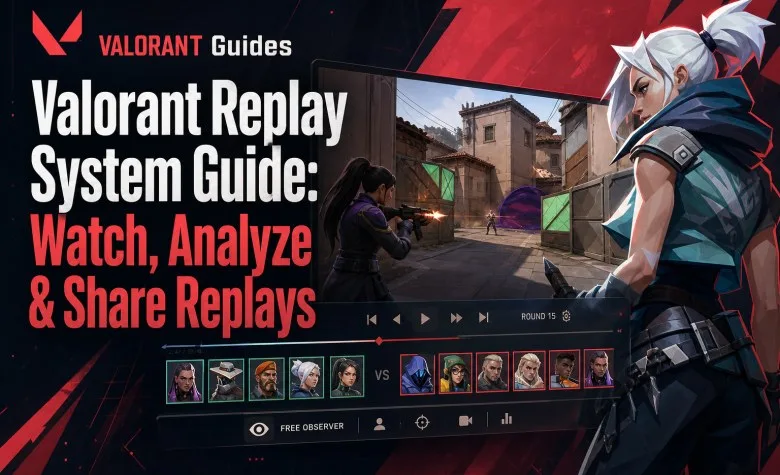
VALORANT's built-in Replay System lets you rewatch recent matches from all 10 player perspectives or a free observer camera. You can slow fights down, jump between rounds, inspect kills and deaths, follow projectiles and study what actually happened instead of relying only on your memory of the match.
The most important limitation is simple: a Replay only works while the match's patch is still the current live patch. When VALORANT moves to a new patch, older Replay files from the previous patch can no longer be played.
| Replay feature | Current status |
|---|---|
| Competitive | Supported |
| Unrated | Supported |
| Swiftplay | Supported |
| Premier | Supported |
| Custom Standard | Supported if recording is enabled |
| Custom Swiftplay | Supported if recording is enabled |
| Watch friends' Replays | Supported through their Career page |
| Voice chat recording | No |
| Text chat recording | No |
| Built-in video export | No |
| Replay lifetime | Current live patch only |
How to Watch a Replay in Valorant
For your own eligible matches:
- Open Career.
- Select the match you want to review.
- Choose the Replay download option.
- Wait for the Replay file to download inside the client.
- Select the play option to launch the Replay viewer.
You can also access a Replay directly from the post-match details page while that match is still eligible.
Can You Watch a Friend's Valorant Replay?
Yes.
Replay Friend Sharing was added in Patch 12.10. You can open an eligible friend's Career page and access their Replay for supported game modes.
This is especially useful for:
- reviewing a duo partner's point of view;
- analyzing a teammate's utility timing;
- checking how another role experienced the same round;
- reviewing team mistakes without screen sharing.
This is client-based Replay access. It is not the same as sending someone a normal video file.
Which Valorant Modes Support Replays?
The current Replay System supports:
- Competitive;
- Unrated;
- Swiftplay;
- Premier;
- recorded Custom Standard matches;
- recorded Custom Swiftplay matches.
Explore services related to this guide, selected from our Valorant catalog.
View All Valorant Services

How Do Custom Game Replays Work?
Custom Replays are not automatically recorded in every lobby.
The lobby owner must enable Replay recording in the Custom Game options before the match starts.
The option must be enabled again for every new Custom match.
If nobody enabled recording before the game started, you cannot create the Replay afterward.
How Long Do Valorant Replays Last?
Replays are tied to the game version on which the match was played.
Once Riot deploys the next live patch, Replays created on the previous patch can no longer be watched.
That means Replay lifetime is not a fixed number of days.
A match played immediately after a patch may remain viewable for roughly the whole patch cycle. A match played shortly before the next patch may only remain available for a short time.
If a match matters, review or externally record the important moment before the next patch.
Can You Keep Valorant Replays Permanently?
Not through the built-in Replay System itself.
If you want to preserve a specific round, clutch or coaching review beyond the current patch, record the Replay playback using your normal video recording software.
The built-in Replay should be treated as a temporary interactive match file rather than permanent video storage.
What Can You Do in a Valorant Replay?
The Replay viewer includes much more than simple playback.
| Tool | What it does |
|---|---|
| 10 player POVs | Watch the first-person perspective of any player in the match |
| Free camera | Move around the map in third-person observer mode |
| Playback speed | 0.1x, 0.25x, 0.5x, 1x, 2x, 4x and 8x |
| Pause | Freeze a specific moment for analysis |
| Round navigation | Jump directly between rounds |
| Timeline | Jump to specific moments in the match |
| Event markers | Highlights kills, deaths and Ultimate usage |
| Player outlines | Toggle friendly and enemy outlines |
| Projectile following | Follow supported projectiles such as Sova Recon Bolt |
| HUD controls | Show or hide HUD and minimap elements |
| Combat Report | Inspect damage information during the Replay |
| Skip dead players | Avoid automatically spectating eliminated players |
Why Watch All 10 Player Perspectives?
Your own POV explains only what you saw.
A Replay can show:
- what the enemy saw before killing you;
- whether your movement exposed you first;
- how useful your flash or recon actually was;
- whether your teammate could realistically trade you;
- how defenders reacted to your utility;
- whether your lurk created pressure or achieved nothing.
This is one of the biggest advantages over a normal screen recording.
How to Use Valorant Replays to Improve
Do not watch the entire match passively from start to finish.
Review specific decisions.
1. Review Every First Death
Look at rounds where you died first and ask:
- Did I have useful information before taking the fight?
- Could a teammate trade me?
- Was I exposed to more than one angle?
- Did I use utility before peeking?
- Did I repeat the same position?
2. Watch the Enemy POV
Switch to the opponent who killed you.
This immediately shows whether:
- your peek was predictable;
- your movement was visible before you fired;
- your flash missed them;
- your crosshair placement forced a slower adjustment;
- they had information from a teammate or ability.
3. Review Lost 5v4 and 4v3 Rounds
These rounds are especially useful because your team had a numerical advantage but still lost.
Look for:
- unnecessary solo fights;
- poor trading distance;
- bad Spike positioning;
- over-aggression after gaining the advantage;
- missing crossfires.
4. Review Utility Value
Watch from the opponent's perspective when using flashes, recon, smokes, stuns or site-control abilities.
A lineup that looks impressive from your POV may have almost no impact on the defender.
5. Review Rotations
Use the free camera to understand the whole map.
Check whether your team rotated because of confirmed information or simply reacted to noise.
This is especially valuable on maps such as Haven and Lotus, where over-rotating can leave an entire site exposed.
How to Review Your Aim With Replays
Replay is useful for aim analysis, but focus on the decision before the shot rather than only the missed bullet.
Check:
- crosshair height before contact;
- crosshair distance from the expected angle;
- whether you stopped before shooting;
- whether you exposed yourself to multiple enemies;
- whether your first adjustment was too large;
- whether movement made the duel harder than necessary.
For mechanics practice, combine Replay review with our Valorant Aim Training Guide.
How to Review Ranked Games Efficiently
You do not need to spend 40 minutes reviewing every 40-minute match.
A practical review can focus on:
- your first five deaths;
- every first death;
- every lost man-advantage round;
- one attack execute that failed;
- one defense setup that repeatedly failed;
- your most important clutch or post-plant.
This often reveals repeated mistakes much faster than watching the entire match.
Can Valorant Replays Show Voice Chat?
No.
The Replay System does not record voice communications.
You can therefore analyze positioning and gameplay, but you cannot reconstruct exactly what teammates said during the round.
Does Replay Record Text Chat?
No. Text chat is also not recorded in the Replay.
Can You Make Clips Directly From a Valorant Replay?
The built-in Replay viewer does not currently provide a full clipping or video-export workflow.
If you want an MP4-style highlight, social-media clip or permanent VOD, use screen recording while playing back the Replay.
Can You Send a Replay File to Another Player?
The Replay System is designed around the VALORANT client rather than portable video files.
For friends, the intended built-in solution is Replay Friend Sharing through the Career page.
If you need a permanent shareable asset, record the playback as video.
Known Valorant Replay Limitations
Minimap Information Is Not True Fog of War
Enemy outlines can be hidden from the first-person view, but enemy information can still appear on the minimap or megamap.
Do not use the Replay minimap alone to judge exactly what a player knew in real time.
Ability Tactical Maps May Be Missing
Some tactical ability interfaces are not recreated inside the Replay.
Examples include placement maps used by Agents such as Brimstone or Clove.
You can see the Agent begin the ability animation and later see the deployed ability, but not necessarily the exact tactical placement interface they saw while casting.
Placement Previews May Be Missing
Preview outlines for deployable utility may not appear.
This can affect things such as:
- Killjoy Turret previews;
- Deadlock Sonic Sensor previews;
- Cypher Trapwire placement previews.
Can You Use Replays to Detect Cheaters?
Replays can help identify suspicious patterns, but one strange-looking moment is not proof of cheating.
Server timing, latency and the reconstructed nature of Replay playback can make some interactions look different from what either player saw live.
If you believe a player is cheating, use the normal in-game reporting system rather than treating a Replay clip as definitive technical proof.
Replay System vs Screen Recording
| Feature | Valorant Replay | Screen recording |
|---|---|---|
| Your POV | Yes | Yes |
| Enemy POV | Yes | No |
| Teammate POV | Yes | No |
| Free camera | Yes | No |
| Slow motion | Yes | Depends on editor |
| Voice chat | No | Can be recorded |
| Permanent storage | No | Yes |
| Direct video sharing | No | Yes |
Best Replay Review Routine for Ranking Up
Use this short routine after difficult Competitive games:
- Download the Replay before the next patch.
- Review first deaths.
- Switch to the enemy POV for every confusing duel.
- Check lost advantage rounds.
- Review one attack and one defense setup.
- Write down only one or two repeated mistakes.
- Focus on fixing those mistakes in the next session.
Replay review works best when it creates one specific change in your next games rather than a list of twenty theoretical problems.
For the broader climbing process, see our Valorant Rank Up Fast Guide.
Valorant Replay FAQ
Does Valorant have Replays?
Yes. The built-in Replay System launched with Patch 11.06.
Can I watch Competitive matches?
Yes.
Can I watch Premier matches?
Yes.
Can I watch Custom matches?
Yes, for supported Custom Standard and Swiftplay games when Replay recording was enabled before the match.
Can I watch my friend's Replay?
Yes. Eligible friend Replays can be accessed from their Career page.
Do Valorant Replays expire?
Yes. Replays only work while the match's patch remains the current live patch.
Can I watch a Replay after the next patch?
No.
Do Replays record voice chat?
No.
Do Replays record text chat?
No.
Can I watch every player's POV?
Yes. You can switch between all 10 player perspectives.
Does Valorant Replay have a free camera?
Yes.
Can I slow down a Replay?
Yes. Playback speeds range from 0.1x up to 8x.
Can I permanently save a Replay as a video?
Not directly through the built-in Replay System. Record the Replay playback externally if you want permanent video storage.
Valorant Replay System in One Minute
- Replays launched in Patch 11.06.
- Competitive, Unrated, Swiftplay and Premier are supported.
- Supported Custom matches can also be recorded.
- Friends' eligible Replays can be watched through their Career page.
- You can watch all 10 player POVs and use a free camera.
- Playback supports pause, slow motion, fast-forward and timeline navigation.
- Voice and text chat are not recorded.
- Replay files only work on the current live patch.
- The system is designed for temporary analysis, not permanent video storage.