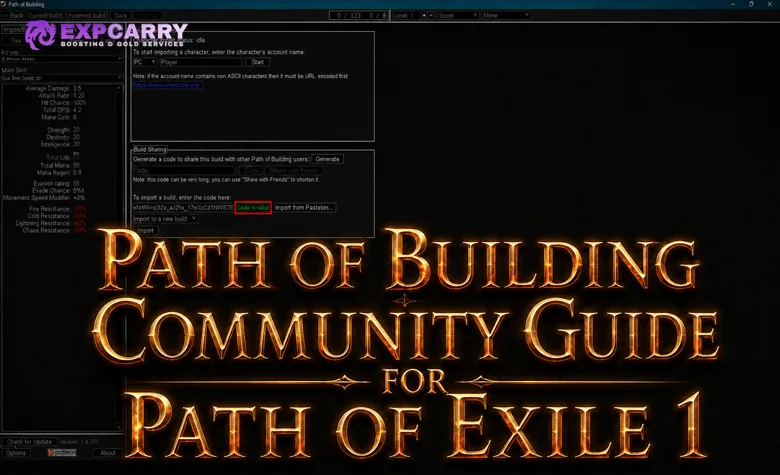
Path of Building Community Fork is one of the most widely used planning and calculation tools for Path of Exile 1. It can model passive trees, gems, items, reservations, damage, defenses, recovery, and many conditional mechanics before currency is spent in game. The number in the sidebar is useful only when the build, target, skill behavior, and combat conditions have been configured honestly.
Path of Building Community Fork is third-party community software. It is not developed, published, supported, or officially endorsed by Grinding Gear Games. The safest starting point is the canonical Path of Building Community repository. This guide covers the Path of Exile 1 application, not the separate Path of Exile 2 project.
What Path of Building Can and Cannot Tell You
PoB is an offline build planner backed by a large community-maintained ruleset. It reads supported stats from skills, supports, items, passive nodes, Ascendancies, Pantheon powers, and configuration choices, then applies them to a mathematical model. Its calculations are excellent for controlled comparisons because the same assumptions can be kept while one item, passive, gem, or condition is changed.
It is not a combat simulator. It does not watch a boss fight, predict player movement, measure latency, or know how many projectiles actually overlap a target unless that behavior is supported or configured. It also cannot decide whether a temporary buff has realistic uptime. The user supplies those assumptions, which means an incorrect Configuration tab can produce a precise-looking but misleading result.
| PoB is good at | PoB does not guarantee |
|---|---|
| Comparing one controlled build change against another | That the modeled conditions occur throughout a real encounter |
| Calculating supported damage, defenses, recovery, and reservations | Perfect support for every new or unusual mechanic |
| Showing where a number comes from in the Calcs tab | Correct projectile overlap, stage count, or target uptime without valid inputs |
| Planning trees, gems, item sets, and upgrade paths | That a planned rare item exists at an affordable market price |
| Checking requirements, resistance caps, and reservation pressure | Player execution, reaction time, positioning, or encounter mechanics |
How to Install Path of Building Community Fork Safely
Download PoB from the Releases section of the Community repository. The project normally provides an install wizard and a portable archive. The installer is convenient for a regular Windows setup, while the portable package can be extracted to a dedicated folder and run without a normal installation. Linux and macOS methods may depend on community packages or compatibility layers, so their maintainers and update schedules should be verified separately.
- Open the PathOfBuildingCommunity repository, not a similarly named download mirror.
- Choose Releases and download the current Path of Exile 1 build.
- Use either the install wizard or portable archive supplied with that release.
- Launch the application and let it check for data updates.
- Confirm that the available game version and passive tree match the PoE 1 version you intend to play.
Do not keep an old executable merely because an existing build still opens. A file can load while using outdated tree data, gems, unique items, or calculations. Update PoB before evaluating a new league build, and preserve a copy of an important build before converting it to a newer tree version.
Starting a Build or Importing a Shared PoB
A new build is defined by its class, Ascendancy, character level, and passive-tree version. A shared build can be loaded from its compressed code or a supported build URL through Import/Export Build. Import first, save a local copy under a clear name, and then inspect every tab before treating the published numbers as a realistic benchmark.
Build authors often include several passive trees, item sets, skill sets, and Configuration sets for campaign milestones and endgame budgets. Current PoB versions can group matching sets into Loadouts, so select the intended progression state rather than mixing sets manually. An early tree paired with endgame items, or a budget item set paired with level 100 passives, creates a hybrid that the author never planned. Notes should also be read because they may explain gem swaps, boss settings, required buttons, or mechanics that PoB cannot model automatically.
When following a starter plan, compare its early tree, available gems, attribute requirements, and first mapping item set instead of opening only the final damage setup. A coherent PoE 1 league starter configuration should show how the character reaches its finished state, not only what it looks like after expensive upgrades.
Explore services related to this guide, selected from our Path of Exile catalog.
View All Path of Exile Services

Importing Your Path of Exile 1 Character
Character import is available from Import/Export Build. Current PoB versions provide two paths: Import From Your Account through Path of Exile authorization, and Import By Account Name for a public profile. Account-name import expects the account discriminator, such as Name#1234, and supports the PC, Xbox, and Sony realms. Grinding Gear Games documents account characters and authorization in its Path of Exile developer API reference.
- Create a new PoE 1 build and open Import/Export Build.
- Use Authorize with Path of Exile for your own account, or use Import By Account Name for a public profile.
- Select the correct platform, league, and character.
- Import the passive tree and jewels.
- Import items and skills, then verify weapon swap, gem levels, quality, and socket groups.
- Save the result as a new file before changing configurations or testing upgrades.
Never give a third-party guide, website, or person your Path of Exile password. Use the authorization page opened by Path of Exile when that option is available. Do not paste session cookies into random websites. If importing through a public profile, expose only the profile information required for the import and restore the desired privacy settings afterward.
Re-importing is not the same as synchronizing every decision. Depending on the selected import options, it can replace the passive tree, jewels, equipment, and skills. Current versions preserve several skill-state choices during re-import, but you should still verify Full DPS inclusion, counts, stages, the selected main skill, and Configuration choices afterward. Save dated snapshots when comparing the live character with a proposed upgrade path.
Understanding the Main PoB Tabs
| Tab | Main purpose | What to verify |
|---|---|---|
| Tree | Passive tree, Ascendancy, masteries, cluster jewels, and socketed jewels | Character level, allocated points, mastery choices, jewel placement, and tree version |
| Skills | Active gems, supports, socket groups, levels, quality, and enabled states | Links, item socket location, gem variants, Full DPS inclusion, and count |
| Items | Equipped gear, item sets, flasks, crafted test items, and trade searches | Local rolls, requirements, anoints, implicits, disabled modifiers, and selected set |
| Calcs | Detailed breakdown of offense, defense, speed, costs, and skill behavior | Selected skill, skill part, calculation mode, stages, and every multiplier source |
| Configuration | Player conditions, enemy conditions, map settings, custom modifiers, and combat state | Whether every enabled condition has a real source and believable uptime |
| Import/Export | Character import, build-code import, sharing, and updates from another build | Correct league, character, imported components, and saved backup |
| Notes | Instructions, milestones, crafting notes, and limitations supplied by the author | Boss swaps, temporary skills, progression order, and unsupported mechanics |
The left sidebar is a summary, not the complete proof. When a value matters, open Calcs and expand its breakdown. PoB can show whether damage comes from the base skill, added damage, conversion, critical strikes, resistance changes, damage taken modifiers, attack or cast rate, ailments, or another supported component. Current versions also include a Compare tab for build-to-build comparisons and a Party tab for supported party effects; neither removes the need to verify the assumptions behind the numbers.
Build a Clean Baseline Before Checking DPS
Realistic comparison begins with a baseline that represents one recognizable state. Select the passive tree, item set, and skill set that belong together. Set the real character level, allocate only obtainable passives, and remove impossible crafted items. Make sure attributes, gem requirements, reservations, and resistances remain valid before looking at damage.
- Select the main damage skill and correct transfigured or Vaal variant.
- Choose the skill part that actually hits the target.
- Enable only socket groups active in the tested setup.
- Equip one matching item set and the correct weapon swap.
- Set a target appropriate to the content being evaluated.
- Clear inherited custom modifiers that are not explained.
- Record baseline Full DPS, maximum hit values, recovery, speed, and reservations.
A useful baseline is conservative and repeatable. Create separate mapping and boss copies if the character uses different gems, flasks, Pantheon powers, or gear. Trying to represent every situation with one collection of toggles usually creates a setup that exists only inside PoB.
How to Configure the Enemy Correctly
The enemy section determines resistances, ailment threshold, armor interactions, damage taken modifiers, and several conditional effects. Select the boss category that matches the intended test. Mapping clear, pinnacle bosses, and harder boss variants should not be compared under different target settings and presented as if the results were equivalent.
Enable Exposure, curses, covered effects, Intimidate, Unnerve, Wither, Shock, or resistance reduction only when the build applies them to the tested target. Enter an actual sustainable magnitude or stack count. Maximum Shock, maximum Wither stacks, and every curse at full effect should not be assumed merely because the build can produce one weak or short application.
| Enemy setting | Realistic question | Common inflated assumption |
|---|---|---|
| Boss type | Which encounter is this build being measured against? | Using a normal enemy for a bossing claim |
| Shock effect | What effect can the build apply to this target consistently? | Entering the maximum without enough hit damage or a fixed source |
| Wither stacks | How quickly are stacks applied and maintained during movement? | Using maximum stacks from the first second of combat |
| Curses | Are they applied, in range, and valid against this boss? | Enabling every available curse without a source or curse limit |
| Enemy position | Is the target reliably nearby, at range, moving, stationary, or on ground? | Choosing whichever state produces the highest number |
| Resistance changes | Does the build maintain Exposure, Scorch, or another reduction? | Adding manual resistance penalties already calculated elsewhere |
Conditional Buffs Must Have a Source and Uptime
The player section contains charges, flasks, Onslaught, Fortification, Rage, Arcane Surge, Adrenaline, Elusive, leech states, recent actions, and build-specific conditions. Every box is a statement about combat. Checking it says the condition exists during the period represented by the DPS number.
Separate permanent, sustainable, burst, and mapping-only states. Minimum charges or continuously generated charges can be part of a sustained setup. Charges gained only on kill may be reliable while clearing but absent during an isolated boss phase. Focus, Berserk, Vaal skills, temporary shrines, and short flask windows belong in a burst profile unless their uptime is demonstrated.
Recently normally means the last four seconds in PoE 1, but the event still has to occur. Have you Killed Recently is inappropriate for many single-target phases. Have you Crit Recently can be dependable for a high-rate critical build and unreliable for a slow skill with low critical chance. Full Life, Low Life, leeching, stationary, moving, and enemy proximity must match the way the character is actually played.
For builds with several interacting conditions, use separate conservative and burst files or clearly named configuration states. A build-specific PoE 1 configuration review is most useful when it explains the source and expected uptime of every enabled modifier instead of presenting only the highest sidebar value.
Stages, Skill Parts, and Maximum Values
Staged skills gain or change behavior while channeling, charging, attaching objects, accumulating blades, building intensity, or reaching another skill-specific state. Current Community Fork versions default supported staged skills to their maximum stages. Maximum is a calculation input, not proof that the build reaches or maintains that state in combat.
First identify what one stage represents for the selected skill. Then calculate how long it takes to reach the chosen number using the real attack rate, cast rate, trigger rate, cooldown, or generation limit. Account for the target moving, the player dodging, objects expiring, maximum object counts, and the time needed to restart after an interruption.
The Calcs tab may offer several skill parts such as a projectile hit, explosion, release, pulse, secondary effect, or damage over time component. Select the part being discussed. Do not add mutually exclusive parts together unless the game can produce them on the same target in the measured window. For Vaal and non-Vaal versions, confirm which version the sidebar is showing.
| Stage check | What to calculate |
|---|---|
| Ramp time | Time required to reach the entered stages from zero |
| Sustain | Whether stages remain during movement, phases, or missed attacks |
| Resource cost | Mana, Life, Rage, charges, corpses, blades, or another consumed resource |
| Hard limit | The in-game cap on stages, attached objects, active brands, totems, traps, or minions |
| Selected skill part | The hit, release, pulse, explosion, or DoT component included in the displayed value |
| Reset behavior | What happens when channeling stops, the target phases, or the effect expires |
Projectile and Area Overlap Without Fake Shotgunning
Overlap means that more than one valid damage instance from the same use or repeated behavior can affect one target. Extra projectiles do not automatically multiply single-target DPS. Some skills allow several explosions, areas, secondary projectiles, returning projectiles, or ground effects to overlap. Others prevent multiple projectiles from the same use from hitting the same target.
PoB can calculate supported per-hit damage and may expose count or overlap controls, but it cannot always infer encounter geometry. A count of five means five valid instances reach the target in the modeled period. It must not be set to five only because the skill fires five projectiles. Target size, spread, distance, area radius, terrain, projectile behavior, and skill-specific hit rules determine the real number.
- Find the damage of one valid hit or one damage instance.
- Confirm whether multiple instances from one use may damage the same target.
- Estimate minimum, typical, and ideal overlaps from gameplay behavior.
- Use the typical value for the main build comparison.
- Label the ideal overlap as a ceiling rather than sustained DPS.
The same caution applies to traps, mines, totems, brands, minions, and triggered skills. Count only entities that are active, in range, targeting the same enemy, and attacking at the modeled rate. Summoned quantity is not automatically effective single-target quantity.
Full DPS, Combined Damage, and Real Encounter DPS
Full DPS can sum socket groups marked for inclusion, using the Count assigned to the selected active skill in each included group. It is useful for builds where several skills or entities deal damage together. It can also double-count alternate setups, duplicate damage sources, unused movement skills, or mutually exclusive damage modes if the Skills tab has not been cleaned.
The damage shown for a selected skill may combine its hit and supported damage over time components, while Full DPS can add other included groups. Read the label and breakdown instead of calling every number DPS. Average Hit, damage per use, ailment DPS, trigger rate, attack or cast rate, and Full DPS answer different questions.
Real encounter DPS is lower whenever the character cannot attack continuously. A simple practical model is:
Practical DPS = configured sustained DPS multiplied by damage uptime, after realistic ramp and phase losses.
If a build shows 20 million sustained DPS but can damage the target only 60% of the measured phase, its rough output during that window is closer to 12 million before additional ramp losses. This is not a replacement for encounter testing, but it is more honest than treating uninterrupted stationary damage as universal.
| DPS profile | Conditions to include | Best use |
|---|---|---|
| Mapping | On-kill effects, normal clear overlap, mapping flasks, and realistic enemy type | Clear speed and ordinary rare monsters |
| Sustained boss | No kill-only buffs, maintainable charges, realistic debuffs, and typical overlap | Primary endgame comparison |
| Burst boss | Short flasks, Vaal skills, Focus, Berserk, or temporary maximum conditions | Opening damage window with stated duration |
| Ideal ceiling | Maximum overlap, maximum stages, and perfect uptime | Theorycrafting only, never presented as sustained damage |
Checking Defenses Beyond the Effective Hit Pool
Effective Hit Pool is a modeled average under selected enemy damage and avoidance assumptions. It can rise sharply from evasion, block, recovery, or other probabilistic layers, but it does not show the size of a single hit the character survives. Maximum Hit Taken by damage type is the more direct one-shot check, while recovery determines how quickly the character stabilizes after surviving.
Review Life, Energy Shield, reservation, elemental and Chaos Resistances, armor, evasion, block, Spell Suppression, physical damage reduction, recovery, and ailment protection separately. Armor changes with hit size, so a percentage displayed against one configured physical hit is not a universal physical reduction value. Guard skills and temporary flasks should be tested both enabled and disabled.
- Check physical, Fire, Cold, Lightning, and Chaos maximum hits separately.
- Compare values with and without guard skills, flasks, Molten Shell, or other temporary effects.
- Confirm that Spell Suppression is actually capped when the build claims reliable suppression.
- Check recovery sources during bosses without monsters to kill.
- Verify ailment, curse, stun, Bleeding, and Corrupted Blood answers outside the EHP number.
- Inspect mana or Life costs under the real attack or cast rate.
A defensive upgrade that lowers tooltip DPS may still improve actual boss damage by increasing time on target. PoB cannot fully value the extra casts gained when the player no longer has to retreat after every hit.
How to Compare Items Without Breaking the Build
Copy an in-game item while hovering it, then paste it into the Items tab so PoB can parse its base, implicits, affixes, quality, enchantments, and other supported properties. Equip the copied item in the intended slot and compare it against the baseline. Hover comparisons are useful, but the final check must cover the whole build rather than the green damage line alone.
PoB can create rare test items and search for impactful modifiers, but a perfect theoretical rare is not automatically obtainable. Use the generated query as a starting point on the official Path of Exile Trade site, review actual listings, and reduce impossible or unaffordable combinations. Never interpret a price estimate as a guaranteed purchase price.
| Item comparison check | Why it matters |
|---|---|
| Damage and skill behavior | An upgrade may affect only one skill part or conditional state |
| Life, Energy Shield, and maximum hits | More DPS can hide a large survivability loss |
| Resistances and attributes | Replacing one item can disable gems or uncap defenses |
| Reservation and resource cost | A new item may change aura capacity or make the main skill unsustainable |
| Sockets and links | The item must support the real gem setup, not only its affixes |
| Conditional modifiers | PoB gains may depend on Full Life, charges, nearby enemies, or another state |
| Market availability | The exact combination may be rare, legacy, mirrored, or outside the budget |
Keep the original and candidate item in the same file, switch between them, and compare under identical Configuration settings. When planning a sequence of purchases, match the PoB result with a realistic PoE 1 item progression route so that the first upgrade does not consume the budget needed to fix resistances, attributes, or links.
Comparing Whole Builds and Progression States
Use separate passive trees, item sets, skill sets, and Configuration sets for campaign, early maps, midgame, and endgame. Name each state with its intended level and budget, or link matching sets through Loadouts so one selection changes the complete progression state. Current PoB versions include a Compare tab for inspecting two builds, but both sides still need equivalent enemy and combat assumptions before the result is meaningful.
Change one category at a time when diagnosing value. Compare the passive tree while holding items and skills constant. Compare a gem link without also enabling a new flask. Compare an item under the same stages, overlap, and boss settings. Once the isolated difference is understood, create the complete progression state and check that the pieces still work together.
- Duplicate the verified baseline.
- Apply one planned upgrade or one coherent package of linked changes.
- Check DPS, defenses, recovery, speed, reservation, requirements, and costs.
- Record the required currency and any prerequisite upgrade.
- Reject a change that creates an unsolved attribute, resistance, socket, or sustain problem.
- Save the accepted state under a new progression name.
Unsupported Modifiers and Custom Configuration
The Community Fork supports most common mechanics, but new, rare, or highly conditional effects can be incomplete. The project documentation notes that supported item modifiers are generally shown in blue and unsupported ones in red. A red line is not automatically useless in game; it means PoB may not be calculating that line.
Before adding a custom modifier, check the Calcs breakdown, current changelog, and project issue tracker. The effect may already be represented through another control or may be unsupported for a reason. Adding a custom more-damage line without reproducing the actual conditions can double-count an effect or apply it to the wrong damage component.
Custom modifiers should be labeled, grouped, and explained in Notes. Use the smallest supported approximation and compare it with an unmodified version. If the mechanic depends on target movement, random outcomes, changing values, geometry, or a sequence of events, present a range rather than one exact claim.
Common Ways PoB DPS Gets Inflated
| Mistake | Why the result is false or misleading | Better setup |
|---|---|---|
| Maximum stages by default | The skill may need several seconds or uninterrupted channeling to reach them | Use sustainable stages and state the ramp time |
| Projectile count treated as overlap | Extra projectiles may spread or be unable to hit the same target | Use a tested typical overlap range |
| Every flask enabled | Boss charge generation may not sustain the effects | Create separate sustained and burst profiles |
| On-kill buffs enabled for bosses | Many boss phases provide no enemies to kill | Disable them unless the encounter or build supplies kills |
| Maximum Shock or debuff stacks | The build may apply a smaller effect or need time to ramp | Enter the measured or sustainable value |
| Duplicate Full DPS groups | Alternate links or mutually exclusive skills are counted together | Include only simultaneous damage sources |
| Impossible custom items | The affix combination may not exist or may exceed the budget | Check modifier compatibility and live listings |
| Normal enemy used for boss DPS | Enemy defenses and thresholds do not match the claimed target | Select the appropriate boss category |
| Guard skill included in permanent defense | The cooldown creates windows without that protection | Compare defenses with the guard skill on and off |
| Ignoring attack time and phases | Sidebar DPS assumes more time on target than real gameplay allows | Apply realistic damage uptime after configuration |
A Repeatable Real DPS Verification Workflow
- Update PoB: Use current PoE 1 data before importing or converting the build.
- Choose one state: Match the passive tree, item set, skill set, level, and weapon swap.
- Select the damage component: Confirm the main skill, variant, skill part, and calculation mode.
- Configure the target: Use the intended boss category and only applied debuffs.
- Configure the player: Separate permanent, sustained, mapping, and burst conditions.
- Set mechanics: Enter realistic stages, overlaps, active entities, and stack counts.
- Audit Full DPS: Include only skills that deal damage simultaneously and use real counts.
- Check sustain: Verify resource costs, charge generation, flask uptime, and ramp time.
- Check defenses: Review maximum hits, EHP context, recovery, resistances, and temporary layers.
- Compare one change: Swap one item, gem, or tree decision while keeping assumptions fixed.
- Apply encounter uptime: Reduce sustained DPS for movement, invulnerability phases, and setup time.
- Save both versions: Preserve the baseline and the tested upgrade with clear names.
The best PoB is reproducible. Another player should be able to open the file, identify every enabled condition, understand the overlap and stage assumptions, and obtain the same comparison without guessing what the author intended.
Troubleshooting Imports and Suspicious Numbers
| Problem | Checks |
|---|---|
| Character does not appear | Confirm platform, league, account authorization or profile visibility, and the exact account identity |
| Items or skills are missing | Re-import the correct component, inspect weapon swap, and verify item and skill sets |
| DPS changes after import | Recheck main skill, Full DPS inclusion, counts, stages, configuration, and selected tree |
| Damage is unexpectedly zero | Check weapon requirements, gem compatibility, resource availability, selected skill part, and disabled groups |
| Damage is impossibly high | Check stages, overlaps, duplicate groups, custom modifiers, charges, flasks, Shock, and enemy type |
| Resistance or attributes changed after an item swap | Inspect the complete build, gem requirements, jewels, and conditional item modifiers |
| A modifier is red | Check whether it is unsupported, whether the changelog mentions it, and whether a configuration control is required |
| An old build produces errors | Open a backup, update PoB, convert the tree carefully, and replace legacy mechanics rather than forcing the old file |
Conclusion
Path of Building Community Fork is a widely used practical planner for Path of Exile 1, but it remains a third-party community project rather than an official GGG tool. Install it from the canonical repository, update it before evaluating a build, use safe Path of Exile authorization or public import, and preserve a clean baseline before changing anything.
Accurate PoB work depends on inputs. Configure the correct enemy, enable only sustainable buffs and debuffs, verify stages and skill parts, use realistic overlap counts, and audit every group included in Full DPS. Compare items under identical conditions, then check attributes, reservations, defenses, recovery, and market availability before calling an item an upgrade. A credible PoB does not show the largest possible number. It shows a repeatable model of what the character can actually maintain in the content it is meant to play.