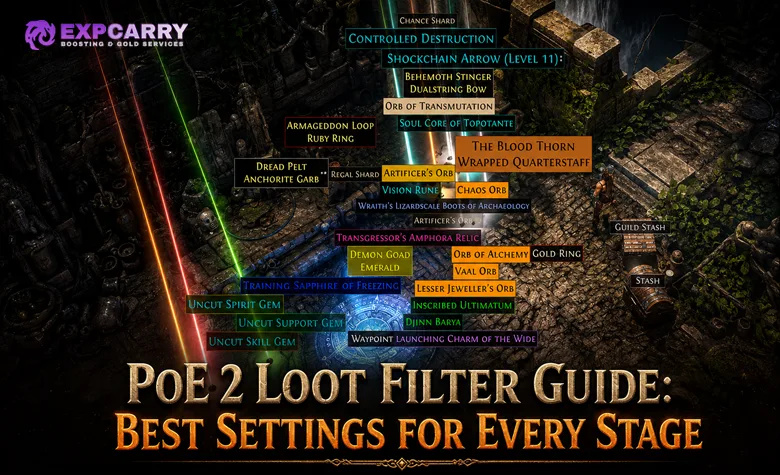
The best PoE 2 loot filter is not one permanent strictness setting. Campaign characters need to see broad equipment upgrades, socket and quality opportunities, gems, and basic currency. Early Atlas characters need fewer weak bases but still require Waystones, resistance fixes, and crafting projects. A fast endgame farmer should hide most low-value interruptions while making scarce currency, valuable bases, and important encounter drops impossible to miss.
A loot filter changes how dropped items are displayed; it does not improve drop rates or delete hidden items. Good setup therefore means controlling visibility, label size, colour, beams, minimap icons, and alert sounds according to the character's current needs. Tighten the filter when visible loot regularly stops your movement, but loosen it whenever progression requires items the current preset suppresses.
How to Install a PoE 2 Loot Filter
The simplest method works through your Path of Exile account. Open the official PoE 2 item filter list, choose a filter maintained for Path of Exile 2, and select Follow. Start the game, open Options, find the Item Filter selection under Gameplay, choose the followed filter, and save the setting. Refresh the list or restart the game if a newly followed filter does not appear immediately.
- Confirm that the filter is made for PoE 2 rather than Path of Exile 1.
- Check its update date and whether the author supports the current game content.
- Follow or synchronise the filter with the same Path of Exile account used in game.
- Select it from the Item Filter menu and apply the change.
- Drop a harmless item in a safe area or inspect the next loot pile to confirm that label styling changed.
Account-synchronised filters are the practical option for both PC and console because they do not require manual access to game folders. PC players can also use a local filter file. Place the file with a valid .filter extension in the directory opened by the in-game filter-folder button, return to the Item Filter menu, refresh, and select it. Using the button is safer than assuming a fixed folder path because document locations can differ between Windows configurations.
Local custom sound files require additional files in the correct directory and are primarily a PC workflow. Console players should use account-synchronised filters and built-in sounds. A filter that depends on unavailable custom audio may fail to reproduce its intended alerts on console even when its visual rules load.
Campaign, Early Atlas and Endgame Need Different Filters
| Progress stage | Recommended strictness | Keep visible | Reduce or hide |
|---|---|---|---|
| Early campaign | Soft or regular | Currency, Uncut Gems, useful weapon and armour classes, jewellery, flasks, quality items, socket opportunities, and relevant rares | Equipment classes the character cannot use and low-value Normal duplicates |
| Late campaign | Regular or semi-strict | Current-tier bases, rares, resistance and attribute candidates, currency, gems, quality items, and useful crafting bases | Outleveled Normal and Magic equipment without a specific purpose |
| Early Atlas | Semi-strict | Waystones, progression items, currency, good bases, jewellery, build-relevant rares, socket projects, and encounter rewards | Weak campaign bases, unsuitable weapon classes, and common items with little pickup value |
| Established endgame | Strict | Valuable currency, high-demand bases, higher-tier Waystones, strong rares, selected gems, jewels, and current mechanic rewards | Low-value rares, obsolete bases, common low-tier currency with poor time value, and routine vendor clutter |
| High-density farming | Very strict with custom exceptions | Top priorities for the chosen strategy, expensive drops, compact valuable items, and resources required to continue farming | Anything that is consistently left on the ground after a completed encounter |
During the campaign, equipment changes frequently and one ordinary-looking drop can solve a resistance, attribute, damage, or movement problem. Hiding most rares at this stage makes the character dependent on vendors, crafting, or trade before that restriction saves meaningful time. A player moving through the story can also use a contextual PoE 2 Campaign service if campaign completion is the actual obstacle, but the filter should still expose upgrades needed by the active character.
The first Atlas filter should remain more permissive than a finished farming preset. Early mapping is when players replace campaign gear, establish Waystone sustain, repair resistances, and collect bases for inexpensive crafting. Hiding every non-premium rare may remove exactly the medium-strength upgrade the character still needs.
Endgame strictness becomes efficient only when the character clears quickly enough that reading common labels costs more than those items return. At that point, the filter should prioritise value per pickup and support the selected farming strategy. It should not copy a top farmer's exclusions without matching that player's build, economy, clear speed, and willingness to trade.
Best PoE 2 Loot Filter Settings
Strictness controls quantity, but presentation controls reaction time. Valuable categories should have a consistent visual and audio hierarchy. If five different value tiers share the same loud sound, the player learns to ignore all of them. If common drops use large labels and beams, genuinely scarce items no longer stand out.
| Setting | Best use | Mistake to avoid |
|---|---|---|
| Label size | Large for must-pick items, medium for items needing inspection, small for optional supplies | Making every visible item equally large |
| Text and border colour | Separate currency, Waystones, gems, bases, and valuable equipment into recognisable groups | Using similar colours for categories with very different priority |
| Background colour | Reserve strong contrast for rare or immediately actionable drops | Covering the screen with opaque backgrounds on routine items |
| Alert sound | Use distinctive sounds for drops worth interrupting combat to collect | Assigning loud alerts to items commonly left behind |
| Beam and minimap icon | Mark compact valuable drops that can be lost in dense encounters or returned to after combat | Adding beams and icons to so many categories that the map becomes noise |
| Area level rules | Show broad bases in progression zones and hide obsolete versions in later content | Using one base rule from the first act through the entire Atlas |
| Item level rules | Highlight bases capable of the desired crafting outcomes | Assuming high item level makes the wrong base valuable |
A useful hierarchy has three practical reactions. The highest tier says stop and pick up the item. The middle tier says inspect it when safe. The lowest visible tier says collect it only when needed or when inventory space allows. Everything else can be hidden, but only after confirming that no important exception falls into the hidden group.
Do not make colour the only distinction. Sounds, label sizes, borders, beams, and icons help when combat effects cover the ground or when players have difficulty separating similar colours. Keep the same visual language between strictness versions so changing presets does not require relearning every alert.
Explore services related to this guide, selected from our Path of Exile 2 catalog.
View All Path of Exile 2 Services


Customise the Filter Around Your Build
A generic filter knows broad market categories; it does not know which equipment your character can equip or which resource is blocking progress. Customisation should begin by protecting build-specific exceptions before hiding additional loot.
- Weapon classes: emphasise the bases used by the active skill and suppress incompatible weapon types once vendor value no longer matters.
- Defence bases: prioritise Armour, Evasion, Energy Shield, or hybrid bases that match the build's passive scaling and attribute requirements.
- Jewellery: keep rings, amulets, and belts visible longer when resistances, attributes, Spirit, or relevant Skill Levels remain unresolved.
- Gems: retain the Uncut Gem types and levels needed for the current setup, planned upgrades, or worthwhile trade targets.
- Crafting bases: add explicit exceptions for the correct BaseType and useful item-level range instead of showing every Normal item.
- Waystones: highlight the tiers needed for progression and sustain, with stronger treatment for drops that extend the current farming range.
- League and encounter items: keep resources used by the content being farmed and reduce categories that the strategy does not consume.
Custom rules should be narrow. A rule that shows every Rare weapon because one specific bow matters recreates the clutter the filter was meant to remove. Define the desired class or base and the conditions that make it useful. When a build changes, review those exceptions before increasing overall strictness.
Economic highlighting also needs regular review. A community preset may rank drops using market demand, but prices move as builds and supply change. Treat automatic economy tiers as a maintained estimate rather than a guarantee. Check questionable items before hiding an entire category, especially near the beginning of a new economy.
How to Adjust Strictness Without Hiding Valuable Loot
Change one layer at a time and test it during content you actually run. Moving directly from a campaign preset to an extreme endgame filter makes it difficult to identify which missing category caused a problem.
- Run several representative areas and note which visible items you repeatedly leave behind.
- Reduce those categories first by base tier, area level, item level, rarity, stack size, or build relevance.
- Protect currency, Waystones, gems, jewels, special bases, and current encounter resources with explicit show rules.
- Reload the filter and confirm that its most important alerts still appear correctly.
- Run another sample and check the ground by temporarily disabling the filter after combat.
- Save the working version before making the next strictness change.
Temporarily showing all loot is the fastest safety check when a drop appears to be missing. Compare the unfiltered pile with the filtered view after a dense encounter. If useful categories disappear, correct their rules or move back one preset level. Do not troubleshoot during active combat or around dangerous ground effects.
Keep at least two presets available: a progression filter and a farming filter. A third, less strict recovery preset is useful when starting a new character, changing builds, or rebuilding Waystone supply. Players focused on repeated mapping and farming can compare the PoE 2 Hourly Farming service, while their own filter remains matched to the items and content they personally intend to collect.
Fix a Loot Filter That Does Not Work
| Problem | Likely cause | Fix |
|---|---|---|
| Filter does not appear in the list | Wrong account, wrong game type, failed synchronisation, or incorrect local folder | Confirm PoE 2 compatibility, follow it again, refresh the menu, and use the folder opened by the game for local files |
| Filter appears but nothing changes | The selection was not saved, the filter failed to load, or its rules show most current drops | Apply the selection again, check the load message, and test a visibly styled category |
| Local file is ignored | Wrong extension, invalid syntax, duplicate extension, or file placed in another directory | Verify the .filter filename, open the correct folder through the game, and test a known working file |
| Custom sounds do not play | Missing sound files, incorrect filenames, unsupported path, or console limitations | Restore built-in sounds first, then validate local sound files individually on PC |
| A required item is hidden | Strictness is too high or a broad hide rule catches it | Show all loot to identify the item, add a narrow exception, and retest before continuing |
| Labels are still overwhelming | Too many categories share permissive rules or high-priority styling | Reduce the items consistently ignored and reserve large labels, beams, and sounds for real priorities |
Filters shared by other players can become obsolete when item classes, bases, currencies, or endgame systems change. Use a maintained version and review its notes before importing personal edits. The official PoE 2 patch notes are the correct place to check whether new items or system changes require new filter rules.
Common Loot Filter Mistakes
- Starting too strict: campaign and early Atlas characters still need imperfect upgrades and crafting projects.
- Copying a streamer's preset: a specialised farmer may deliberately hide items that are valuable to a developing account.
- Trusting market tiers forever: item demand and currency values change.
- Hiding before adding exceptions: build bases, gems, Waystones, and encounter resources should be protected first.
- Overusing sounds and beams: constant alerts remove the distinction between routine and exceptional drops.
- Editing without backups: one broad rule can silently suppress several valuable categories.
- Assuming hidden means removed: the filter only changes presentation, so temporarily showing all items remains an essential test.
The best strictness is reached when nearly every visible item deserves a decision and every hidden item can be ignored under the current goal. If the player routinely leaves half the visible labels behind, the filter is too loose. If progression stalls because required bases, Waystones, or upgrades never appear, it is too strict or poorly customised.
Conclusion
Use a broad filter to build the character, a semi-strict filter to stabilise the Atlas, and a strict customised filter to protect farming speed. Preserve the same colour and sound hierarchy across all three, then change visibility according to build needs, area level, and the content being run.
Create separate progression and farming presets now. After the next dense encounter, reveal all items once, record what the active filter hid and what you ignored, then adjust only those categories. That short test produces safer settings than selecting the strictest preset and hoping its priorities match yours.