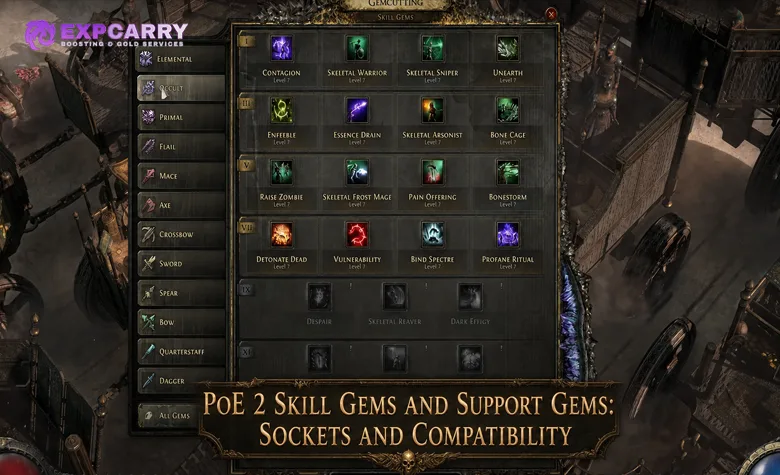
Path of Exile 2 separates skills from equipment. Active Skill Gems are placed in the Skills panel, Support Gems are inserted into sockets belonging to those skills, and Uncut Gems are used to create or upgrade them. A setup works only when the character meets the Skill Gem's level, attribute, and weapon requirements and every Support Gem is compatible with the exact skill it modifies.
The most important differences are easy to remember: equipment sockets are not Skill Gem sockets, Support Gems do not grant active abilities, and a support being available in the Gemcutting menu does not mean it works with every skill. The sections below explain the current system, including Support tiers, Jeweller's Orbs, Spirit reservation, Meta Gems, and the mistakes that most often disable a setup.
How Skill Gems and Uncut Gems Work in PoE 2
Skills are items managed through the Skills panel rather than socketed into armour. Classes receive different recommendations in the Gemcutting menu, but those recommendations are not class restrictions. Any class can use a Skill Gem when its character level, attributes, and required weapon type are valid.
| Gem type | Purpose | How it is obtained or upgraded |
|---|---|---|
| Uncut Skill Gem | Creates an Active Skill Gem or raises the level of an existing Active Skill | Drops from enemies and campaign rewards at different levels |
| Active Skill Gem | Grants an attack, spell, movement ability, minion skill, mark, curse, or other usable skill | Engraved from an Uncut Skill Gem and placed in the Skills panel |
| Uncut Reservation Gem | Creates or upgrades a skill that reserves Spirit, including many Persistent Skills | Obtained from specific campaign rewards and drops; older guides may call it an Uncut Spirit Gem |
| Uncut Support Gem | Creates a Support Gem from the tiers available at that stage of progression | Obtained as campaign rewards or drops |
| Support Gem | Changes the behaviour, damage, cost, targeting, utility, or restrictions of a compatible skill | Inserted into a Support Socket attached to that skill |
| Meta Gem | Contains other Skill Gems and uses or triggers them when its stated condition is met | Created from the relevant Uncut Gem and configured in the Skills panel |
An Uncut Skill Gem has a level. It can engrave a skill available at that level or upgrade an existing Skill Gem to the Uncut Gem's level. Active Skill Gems do not simply gain experience and level themselves; upgrading consumes an appropriate Uncut Skill Gem. Before accepting the upgrade, compare the new attribute requirement, character-level requirement, resource cost, and any scaling shown in the preview.
Support Gems were reworked in The Third Edict. The old character-wide restriction that allowed only one copy of a particular Support Gem was removed, and many Supports now have multiple tiers with different values or behaviour. The official Support Gem overhaul notes also introduced Lineage Supports for endgame. A guide that still tells players they cannot use the same Support on two different skills is outdated. This change does not remove the general restriction on placing duplicate copies of the same Active Skill Gem in the main skill slots.
Support Gem Sockets and Jeweller's Orbs
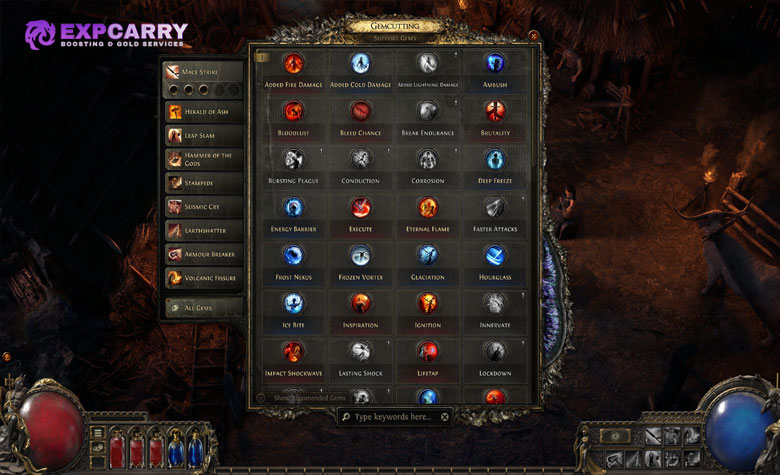
A normal Active Skill Gem begins with two Support Sockets. These sockets belong to that specific Skill Gem, not to the helmet, body armour, gloves, boots, or weapon. Equipment sockets are used by systems such as Runes and Soul Cores, so replacing a piece of armour does not normally break the Support setup attached to an Active Skill Gem.
| Currency | Result on a normal Skill Gem | Best use |
|---|---|---|
| Lesser Jeweller's Orb | Sets the skill to 3 Support Sockets | Primary campaign damage skill or an important combo skill |
| Greater Jeweller's Orb | Sets the skill to 4 Support Sockets | A skill expected to remain in the build through early endgame |
| Perfect Jeweller's Orb | Sets the skill to 5 Support Sockets | A settled main skill with five useful and sustainable Supports |
Jeweller's Orbs set the socket count to their stated value; they do not roll a random number and do not reduce a skill that already has more sockets. Adding an empty socket provides no power by itself. Spend the currency only when a compatible Support is available and the character can satisfy its attribute capacity and resource cost.
Skills granted by equipment or Ascendancy passives can follow special socket rules. The current official Path of Exile 2 patch notes allow Lesser, Greater, and Perfect Jeweller's Orbs to be applied to items that grant skills. If one item grants several skills, the Orb affects all of those granted skills. Check an Ascendancy-granted skill in the Skills panel instead of assuming that it follows the same upgrade path as a normal Skill Gem.
Corrupting a Skill Gem can produce changes to level, quality, or socket count, including an outcome beyond the normal five Support Sockets. It can also produce no useful change or reduce part of the gem. Once corrupted, the gem cannot be modified normally, so corruption belongs at the end of the upgrade process rather than on a campaign gem that still needs sockets or quality.
Gem Requirements and Support Compatibility
A gem can appear in the interface and still remain unusable. Check requirements in a fixed order: character level, attributes, weapon type, Support capacity, compatibility text, and final resource cost. This catches most disabled skills without repeatedly removing and reinserting every gem.
| Requirement | What it controls | What to verify |
|---|---|---|
| Character level | Whether the chosen Skill Gem level can be used | The required level after upgrading the gem |
| Strength, Dexterity, Intelligence | Active Skill requirements and character-wide Support capacity | Requirements with the intended equipment and passive tree |
| Weapon requirement | Whether an Attack or weapon-specific skill can activate | The correct weapon type in the active weapon set |
| Skill tags | Interactions with Supports, passives, items, and modifiers | Tags such as Attack, Spell, Projectile, AoE, Duration, Minion, or Persistent |
| Support restriction text | Which skills the Support is allowed to modify | Lines beginning with Supports and any Cannot Support restriction |
| Mana, Life, Energy Shield, or Spirit | Whether the supported skill can be used or kept active | The final cost or reservation after every Support is inserted |
Red Supports are aligned with Strength, green Supports with Dexterity, and blue Supports with Intelligence. Each equipped Support consumes 5 points of its matching attribute capacity across the character. A character with 40 Strength can therefore sustain eight red Supports before modifiers, regardless of which Active Skills contain them. Using another copy of the same Support is allowed, but every copy still counts toward the appropriate capacity. If capacity is insufficient, the affected Supports are disabled rather than disabling the entire Active Skill.
Tags are the first compatibility check, not the final answer. A Projectile Support normally needs a skill that creates projectiles, while an Attack Support does not modify a Spell unless its wording explicitly permits it. Restrictions such as skills you use yourself, cannot support Persistent Skills, or cannot support skills that already consume a particular effect override a broad matching tag.
The Gemcutting interface can show recommended Supports or all valid choices for the selected skill. Recommendations are a learning aid, not a complete build plan. The All Valid filter is more useful when testing an unusual combination, but the Support tooltip must still be read for trade-offs. A valid Support may lower another damage type, shorten Duration, add a cooldown, consume an ailment, or increase the skill's cost.
Explore services related to this guide, selected from our Path of Exile 2 catalog.
View All Path of Exile 2 Services


Support Tiers, Spirit Skills and Meta Gems
Support tiers are progression variants rather than a promise that every higher Roman numeral is the same effect with a larger number. Some higher-tier Supports add a condition, change the supported mechanic, or become useful for a different type of setup. Compare the complete descriptions before replacing a working lower-tier Support.
Persistent Skills commonly reserve Spirit while active. Socketing a Support into one of these skills can change its reservation or function when the Support explicitly says so. If total reservation exceeds available Spirit, the Persistent Skill cannot remain active. After changing equipment, Spirit modifiers, or Supports, reopen the Skills panel and verify that every intended Persistent Skill is enabled.
Meta Gems are containers for other Skill Gems. They trigger, use, or otherwise manage the contained skills after the Meta Gem satisfies its stated condition, which may involve generated Energy, an ailment, a critical hit, or another event. Skill Gems and compatible Supports can be placed inside a Meta Gem, but one Meta Gem cannot be nested inside another. Compatibility must account for both the Meta Gem and the skills stored inside it.
The current gem-cutting interface was updated so the All Valid view can include Supports that work with any Skill Gem socketed into the selected Meta Gem. This behaviour is documented in the official Path of Exile 2 patch notes. It prevents useful Supports from disappearing merely because they modify the contained skill rather than the Meta Gem's outer trigger.
Common PoE 2 Gem Setup Mistakes
Most broken gem setups are caused by one overlooked restriction rather than a lack of damage. The following problems should be checked before replacing gear or rebuilding the passive tree.
| Mistake | Why it causes problems | Correct approach |
|---|---|---|
| Treating PoE 2 like the first game | Players search armour for linked Skill Gem sockets | Manage Active and Support Gems in the Skills panel; use equipment sockets for their separate item systems |
| Cutting every Uncut Gem immediately | The gem is consumed and may be needed to upgrade the main skill | Keep spare Uncut Gems until the core setup and upgrade order are clear |
| Upgrading every skill to the highest possible level | Requirements and costs may rise beyond what the build can sustain | Preview the next level and delay upgrades that create an attribute or resource problem |
| Following the former one-copy Support rule | A useful Support is unnecessarily withheld from a second compatible skill | Use additional copies when helpful and account for their attribute capacity |
| Using only the recommended Support list | Valid utility or build-specific combinations may be hidden | Check All Valid and read the full wording of each candidate |
| Matching a Support by one tag | A restriction elsewhere in the tooltip can disable the interaction | Read both the Supports line and every Cannot Support condition |
| Ignoring the downside of a valid Support | The skill may lose damage, Duration, speed, or resource efficiency | Test the full rotation and compare the detailed skill panel, not only one tooltip number |
| Spending rare Jeweller's Orbs on temporary skills | Socket investment remains tied to a gem that may soon be replaced | Prioritise the main damage skill and settled endgame components |
| Forgetting the active weapon set | A weapon-specific skill becomes disabled when the wrong set is active | Assign the skill to the correct set and verify the weapon requirement on both loadouts |
| Corrupting before finishing the gem | The gem can no longer receive normal socket or quality upgrades | Finish normal upgrades first and corrupt only when the possible loss is acceptable |
If a weak gem setup has made campaign progression impractical, a single contextual PoE 2 campaign boost can help move the character forward. It does not replace fixing compatibility, attribute capacity, and skill costs, because the same problems will remain when the character reaches the Atlas.
A Reliable Gem Upgrade Order
Gem investment is most efficient when it follows the build's actual combat loop. Strengthen the skill used most often, then the bossing combination, and only then the secondary utility skills. More sockets are valuable only when their Supports contribute to a working rotation.
- Choose the main damage skill: confirm its weapon requirement, tags, and intended damage type before spending currency.
- Install two dependable Supports: prioritise effects that work in both normal clearing and boss fights without creating an unsustainable cost.
- Keep the Skill Gem at a sustainable level: upgrade when the next requirement and cost still fit the character.
- Use a Lesser Jeweller's Orb first: add the third Support only after selecting a compatible gem with a measurable purpose.
- Configure Persistent Skills: reserve Spirit for the strongest combination the build can keep active, leaving room for any Spirit-based minions or mechanics it requires.
- Build the supporting rotation: add movement, crowd control, ailment setup, charge generation, or defensive skills that make the main skill more reliable.
- Commit Greater and Perfect Jeweller's Orbs later: spend them after testing the full setup and deciding which Skill Gem will remain through endgame.
- Consider quality and corruption last: inspect the gem-specific quality effect and accept corruption risk only after normal modification is complete.
When comparing two Supports, test them against the content the build is failing. Clear speed, boss damage, ailment buildup, resource sustain, and defensive utility solve different problems. The Support producing the largest displayed hit is not automatically the best choice for the complete skill sequence.
Final Thoughts
Build each PoE 2 skill from its requirements outward: valid weapon, sustainable gem level, compatible Supports, enough matching attributes, and an affordable final cost. Save rare socket currency for skills that already have a defined role, and revisit the setup whenever a weapon swap, Spirit change, or higher Support tier alters that role. This keeps the gem system flexible without turning every upgrade into a new requirement problem.