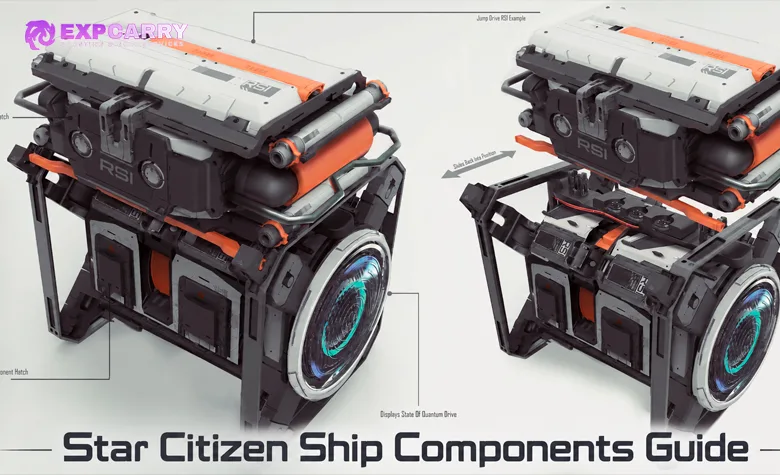
Star Citizen ship components determine how much power your spacecraft generates, how effectively it manages heat, how much damage its shields absorb, how well it detects targets, and how efficiently it travels between destinations. In Alpha 4.10.2, choosing upgrades requires understanding component sizes from 0 to 4, quality grades A through D, and five equipment classes: Civilian, Military, Industrial, Stealth, and Competition. Power Plants, Coolers, Shield Generators, Radars, and Quantum Drives also interact through the Resource Network introduced with Engineering gameplay. A higher grade does not automatically make every component the best choice for every ship. This guide explains component compatibility, important statistics, installation methods, power management, upgrade priorities for different ship roles, and common equipment problems in the current LIVE build.
Short answer: Check your ship's component slots before buying upgrades. Each component must match the required type and size, while grade and class determine its performance characteristics. For most everyday ships, prioritize a suitable Quantum Drive for travel or a Shield Generator for survivability. Upgrade the Power Plant when available power limits your loadout, improve cooling when sustained operation causes overheating, and consider Radar upgrades for specialized detection requirements. Use the Vehicle Loadout Manager to install compatible equipment and save the configuration. In Alpha 4.10.2, Engineering also makes component condition, coolant, power distribution, and damaged relays important to ship performance.
How Ship Components Work in Star Citizen
Ship components are the internal systems responsible for operating a vehicle. Unlike ship weapons, which directly determine offensive firepower, core components support power generation, heat management, defensive shields, navigation, and sensor functionality.
Every ship has a predefined component configuration. Its available slots determine how many systems it can carry, their physical sizes, and whether individual components can be replaced.
The main equipment categories are:
- Power Plants: Generate power for the ship's electrical systems.
- Coolers: Supply coolant to regulate component temperatures.
- Shield Generators: Create protective shields and determine important defensive characteristics.
- Radars: Detect nearby objects, ships, and their signatures.
- Quantum Drives: Enable quantum travel and determine relevant travel characteristics.
Other ship equipment includes weapons, life support generators, jump modules, fuel systems, and specialized mining or salvage tools. This guide concentrates on the five principal upgrade categories rather than individual weapon loadouts.
The important change introduced by the Engineering system is that these components operate as connected physical systems. Their available power, temperatures, damage states, and resource connections influence the vehicle's ability to function.
A powerful component installed in an unsuitable configuration may offer little improvement or create additional demands on the ship. Choosing equipment therefore requires comparing the entire loadout rather than purchasing the most expensive component in each category.
The official Star Citizen Engineering Gameplay Guide explains the Resource Network, ship systems, and maintenance mechanics. This article focuses on selecting compatible components and determining which upgrades provide the greatest practical benefit.
Alpha 4.10.2 compatibility note: Component statistics, store availability, Engineering behavior, and individual ship configurations can change between patches. The classification rules and core Engineering principles below are supported by CIG documentation. For an exact purchase or numerical comparison, use current LIVE data for your specific ship. Do not apply older component recommendations without checking the current build.
Star Citizen Component Sizes Explained
Component size is the first compatibility requirement. Star Citizen uses five principal component sizes, numbered 0 through 4.
These sizes generally correspond to the scale of the vehicle, although the actual slot configuration depends on the individual ship rather than its broad classification as a fighter, freighter, or capital ship.
| Size | Category | Typical application | Replacement considerations |
|---|---|---|---|
| Size 0 | Vehicle | Ground vehicles and specialized small systems | Requires a compatible Size 0 port. |
| Size 1 | Small | Small ships, fighters, and starter spacecraft | May support manual replacement when physically accessible. |
| Size 2 | Medium | Medium spacecraft and larger multipurpose ships | May support physical replacement away from a hangar when accessible. |
| Size 3 | Large | Large vessels and multicrew spacecraft | Replacement requires a hangar under current Engineering rules. |
| Size 4 | Capital | Capital-class ships and very large systems | Requires hangar-based replacement through supported loadout controls. |
Component size does not describe item quality. A Size 1 Grade A shield is still a Size 1 component and cannot replace a Size 2 shield solely because it has a higher grade.
Similarly, upgrading from Grade C to Grade A does not change the size of the component or increase the number of available component slots.
Can You Install a Different Component Size?
Standard component slots require the correct component type and matching size. A Size 2 Power Plant slot accepts a compatible Size 2 Power Plant, not a Size 1 or Size 3 model.
You also cannot replace a Cooler with a Shield Generator or exchange multiple small Shield Generators for a larger generator unless the ship itself provides an appropriate slot.
This is different from certain weapon hardpoints, where gimbals and other mounting arrangements can allow weapons smaller than the maximum supported hardpoint size.
Do not apply weapon mounting rules to Power Plants, Coolers, Shields, Radars, or Quantum Drives.
Fixed Components and Ship-Specific Restrictions
Not every component is freely interchangeable. Some vehicles use bespoke systems designed specifically for their hull, while others have limited physical access or special equipment arrangements.
Before purchasing an upgrade, confirm:
- The ship has a replaceable slot for that component type.
- The component matches the required size.
- The selected model is supported by the current ship configuration.
- The component is obtainable and installable in the current LIVE version.
- The ship's Resource Network can support the component's requirements.
The easiest way to check compatibility is through the in-game Vehicle Loadout Manager or a patch-current loadout calculator such as Erkul.
Do not rely exclusively on an old ship matrix. A component that previously appeared compatible may have different restrictions or characteristics after a Gold Standard ship update.
Star Citizen Component Grades A, B, C, and D
Standard graded components have a quality classification describing their general performance tier. Grades range from A to D, with A representing the highest overall tier.
| Grade | General quality | Typical characteristics |
|---|---|---|
| A | Highest tier | Strong overall performance within its component family, often with higher acquisition cost or additional requirements. |
| B | High quality | Good performance and a potential upgrade from standard equipment. |
| C | Standard | Common baseline equipment, often installed as part of a default ship loadout. |
| D | Lower tier | Lower overall performance, typically less desirable for a permanent optimized loadout. |
Many ships begin with Grade C components, although stock configurations vary. Some ships receive Grade B equipment or components selected for a specialized role.
Grade provides a useful starting point, but it does not replace comparing actual statistics.
A Grade A component may have superior general performance while consuming more resources or producing an undesirable signature for a particular build. A lower-grade component belonging to another class may provide a better compromise for specialized requirements.
Grade also does not guarantee that every numerical statistic improves. The current component model includes attributes such as power generation, heat characteristics, emissions, durability, fuel consumption, and other performance values that vary between products.
Is Grade A Always the Best Component?
Grade A is generally the strongest quality classification, but the best upgrade depends on your ship's role and the metrics that matter most.
For example, a combat ship may prioritize durability and reliable shield performance, while a stealth-oriented vessel may prioritize lower signatures even if its equipment provides less overall output.
A long-distance cargo ship may benefit more from a Quantum Drive with favorable fuel efficiency than from a drive selected only for maximum speed.
Always compare the relevant statistics within the same component size before choosing between models.
Explore services related to this guide, selected from our Star Citizen catalog.
View All Star Citizen Services


Civilian, Military, Industrial, Stealth, and Competition Classes
Component class describes the design philosophy and intended trade-offs of a particular item. Unlike grade, class does not form a simple ranking from worst to best.
Star Citizen uses five principal classes: Civilian, Military, Industrial, Stealth, and Competition.
| Class | Primary characteristics | Trade-offs | Typical role |
|---|---|---|---|
| Civilian | Balanced general-purpose performance | May lack specialized advantages | Daily travel and mixed activities |
| Military | Durability and strong system performance | Greater resource demands and emissions | Combat and hostile environments |
| Industrial | Reliable output and sustained operation | Potentially higher signatures | Mining, salvage, and hauling |
| Stealth | Lower signatures and reduced detection exposure | Lower output or faster wear in some cases | Reconnaissance and low-signature builds |
| Competition | Performance-focused characteristics | Lower durability and less emphasis on stealth | Racing and specialized performance builds |
These characteristics reflect the intended class differences described by CIG. Exact numerical bonuses and penalties depend on component type, model, and current balancing.
Which Component Class Should You Choose?
For an ordinary starter or multipurpose ship, Civilian components often provide a practical baseline. They are designed for mixed activities without demanding that the entire build prioritize one specialized characteristic.
Military components are worth considering when durability, combat capability, and demanding equipment configurations are more important than keeping emissions low.
Industrial components suit ships operating repeatedly under sustained loads, especially when reliability matters during mining, salvage, or cargo operations.
Stealth components are appropriate when minimizing electromagnetic and infrared signatures is a deliberate part of the loadout. Installing one Stealth component does not automatically make the entire ship difficult to detect.
Competition components emphasize specialized performance but may be inappropriate for a vessel that must survive prolonged combat or operate with minimal maintenance.
Mixing classes can be reasonable. For example, a cargo ship may use an efficient Quantum Drive, a durable Shield Generator, and a Power Plant selected for sufficient output rather than matching all components to one class.
Power Plants: Power Generation and Upgrade Requirements
Power Plants are the central source of electrical power for ship systems. Weapons, shields, thrusters, coolers, radars, and other equipment depend on the ship's available power and Resource Network connections.
In the Engineering system, power is distributed between ship systems and represented through allocatable power segments or PIPs. A Power Plant influences the amount of power available for those allocations.
A Power Plant upgrade is particularly valuable when the current component cannot support the desired configuration or when damage and resource limitations interfere with system operation.
Important Power Plant Statistics
When comparing Power Plants, examine the following properties:
- Power generation: Determines the amount of power available to the ship's systems.
- Component integrity: Describes how much damage the physical component can withstand.
- Electromagnetic emissions: Influence the ship's overall detectable EM signature.
- Heat characteristics: Affect the demands placed on the cooling system.
- Power and operating characteristics: Determine how effectively the plant supports its intended loadout.
Current component databases represent power output using numerical values or power PIPs. Compare these values within the same game build, since older power-generation measurements may not describe the present Engineering system.
Installing a stronger Power Plant does not automatically increase a weapon's base damage or make every engine faster. The practical benefit depends on whether your previous power supply was limiting the equipment and how available power is distributed.
When Should You Upgrade Your Power Plant?
Prioritize a Power Plant upgrade when adding more demanding equipment, operating a power-heavy combat configuration, or consistently running out of allocatable power.
For example, an additional shield or weapon requirement may become difficult to satisfy if the available power pool is already fully allocated.
Before purchasing a replacement, open the power-management interface and check whether the problem can be resolved by changing allocations.
If the ship has enough total generation but uses an inefficient distribution profile, replacing the Power Plant may not solve the underlying issue.
Likewise, a damaged relay or missing fuse can reduce effective power delivery even when the Power Plant itself is fully functional.
Coolers: Heat Management and Sustained Performance
Coolers regulate the temperature of ship components by supplying coolant through the Resource Network. They are essential for keeping high-load systems within their operational temperature limits.
As a ship operates, its equipment generates heat. The effectiveness of the cooling system depends on Cooler characteristics, available power, and the demands created by the installed components.
Under the current Engineering design, coolant is generated automatically by powered cooling equipment and distributed through the connected system.
What Cooler Statistics Matter?
The most important characteristics include coolant generation or cooling capacity, component integrity, operating power demand, and emissions.
Higher cooling performance can help a ship sustain demanding system configurations without reaching damaging temperatures.
However, more cooling is not always the best use of an upgrade budget. If a ship's existing Coolers already handle the intended loadout without thermal problems, replacing them may provide little immediate benefit.
Power allocation also matters. A high-quality Cooler that receives insufficient power cannot be expected to deliver its full performance.
When Are Better Coolers Worth Buying?
Consider upgrading Coolers when your ship repeatedly overheats during sustained operation, especially after other equipment changes increase system demand.
Before replacing hardware, inspect:
- The temperature and condition of the overheating component.
- Whether the Cooler itself is powered and operational.
- The power allocated to cooling systems.
- Damaged relays or interruptions in resource distribution.
- The total cooling requirements of the current loadout.
If the overheating begins only after fitting new equipment, compare that equipment's resource requirements with your previous setup.
For multicrew vessels, assigning a crewmate to monitor the Engineering console can help identify temperature problems before a component fails.
Shield Generators: Shield Strength, Regeneration, and Resistance
Shield Generators produce the defensive energy shields surrounding a ship. Their performance determines important aspects of survival against incoming fire.
Shield upgrades can be among the most noticeable improvements for combat pilots, cargo operators, and players frequently entering hostile areas.
However, choosing a shield requires more than comparing its maximum shield capacity.
How to Compare Shield Generators
Relevant characteristics include:
- Maximum shield strength: Determines the shield capacity available under the relevant power conditions.
- Regeneration: Influences how shields recover after damage.
- Regeneration behavior: Includes relevant delays or recovery characteristics.
- Damage resistance: Influences how incoming damage interacts with protection.
- Power requirements: Determine the resources needed to operate the shield effectively.
- Component durability: Determines how resistant the physical generator is to internal damage.
A shield with greater maximum capacity is not necessarily superior in every fight. Regeneration characteristics, resistance values, and power requirements may make another generator more suitable.
Current Alpha 4.10.2 release notes include a specific shield-resistance correction: flat resistance values can now apply correctly without requiring different minimum and maximum values.
That change is another reason to compare shields using the current patch instead of older tables.
Best Shield Upgrade Priorities for Combat Ships
For ship combat, compare effective protection under sustained fire rather than selecting only the highest listed shield value.
A fighter facing frequent engagements may benefit from strong recovery and suitable resistances, while a cargo ship trying to survive an attack long enough to escape may prioritize a dependable defensive margin.
When upgrading a ship with multiple shield slots, check each slot separately and consider the combined system rather than treating one generator as the entire shield configuration.
Also ensure the Power Plant and Resource Network can support the resulting shield setup. An expensive generator operating below its intended power range may fail to provide the improvement expected from its specifications.
Radars: Detection, Target Tracking, and Signatures
Radars identify nearby objects and help pilots maintain situational awareness. They are part of the ship's avionics and sensor systems rather than a direct offensive weapon.
In practical gameplay, radar functionality contributes to identifying nearby spacecraft, detecting signatures, and supporting targeting-related information.
Radar performance interacts with the signatures produced by other ships. A high-output vessel may be easier to detect than a properly configured low-signature ship.
Which Radar Statistics Matter?
Relevant properties may include detection capability, sensitivity to target signatures, operating power requirements, and physical component integrity, depending on the radar model and the statistics exposed in the current build.
Some component records also describe specialized radar attributes. These values are subject to balancing and do not necessarily translate into a universal detection distance against every possible target.
Detection depends on the characteristics of both the detecting ship and the target, as well as environmental and gameplay conditions.
Therefore, a radar upgrade should not be advertised as guaranteeing a fixed number of additional kilometers of detection without a controlled test.
Does a Better Radar Make Your Ship Stealthier?
Radar performance and ship stealth are different concerns.
A better radar may improve relevant detection capabilities, while reducing your own ship's visibility depends on the overall electromagnetic and infrared signatures produced by its systems.
Stealth-oriented components can reduce certain emissions, but an individual radar replacement does not automatically eliminate signatures generated by Power Plants, other equipment, or ship operation.
For a stealth build, evaluate both sensor performance and the emissions of the complete loadout.
For ordinary cargo and exploration gameplay, Radar is usually a lower upgrade priority than Quantum Drive efficiency, shield protection, or inadequate power generation unless the ship has a specific sensor-related weakness.
Quantum Drives: Speed, Fuel Efficiency, and Travel Time
Quantum Drives enable long-distance quantum travel. For players frequently moving between planets, moons, stations, and mission locations, the Quantum Drive can be one of the most valuable components to upgrade.
Two ships with identical cargo capacity and similar equipment may have different travel characteristics because of their Quantum Drives and available fuel.
The drive is also connected to the ship's navigation systems and the Resource Network. A damaged, unpowered, or otherwise unavailable Quantum Drive can prevent quantum travel.
Important Quantum Drive Statistics
Compare Quantum Drives using the following characteristics:
- Quantum speed: Influences the speed achieved during quantum travel.
- Spool time: Determines part of the preparation time before a jump.
- Cooldown: Affects when the drive becomes available for another jump.
- Quantum fuel consumption: Determines how much fuel a particular travel profile requires.
- Operating requirements: Include the power and other resources needed by the drive.
- Component durability: Affects the physical drive's ability to survive damage.
These characteristics vary between models. A faster drive may consume more fuel, while an efficient drive may provide a better experience for repeated long-distance journeys.
Maximum listed speed also does not equal the complete travel time for every route. Preparation, acceleration behavior, cooldown, and the distance traveled all influence the practical result.
Fastest Quantum Drive or Most Efficient Drive?
For short or frequent jumps, preparation and cooldown characteristics can be important because a substantial portion of the journey may occur outside sustained maximum-speed travel.
For longer routes, sustained travel performance and fuel consumption become increasingly important.
Players hauling cargo, mining, or salvaging should compare the time saved against fuel costs and the number of refueling stops required.
A drive that completes one long jump quickly but requires frequent refueling is not automatically the best option for a full mission route.
A practical comparison should include at least one commonly traveled short route and one representative longer route under the same game version.
Quantum Drive Size and Jump Module Compatibility
Quantum Drives follow the standard component size system. A ship equipped with a Size 1 Quantum Drive slot requires a compatible Size 1 drive.
Jump Modules are associated with quantum travel systems but perform a different function related to navigating jump points.
Replacing the Quantum Drive does not automatically change every characteristic of a separate Jump Module or grant capabilities unsupported by the ship.
Before purchasing a replacement, compare the ship's quantum fuel capacity, drive requirements, supported slot size, and the intended travel routes.
Ship Components and the Engineering Resource Network
The Resource Network connects ship components and distributes the resources required to operate them. It is the foundation of the Engineering gameplay introduced in Alpha 4.5 and developed through later Alpha 4.x updates.
This changes how upgrades should be evaluated. Component performance depends not only on its individual statistics but also on the ship's power allocation, cooling capacity, network condition, and damage state.
The main resources described by CIG include power, coolant, life support, hydrogen fuel, and quantum fuel.
These systems serve different purposes and should not be treated as interchangeable. A Power Plant produces electrical power, while Coolers supply the cooling resource needed to regulate component temperature.
Power Distribution and PIPs
Small ships typically handle power management through multifunction displays. Larger multicrew vessels provide more detailed control through an Engineering console.
Available power is allocated between systems, often using PIPs or segments. A system may require a minimum allocation to operate, while additional power can improve its performance within the limits of its design.
CIG describes three broad operating ranges: low, medium, and high output. Their approximate boundaries are 0–40%, 40–80%, and 80–100%, although individual components can behave differently.
The exact effect of an additional PIP depends on the receiving system. More assigned power is not a universal percentage bonus applied equally to every component.
Some systems are controlled as groups, commonly including weapons, shields, and thrusters. Their available power pools can limit how many demanding items can operate simultaneously.
Engineering Console and System Presets
Ships equipped with an Engineering console can provide detailed information about component condition, power allocation, temperatures, and network connections.
The official interface includes three main views:
- Vehicle Holo or Rooms View: Displays the ship's layout and component locations.
- Engineering View: Shows power management, resource consumption, temperature, and component states.
- Preset View: Allows players to create and select saved power configurations.
Presets are useful because different activities impose different requirements.
A combat configuration may prioritize weapons and defensive systems, while a travel configuration emphasizes systems required for navigation and movement.
Dedicated Mining or Salvage modes may also exist on ships designed for those activities.
For a broader explanation of Engineering procedures, see the Star Citizen Engineering Guide.
Relays, Fuses, and Damaged Components
Relays connect systems across the Resource Network. They use fuses, and damage to those fuses can reduce the effectiveness of resource distribution.
According to CIG's Engineering documentation, relays have one, two, or three fuse slots. A relay may continue operating with fewer functioning fuses, but its efficiency can decline.
This means a ship can experience power problems even when its Power Plant has enough theoretical generation capacity.
Before replacing an expensive component, inspect the Engineering interface for damaged equipment, missing fuses, interrupted connections, or reduced resource availability.
Physical components can also be repaired. A Multitool with a Cambio Lite SRT attachment and suitable canisters is part of CIG's recommended Engineering preparation.
How to Check Ship Component Compatibility Before Buying
Buying an incompatible component wastes time and can leave expensive equipment unused in local inventory. Compatibility should be verified before traveling to a shop or committing credits.
Use the ship's actual slot configuration and the component's current LIVE statistics rather than relying only on its item name.
Component Compatibility Checklist
- Select your ship: Identify the exact model and variant, not just the manufacturer or ship family.
- Inspect its component slots: Check the installed Power Plants, Coolers, Shields, Radars, and Quantum Drives.
- Confirm the size: Match each replacement to the corresponding slot size.
- Check restrictions: Identify bespoke or otherwise limited equipment slots.
- Compare grades and classes: Choose parts according to their characteristics, not only the grade letter.
- Review resource requirements: Make sure the Power Plant and Coolers can support the proposed loadout.
- Compare actual statistics: Check shield characteristics, drive performance, power generation, or other relevant values.
- Verify availability: Confirm that the selected component can be obtained in the current LIVE version.
- Plan the installation: Determine whether it can be fitted physically or requires a hangar-based replacement.
For numerical comparisons, SC DataHub's component database provides Alpha 4.10.2 information on supported component categories, including size, grade, and performance metrics. Erkul and other current loadout tools provide additional ways to compare potential builds.
Third-party calculators are useful planning tools, not substitutes for the current client. Verify the final installation requirements and performance after equipping the item.
How to Buy, Install, and Replace Ship Components
Ship components can be obtained through equipment vendors and other supported acquisition methods, including recovered equipment where available.
Stores such as Platinum Bay and specialized ship equipment shops are common places to look for replacement components. Exact stock and prices vary, so check current item listings before traveling.
There are two main installation approaches: the Vehicle Loadout Manager and physical replacement of accessible components.
Install Components With Vehicle Loadout Manager
The Vehicle Loadout Manager is the straightforward method for configuring a stored ship.
- Purchase or obtain the component: Confirm its size and compatibility before buying.
- Move it to the correct location: Make sure the item is available in the inventory associated with the location where your ship is stored.
- Store your ship: The ship must be available for loadout modification rather than actively deployed.
- Open mobiGlas: Access the Vehicle Loadout Manager.
- Select the correct ship: Choose the exact vehicle you intend to modify.
- Open the relevant category: Locate the Power Plant, Cooler, Shield, Radar, or Quantum Drive slot.
- Select the replacement: Choose an available compatible component.
- Save the configuration: Confirm the change using the appropriate Save and Equip control.
- Retrieve the ship: Verify that the intended component appears in the installed loadout.
- Test the systems: Check available power, cooling, shields, and quantum operation before beginning a long mission.
Rented ships are generally not eligible for the same permanent loadout modifications through the Vehicle Loadout Manager as owned ships.
In Alpha 4.10.2, the official release notes also remind players to imprint their ship loadouts before heading into the universe. Treat saving the loadout and imprinting it as important preparation steps, especially after installing valuable equipment.
How to Replace Components Physically
The Engineering system supports physical component replacement when the component is accessible and its size permits manual handling.
CIG's Engineering documentation states that accessible components from Size 0 through Size 2 can be replaced while away from a hangar, including during flight. Size 3 and Size 4 replacements require a hangar and supported loadout-management controls.
For a physically accessible compatible component:
- Move the ship to a safe location and stop unnecessary system activity.
- Locate the component access point.
- Make sure the replacement component is available and can be moved safely.
- Unlock the appropriate component port using the available ship controls.
- Remove the existing component with suitable handling equipment.
- Position the compatible replacement correctly.
- Secure the new component and verify that it is recognized by the ship.
- Restore power as required and check its status through the available displays.
- Return to a suitable facility when needed to save or imprint the resulting loadout.
Physical replacement depends on access, ship layout, component size, and current gameplay restrictions. Not every component can be removed from every location using a handheld tractor beam.
Large-ship crews should plan replacement and repair procedures before entering dangerous areas, particularly when critical equipment is located deep inside the vessel.
Best Ship Component Upgrade Order in Star Citizen 4.10.2
There is no single upgrade order that is optimal for every ship. A daily transport vessel, light fighter, stealth ship, and multicrew industrial platform have different priorities.
The most practical method is to identify the current limitation of the ship and upgrade the component responsible for it.
For ships without a specific problem, Quantum Drives and Shield Generators are often useful early considerations because they influence travel and survivability across many activities.
Recommended Upgrade Order for General-Purpose Ships
| Priority | Component | When to upgrade |
|---|---|---|
| 1 | Quantum Drive | When better travel time or fuel efficiency would benefit regular gameplay. |
| 2 | Shield Generator | When the current defensive performance is insufficient for your activities. |
| 3 | Power Plant | When power availability limits the desired loadout. |
| 4 | Coolers | When thermal limitations reduce sustained performance. |
| 5 | Radar | When sensor characteristics are important to a specialized role. |
This is a conditional recommendation, not a requirement to replace all five component categories.
A ship with adequate stock cooling does not necessarily need new Coolers. Similarly, a Power Plant already supplying sufficient power may not provide a noticeable improvement when replaced with a higher-grade unit.
Combat Ship Component Upgrade Priority
Combat loadouts should prioritize reliable system operation and survivability.
A practical decision order is to inspect the Power Plant and shield setup first, then investigate sustained cooling performance and specialized sensor needs.
If power is insufficient for the intended weapons and shields, upgrading the Power Plant or correcting power distribution should come before spending credits on additional performance equipment.
If the ship already has adequate power but cannot survive typical engagements, a Shield Generator upgrade may provide greater immediate value.
Cooler upgrades become more important when extended combat causes temperature-related limitations. Radar upgrades should be evaluated for their actual detection and tracking benefits rather than assumed to improve weapon damage.
Cargo, Mining, and Salvage Ship Upgrade Priority
Industrial ships spend significant time traveling between working areas, processing facilities, stations, and delivery locations.
A suitable Quantum Drive can therefore provide regular benefits through travel efficiency and fewer interruptions.
Shield reliability matters when operating in exposed locations or traveling through dangerous space. Industrial Power Plants and Coolers become more important when the working equipment imposes significant continuous resource demands.
For mining and salvage vessels, the Engineering interface should be checked while operating the specialized equipment rather than only when the ship is idle.
A ship that performs normally during travel may experience different resource demands while its industrial systems are active.
Stealth and Reconnaissance Upgrade Priority
Stealth-focused ships need a balanced low-signature configuration rather than simply the highest-grade components.
Review the emissions of the Power Plant and other installed equipment, then consider whether specialized Stealth components offer an appropriate compromise.
Radar performance remains important because reducing your own signature does not eliminate the need to detect other ships.
Keep in mind that ship operation, other installed equipment, and target characteristics affect detection. One low-signature component cannot guarantee that an otherwise high-emission vessel becomes difficult to locate.
How to Compare Ship Component Upgrade Costs
Component prices vary by model, size, grade, acquisition method, and current game economy. Fixed universal prices are not appropriate for comparing all upgrade paths.
Instead, calculate the full practical cost of an upgrade:
Total upgrade cost = Component acquisition cost + installation-related expenses + any required additional equipment.
For a simple replacement fitted at the ship's current location, the main expense may be the component itself. A more involved configuration could require travel, equipment transport, additional power capacity, or related component changes.
Compare each possible upgrade against the limitation it is intended to solve.
For example, replacing a functioning Cooler that already provides sufficient cooling is unlikely to be the best use of credits when the ship's Quantum Drive is the main source of travel downtime.
Similarly, an expensive Power Plant may provide little practical benefit if the ship's current power generation is sufficient and its performance limitation comes from damaged relays.
Use a current component comparison tool and the available in-game prices before making a purchase. Do not assume that the highest listed price corresponds to the greatest benefit for your loadout.
Star Citizen Ship Component Problems and Troubleshooting
Most component problems can be narrowed down by checking compatibility, installation, resource availability, damage, and current patch issues.
A component appearing in inventory does not necessarily mean it has been installed successfully, and an installed component may not operate correctly if its resource requirements are not satisfied.
The Component Does Not Appear in Vehicle Loadout Manager
Verify that the ship is stored at the correct location and the replacement is available in the corresponding local inventory.
Check the component type and size. An incompatible part may not appear among selectable replacements.
Confirm that you are modifying the correct ship variant and that its slot is not bespoke or otherwise restricted.
Also check whether the vehicle is rented, since ordinary loadout customization through mobiGlas is restricted for rented ships.
If all requirements appear correct, close and reopen the Vehicle Loadout Manager before attempting the installation again.
The Ship Has Insufficient Power After an Upgrade
Open the ship's MFD power interface or Engineering console and examine available generation and system allocations.
Check whether recently installed equipment has increased demand beyond the available power pool.
Next, inspect the Resource Network for damaged relays, missing fuses, or components that are offline.
Do not immediately assume that the Power Plant must be replaced. A distribution problem or damaged connection may explain the reduced effective output.
If the loadout genuinely exceeds available generation, select a compatible Power Plant with sufficient output or reduce the demands of the installed systems.
Components Overheat Despite Installing Better Coolers
Check whether the Coolers are receiving sufficient power and are connected through functioning relays.
Inspect the damaged or overheating component itself. A component with an abnormal operating state may need repair or replacement rather than additional cooling capacity.
Compare total cooling generation against the demands of the current loadout while its equipment is operating.
Alpha 4.10.2 also has an official known issue involving unexpected component fires. CIG specifically identifies Coolers on the Corsair and Asgard and the Quantum Drive on the Cutter among affected equipment.
No general workaround is confirmed for that fire issue. Report reproducible cases through the Issue Council rather than assuming a different Cooler will necessarily fix it.
Shield Generators Are Installed but Shields Do Not Work
Confirm that the generators are powered and operating, then review the relevant defensive power allocation.
Check component integrity and the Engineering console for damaged resource connections.
If the problem occurs on an Idris-P, consult the current official known issues. Alpha 4.10.2 documentation identifies an issue where its shields fail to block most laser weapons.
That specific bug is not evidence that ordinary shield upgrades provide no protection across other ships.
Radar Does Not Detect Targets Correctly
Check the Radar's power state, overall ship condition, and the target's likely signature characteristics.
Do not assume every detection issue can be resolved through a higher-grade Radar. The problem may involve power, damage, operating conditions, or a ship-specific issue.
For the Drake Command Module, CIG acknowledges that the radar MFD can stop functioning. The documented workaround is to undock the Command Module from its host ship and then dock it again.
If your radar issue occurs on another vessel, inspect its individual systems before treating the Drake-specific workaround as universally applicable.
The Quantum Drive Will Not Spool or Jump
Confirm that the ship is in the appropriate navigation state, the Quantum Drive is powered, and the relevant travel conditions are satisfied.
Check available quantum fuel and inspect the drive's temperature and component condition.
If the drive has suffered damage or is offline, use the Engineering interface to identify the problem.
A Quantum Drive upgrade cannot resolve every navigation failure. Insufficient resources, damaged components, route restrictions, and mission-specific conditions may require separate solutions.
Upgraded Components Disappear After Renaming a Ship
The Alpha 4.10.2 official known-issues list identifies a problem in which non-stock items can disappear after a ship is renamed.
CIG recommends removing non-stock equipment and customization before changing a ship's name.
This warning is particularly important for expensive Power Plants, Shields, Quantum Drives, and other purchased equipment.
Do not assume that saving a loadout guarantees protection from every known item-loss bug. Check current support guidance before renaming or otherwise modifying the account configuration of a heavily upgraded ship.
Crafted Items Do Not Show Their Improved Statistics
Another official Alpha 4.10.2 known issue affects how crafted item statistics appear in inventory. This is a general crafted-item display issue and should not be interpreted as a confirmed problem affecting every crafted ship component.
CIG reports that a crafted item's adjustments may not display correctly while the item is unequipped.
The documented workaround is to equip the affected item and check its description again.
This is a display issue rather than proof that crafted upgrades lack their intended bonuses. Players should still verify the effective performance of relevant equipped items instead of assuming that every modifier is working correctly.
Star Citizen Ship Components FAQ
These answers cover the main questions about component sizes, quality grades, class differences, installation, compatibility, and upgrade priorities.
What are ship components in Star Citizen? They are the systems that operate a spacecraft, including Power Plants, Coolers, Shield Generators, Radars, and Quantum Drives. Their behavior is connected through the Engineering Resource Network.
What component sizes exist in Star Citizen? Standard component sizes run from Size 0 to Size 4, representing Vehicle, Small, Medium, Large, and Capital categories. Individual ships determine which sizes their slots support.
Can you install a Size 2 component in a Size 1 slot? No. Standard ship components must match the type and size of the available slot. Certain weapon hardpoint rules do not apply to ordinary ship components.
What is the difference between Grade A, B, C, and D? Grade A is the highest overall quality tier, followed by B, C, and D. Actual performance still depends on the component's model, class, and individual statistics.
What is the difference between Military and Civilian components? Military components emphasize durability and performance for demanding situations, potentially requiring more resources and producing greater emissions. Civilian components provide more general-purpose characteristics.
Are Stealth components always better? No. Stealth components emphasize reducing signatures and detection exposure, potentially sacrificing other performance characteristics. They are most useful when the full ship build benefits from reduced emissions.
What is the best ship component to upgrade first? Quantum Drive is often a useful first choice for frequent travel, while Shield Generators can be valuable for survival. Power Plants should take priority when power availability limits the desired loadout.
Does a better Power Plant make weapons stronger? It can provide more available power for demanding systems, but it does not automatically increase a weapon's base damage. The benefit depends on power allocation and the ship's existing limitations.
Do better Coolers improve ship performance? They can help sustain operating temperatures under demanding conditions. If existing cooling is already adequate, replacing the Coolers may provide little immediate improvement.
How do you compare Quantum Drives? Examine quantum speed, spool time, cooldown, fuel consumption, operating requirements, and compatibility. The fastest listed drive is not automatically the most efficient for every route.
Can you mix Military, Civilian, and Industrial components? Mixed-class builds are possible where the individual ship and component slots allow them. The intended role and actual component characteristics are more important than matching every installed item's class.
Can you replace ship components during flight? CIG's Engineering rules allow manual replacement of accessible components from Size 0 through Size 2 while away from a hangar. Size 3 and Size 4 replacements require hangar access.
Where can you buy ship components? Equipment is available from appropriate in-game stores, including Platinum Bay and specialized ship component vendors. Exact availability and prices should be checked for the current LIVE build.
How do you install ship components? Store the ship, open the Vehicle Loadout Manager in mobiGlas, select the compatible replacement, and save the loadout. Accessible smaller components may also be replaced physically under the relevant Engineering rules.
Why is an installed component not working? Check power distribution, component damage, coolant availability, relays, fuses, and ship-specific restrictions. Installation alone does not guarantee that all operating requirements are satisfied.
Should you buy every Grade A component? Not necessarily. Compare the actual benefit against resource consumption, emissions, compatibility, and acquisition cost. Some stock components may already be sufficient for your activities.
Conclusion
Star Citizen ship components are best understood as connected systems rather than independent upgrades. Size determines compatibility, grade describes general quality, and class influences the performance trade-offs of each model.
Power Plants supply electricity, Coolers regulate temperatures, Shield Generators provide protection, Radars support detection, and Quantum Drives determine important travel characteristics. Their effectiveness also depends on the Engineering Resource Network, including power distribution, coolant, component condition, and functioning relays.
For most players, begin by checking the ship's existing configuration and identifying its main limitation. Improve Quantum Drive performance when travel is the priority, upgrade Shields when protection is inadequate, increase power generation when the loadout requires it, and address cooling or radar limitations when those systems become relevant.
Always verify the component type, slot size, current statistics, and installation requirements before purchasing equipment. Save and imprint the finished loadout, monitor the ship's Engineering state, and account for known Alpha 4.10.2 issues affecting component fires, crafted item statistics, and equipment loss during ship renaming. A balanced configuration that supports the ship's intended role is more useful than simply installing the highest-grade components available.