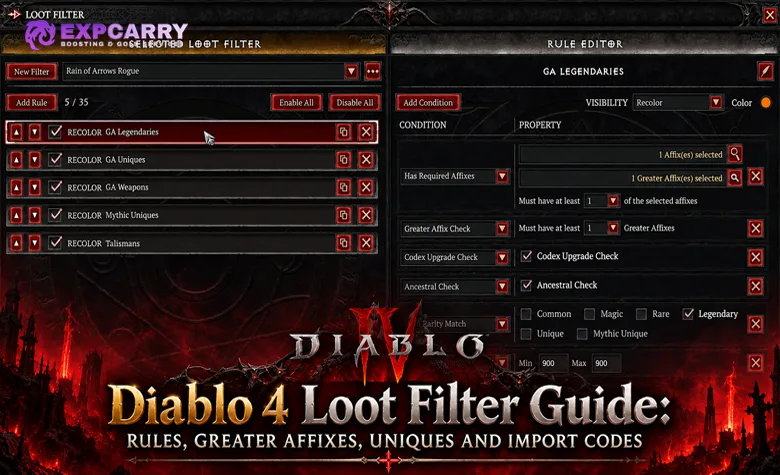
A Diablo 4 loot filter should remove low-value clutter without hiding the exact drops that can improve a finished build. The safest setup is not a single aggressive Hide rule. It is a priority stack: protect Codex upgrades, Greater Affix items, Ancestral bases, Uniques, Mythic Uniques, Charms, and Seals first, then place broader Hide rules underneath them. Because Diablo 4 evaluates loot filter rules from the top down, a protected item that matches a higher Show or Recolor rule can survive a lower rule that would otherwise hide its rarity or item type.
This Diablo 4 loot filter guide focuses on the permanent system introduced with update 3.0 and still used in the current 3.1.3 build during Season of Death Awakening. The Loot Filter is a game-wide feature available on Seasonal and Eternal characters rather than a mechanic tied to Season of Reckoning or Season of Death Awakening. Blizzard already had to patch an early case where items with better Legendary Aspect rolls than the player's Codex could be filtered out, which is exactly why a safe filter should be built around explicit rescue rules instead of trusting one broad cleanup rule.
How Diablo 4 Loot Filter Rules Work
The Loot Filter is opened through Options, then Gameplay. Blizzard allows multiple saved filters, but only one can be active at a time. Each filter can contain up to 25 rules, and individual rules can be disabled without deleting them. The official Lord of Hatred Loot Filter overview confirms that the filter can hide, show, or recolor gear on the ground and can also recolor matching items in inventory, stash, equipment, and vendor screens.
The most important mechanic is rule priority. Rules are evaluated from the top down, and a higher matching rule overrides a lower conflicting rule. This means the top of the list should contain items you refuse to lose, while broad cleanup rules belong near the bottom. If a Mythic, Greater Affix item, or Codex upgrade is protected by a higher Show or Recolor rule, a lower Hide rule cannot remove it from view.
Show, Recolor, and Hide Actions
Use Show when an item must remain visible even if another rule would hide it. Use Recolor when an item must remain visible and should also stand out immediately. Blizzard groups Hide Text Label and Hide All under hidden loot behavior in its official explanation. Hidden ground items lose their text label and cannot be picked up until the relevant condition is disabled or the Loot Filter is toggled off. They are not auto-salvaged and do not become extra materials.
Recolor is usually better than plain Show for your most important exceptions. A Codex upgrade, desired Greater Affix base, or targeted Unique is easier to notice when it has a dedicated color instead of blending into every other visible drop. The exact color is personal preference, but the ordering is not: protection rules must remain above cleanup rules.
Conditions Inside a Rule
A rule can contain several conditions. The practical danger is over-filtering: adding Item Properties, Greater Affix Check, and Has Required Affixes to the same rule makes that rule much narrower than three separate rescue rules. If the goal is to protect every GA item, do not require it to also be Ancestral, a specific slot, and a build affix unless that narrowing is intentional.
For a safe baseline, keep universal protections simple and separate. Build-specific rules can be more restrictive because they exist to highlight candidates rather than prevent valuable item classes from disappearing.
All Diablo 4 Loot Filter Conditions
The Loot Filter still revolves around the ten condition families Blizzard documented when the system launched. However, Season 14 changed an important underlying item rule: Mythic is no longer an item Rarity and is now a modifiable Item Quality. Blizzard's original Loot Filter documentation predates Mythic Uniques 3.0, so old rarity-based assumptions should not be used as the only protection for current Mythic drops.
| Condition | What it checks | Safe use | Main risk |
|---|---|---|---|
| Item Power Range | Minimum and maximum Item Power | Hide obsolete non-Ancestral bases after your build no longer needs them | A low Item Power cutoff can remove crafting bases or items valuable for another reason |
| Item Rarity Match | Item rarity categories such as Common, Magic, Rare, Legendary, and Unique | Hide selected low rarities only after higher rescue rules are in place | Season 14 Mythic is an Item Quality rather than a normal rarity, so rarity rules alone must not be trusted as universal Mythic protection |
| Item Properties | Item properties exposed by the current client; Blizzard's original Loot Filter documentation explicitly listed None and Ancestral | Use Ancestral as a broad rescue condition and review any Mythic-quality property options exposed by the current client before hiding Uniques | Assuming the pre-Season 14 property list fully describes Mythic Uniques 3.0 behavior |
| Codex Upgrade Check | Whether a Legendary Aspect improves the Codex | Place near the top as Show or Recolor | Putting it below a broad Legendary Hide rule defeats the protection |
| Greater Affix Check | Items with one to four Greater Affixes | Protect every one-GA-or-better item first, then add stricter GA highlight rules if desired | Starting at two or three GAs can hide valid one-GA upgrades and crafting bases |
| Item Type Match | Specific equipment and Talisman item types | Protect Charms and Seals or build rules for exact armor and weapon slots | Using a broad item-type Hide rule can remove a special category you forgot to exclude |
| Has Required Affixes | Affixes that must be present | Use for slot-specific candidate rules above general junk rules | Requiring too many affixes can suppress fixable bases |
| Has Optional Affixes | Desired but non-mandatory affixes | Use after core required stats are defined | Treating optional affixes as if they were universal upgrade conditions |
| Is Specific Unique | Specific Unique or Mythic Unique items available to the current class | Recolor exact target-farmed Uniques and Mythics in addition to broad protection rules | Assuming a specific-Unique list protects every valuable Unique or Mythic automatically |
| Talisman Set Bonus | Specific Set Charms available to the current class | Highlight sets used by the active build | Using it as a replacement for a broader Charm and Seal safety rule |
Class-specific Unique and Talisman options depend on the character currently editing the filter. Blizzard specifically notes that another class can later add its own targets to the same filter. This is useful for account-wide setups, but it also means an imported filter created on another class should always be opened and reviewed before use.
Players who are farming large quantities of endgame drops can combine this filter structure with a Diablo 4 farming route, but the same safety principle applies regardless of where the loot comes from: never make the farm faster by moving a broad Hide rule above the upgrade protections.
Safe Diablo 4 Loot Filter Rules for Endgame

The safest universal filter is a rescue-first stack. It protects every item category that can represent a meaningful upgrade, then removes ordinary clutter below those protections. This is deliberately more conservative than a hyper-strict farm filter because its purpose is to avoid losing GA, Mythic, Codex, Ancestral, or Talisman upgrades while still cutting down the number of labels on screen.
| Priority | Rule | Visibility | Condition | Why it is safe |
|---|---|---|---|---|
| 1 | Codex Upgrades | Recolor | Codex Upgrade Check | Protects Legendary Aspect improvements before any Legendary cleanup rule |
| 2 | Mythic and Unique Protection | Show or Recolor | Keep all Unique rarity visible in the universal baseline and add any Mythic-quality or Mythic-property protection exposed by the current client above every Unique Hide rule | Season 14 made Mythic an Item Quality rather than a normal rarity, so this avoids relying on outdated rarity-only logic |
| 3 | Greater Affix Protection | Recolor | Greater Affix Check with at least one GA | Protects every GA candidate before stricter build filters |
| 4 | Ancestral Protection | Show | Item Properties: Ancestral | Preserves Ancestral Common, Magic, Rare, Legendary, and Unique bases; current Mythic Uniques are also always Ancestral |
| 5 | Charm and Seal Protection | Show | Item Type Match for Charm and Seal categories | Prevents Talisman pieces from disappearing under generic gear rules |
| 6 | Desired Talisman Sets | Recolor | Talisman Set Bonus for sets used by the build | Makes useful Set Charms stand out without hiding other Charms |
| 7 | Build Candidate Rules | Recolor | Item Type Match plus Required and Optional Affixes | Highlights fixable upgrades by slot without replacing universal rescue rules |
| 8 | Low-Value Non-Ancestral Gear | Hide | Item Properties: None plus low rarities you no longer want | Removes ordinary clutter only after all major exceptions have been protected |
| 9 | Optional Legendary Cleanup | Hide | Only the Legendary categories or Item Power ranges you have deliberately outgrown | Safe only when Codex, GA, Ancestral, Unique, Mythic, and build candidate rules remain above it |
This stack is a template, not a universal import code. Your build-specific affixes, desired Uniques, class Talisman sets, and current progression change what belongs in rules 6 through 9. If you are still gearing, keep the bottom of the filter loose. If your character already has optimized Ancestral gear, you can tighten the lower rules without changing the top protection layer.
Explore services related to this guide, selected from our Diablo IV catalog.
View All Diablo IV Services

Greater Affix and Ancestral Item Filter Safety
Greater Affix filtering is where aggressive presets most often become dangerous. The correct universal rescue condition is at least one Greater Affix, not two, three, or four. A one-GA item can still be the exact upgrade a build needs, especially when the GA lands on a key skill rank, multiplier, resource stat, cooldown stat, or defensive breakpoint.
Ancestral protection matters for another reason. The 3.0 itemization update allows Common, Magic, and Rare items to appear in Torment as Ancestral crafting bases, and those items can carry Greater Affixes. Hiding every Common, Magic, or Rare item before checking Ancestral and GA status can therefore remove bases that are useful for Horadric Cube progression or later crafting. The safe order is to rescue Ancestral and GA items first, then hide non-Ancestral lower rarities.
When to Make the GA Rule Stricter
Only tighten the main GA rule after your build has reached the point where one-GA items are genuinely irrelevant. Even then, a safer design is to keep the universal one-GA Show rule and add a higher Recolor rule for two or more GAs. That gives two levels of attention without making one-GA items vanish entirely.
If inventory volume is the problem rather than ground clutter, use colors to speed sorting. Recolor desired slots or affixes and leave ordinary protected items visible. The internal Diablo 4 Tempering and Masterworking guide explains how to judge whether a promising GA base is worth finishing after it reaches your inventory.
Mythic Unique and Unique Loot Filter Rules
Mythic Unique filtering needs extra care in Season 14 because Mythic is now an Item Quality rather than a normal Item Rarity. Do not hide Unique rarity and then assume that an old Mythic rarity rule will universally rescue every Mythic version of an ordinary Unique. Players on live 3.1 have reported cases where Mythic-quality versions of regular Uniques were still caught by Unique cleanup rules. Blizzard's public 3.1.x patch notes do not document a general fix for that rarity-versus-quality interaction.
The safest universal setup is therefore to keep all Unique items visible and use Mythic-specific quality or property protection exposed by the current client as an additional higher-priority rescue rule. Use Is Specific Unique only as an extra Recolor rule for the exact item you are farming. That gives you target visibility without turning an incomplete target list into a destructive filter.
The same logic applies to normal Uniques. Broad protection keeps them visible; target-specific rules make the ones you care about impossible to miss. This is especially useful during boss farming, where several Uniques can share the same equipment slot and the ground can fill with similar labels.
For players using a highly specific item setup, a Diablo 4 build optimization service can reduce the number of affix and Unique targets that need custom filter rules. The filter should still preserve the universal Mythic, GA, Ancestral, and Codex protections even when the final build is narrow.
Codex Upgrade Filter After the 3.0.1a Fix
Codex Upgrade Check deserves one of the highest positions in the filter because a Legendary item can be valuable even when its base stats are junk. Salvaging a stronger Aspect roll can improve the stored Codex value and therefore improve future imprints. Blizzard fixed an issue in patch 3.0.1a where items with higher Aspect rolls than the player's current Codex could be filtered out by the Loot Filter.
The fix removes that specific launch bug, but it does not remove the need for correct rule ordering. If your filter has a broad Legendary Hide rule above the Codex Upgrade rule, the higher rule can still win because that is normal filter behavior rather than a bug. Put Codex Upgrade Check near the top, preferably as Recolor, and keep any Legendary cleanup underneath it.
Do Not Confuse Codex Upgrades With Specific Aspects
Codex Upgrade Check asks whether the item improves the stored Aspect value. It is not a searchable list of every Legendary Aspect you might want for a build. If the Codex already has the same or a better roll, the item will not be protected by the Codex-upgrade condition just because its Aspect name is important to you.
For build-defining Aspects that you still want to inspect even without a Codex improvement, keep the Legendary cleanup conservative or use other item and affix rules where the UI supports the target you need. An incomplete Codex makes this protection even more important because every stronger Aspect roll can affect future imprints.
Charms, Seals, and Talisman Set Filters
Charms and Seals need explicit attention because they are part of the Talisman equipment system rather than ordinary armor and weapons. A safe account-wide filter should keep their item types visible before broad cleanup rules. Then use Talisman Set Bonus to Recolor specific Set Charms used by the current build.
Do not rely only on Talisman Set Bonus. That condition is designed for specific set targets, while normal Charms, Unique Charms, and Seals can still be valuable for affixes, slot layouts, Unique powers, or alternate Talisman configurations. Protect the broad Charm and Seal categories first, then add narrower set highlights above or below that protection depending on the color scheme you want.
The current 3.1.3 live game has normal, Set, and Unique Charm itemization. Mythic Unique Charms were shown for the 3.2.0 PTR ahead of Season 15, but they are not part of the current Season 14 live item pool. Do not build a live filter around PTR-only Mythic Charm assumptions. The internal Diablo 4 Charms guide keeps the current live Talisman system separate from the Season 15 PTR additions.
Diablo 4 Loot Filter Import Codes
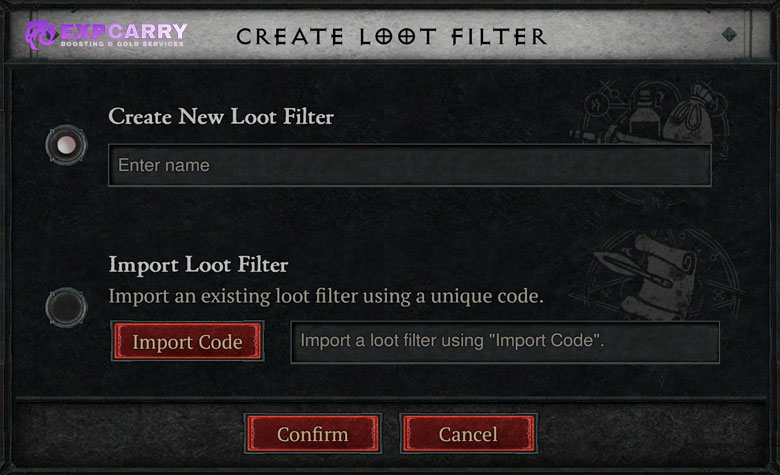
Diablo 4 supports native filter export and import. To export, select the filter, open the three-dot menu beside its name, choose Export, and save the copied filter string somewhere outside the game. To import, create a new filter, choose Import Loot Filter, and paste the Import Code into the field. The code is a serialized filter configuration, not a readable list of rules, so importing a code should always be followed by a manual audit.
There is no safe universal import code that can replace that audit. Class-specific Uniques and Talisman Set Bonus options depend on the class that created or edited the filter, while build-specific affixes and Item Power cutoffs can become obsolete as your character progresses. A code copied from another player can also contain aggressive Hide rules that were correct for their gear but wrong for yours.
How to Audit an Imported Code
Before activating an imported filter for real farming, open the rule list and inspect it from top to bottom. Confirm that Codex upgrades, Unique and Mythic protection, Greater Affixes, Ancestral items, Charms, and Seals are protected before the first broad Hide rule. In Season 14, pay particular attention to any filter that hides Unique rarity, because Mythic is now an Item Quality rather than a normal rarity. Then inspect every build-specific condition and remove any class, slot, affix, Item Power, or Talisman target that does not match your character.
- Check the top five rules first. Universal rescue rules should appear before cleanup.
- Inspect every Hide rule. Identify exactly which rarities, item types, properties, or Item Power ranges it can remove.
- Check class-specific targets. Imported Unique and Talisman rules may have been built on another class.
- Test with the filter toggle. Bind Toggle Loot Filter under Controls and compare a real loot pile with the filter on and off.
- Export your corrected version. Save a fresh code after the filter matches your current build.
On platforms where pasting a long clipboard string is inconvenient or unavailable, rebuilding the small rescue-first baseline manually is safer than typing an opaque code character by character. Blizzard's official import flow is paste-based, so platform text-entry limitations can matter even though the underlying filter system can be reused across characters.
Conflicting Rules and Common Loot Filter Mistakes
Most bad filters fail because of rule order, not because the conditions themselves are broken. A lower Show rule cannot rescue an item already caught by a higher conflicting Hide rule. Put the exceptions first. Treat every lower Hide rule as if it will remove anything not explicitly rescued above it.
- Hiding Common, Magic, and Rare before Ancestral protection: can remove useful Ancestral crafting bases.
- Requiring two or more GAs in the only GA rule: can hide one-GA items that are still real upgrades.
- Putting Codex Upgrade Check below Legendary cleanup: can hide Aspect improvements even though the Codex condition itself works correctly.
- Hiding Unique rarity while trusting a rarity-only Mythic exception: is unsafe in Season 14 because Mythic is now an Item Quality and player-reported live edge cases have affected Mythic versions of regular Uniques.
- Protecting only specific Mythics: can hide premium items that matter for another build or crafting path.
- Using Talisman Set Bonus as the only Charm rule: can miss normal Charms, Unique Charms, or Seals.
- Importing a code and activating it immediately: can inherit another player's class targets, progression assumptions, and aggressive Hide rules.
- Skipping live testing: makes it impossible to notice a conflict before a valuable drop lands under it.
Blizzard has continued fixing filter-related edge cases after launch. The current 3.1 patch notes include a fix for Ring of Starless Skies not appearing correctly in the Loot Filter as a ring. That was a specific item-type fix rather than a documented universal fix for Season 14 Mythic quality classification, so conservative protection and live testing are still important.
How to Test a Loot Filter Without Risking Upgrades
The Toggle Loot Filter shortcut is the best safety tool in the system. Bind it before tightening the filter. Run content that produces a large mix of gear, stop before picking everything up, and compare the same loot pile with the filter enabled and disabled. If an item category appears only when the filter is off, identify which higher Hide rule caught it before continuing.
Repeat the test after changing GA thresholds, Item Power ranges, rarity hides, Unique targets, or Talisman rules. Also repeat it after importing a new code or after a major game update. A filter that was perfect for early Torment can become too permissive later, while an endgame filter copied back onto a fresh character can be dangerously strict.
A useful progression pattern is to maintain two saved filters: a conservative general filter and a stricter farm filter. The general filter protects broad upgrade categories and is safe for new content or build changes. The strict filter can hide more ordinary gear during targeted farming. Because Diablo 4 allows multiple saved filters but only one active filter, switching between these setups is easier than constantly rewriting a single ruleset.
Diablo 4 Loot Filter FAQ
These are the practical questions that matter when a filter starts removing more loot than expected.
What is the safest rule order for a Diablo 4 loot filter?
Put Codex upgrades, Unique and Mythic protection, Greater Affixes, Ancestral items, and Charm or Seal protections above broad Hide rules. In Season 14, do not rely on an Item Rarity rule alone to identify every Mythic. Higher rules override lower conflicts.
Can the Diablo 4 loot filter hide a Greater Affix item?
Yes, if a higher-priority Hide rule catches the item before your GA protection rule. Put a one-GA-or-better Show or Recolor rule near the top.
Can I filter only Ancestral items?
You can use Item Properties to protect Ancestral gear and hide non-Ancestral gear below it. Keep GA, Codex, Unique, Mythic, Charm, and Seal protections above the cleanup layer.
Does Codex Upgrade Check protect better Aspect rolls?
Yes. Blizzard fixed the launch issue that could hide items with better Aspect rolls than the current Codex in patch 3.0.1a. Correct rule order is still required. If filling missing or low-roll Aspects is the progression bottleneck, the Diablo 4 Codex of Power service is directly related to that goal, but it does not replace the filter rule.
Should I hide all non-Ancestral Common, Magic, and Rare gear?
Only after your build no longer needs those bases and after Ancestral plus GA protection is above the Hide rule. Current itemization allows low-rarity items to be Ancestral and carry Greater Affixes.
How do Diablo 4 loot filter import codes work?
Export copies the selected filter into a string. Import Loot Filter accepts that string when creating a new filter. Always audit the imported rules before activating them.
Are Mythic Unique Charms live?
No. Mythic Unique Charms were presented for the Season 15 3.2.0 PTR and should not be treated as part of the current 3.1.3 live item pool.
Does the Loot Filter affect gems, materials, or currency?
Blizzard states that the system filters gear and does not affect non-gear items such as Temper manuals, reagents, gems, or currency.
Conclusion
The safest Diablo 4 loot filter is built from the top down. Protect Codex upgrades first, then Unique and Mythic drops, every Greater Affix candidate, Ancestral gear, and Talisman items. In Season 14, remember that Mythic is an Item Quality rather than a normal Item Rarity, so do not build the protection layer around a rarity-only Mythic assumption. Add build-specific Recolor rules after those universal protections, and place broad rarity or Item Power Hide rules at the bottom.
Keep the baseline conservative until you have tested it with Toggle Loot Filter on real drops. Audit every imported code before activating it, recheck the filter after major patches, and tighten only the lower cleanup layer as your gear improves. If the top rescue rules remain intact, you can make the screen much cleaner while still preserving the GA, Mythic, Ancestral, Codex, Unique, Charm, and Seal upgrades that are actually worth stopping for.