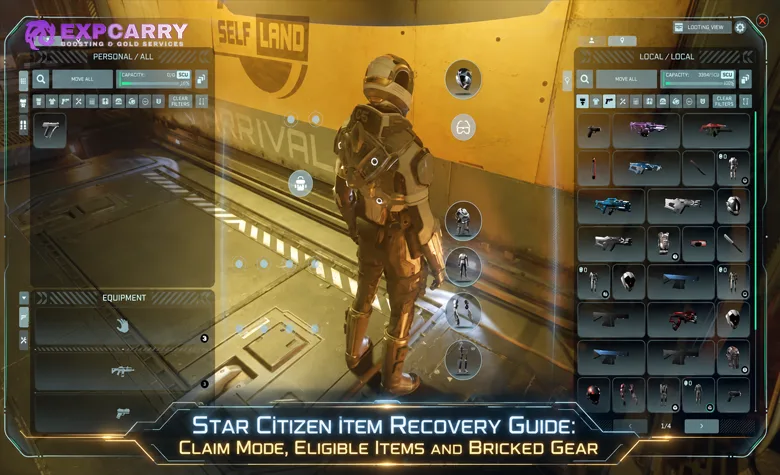
This Star Citizen item recovery guide starts with one rule: item recovery is not a universal restore button for every weapon, armor piece, container, or piece of loot that disappears. The current system is a limited recovery implementation centered on supported account-linked items in the Freight Manager, and the fastest way to decide whether a specific loss can be recovered is to separate eligible account-owned items from equipment that was earned, looted, or purchased inside the game. If the item appears in Claim Mode, it can be reclaimed through that interface. If it does not appear, you should not assume RSI Support can manually restore it.
The current RSI pledge item recovery instructions describe ship-related items as the supported pledge category and explicitly say FPS-related recovery is planned for a future patch. Alpha 4.10 also expanded global item recovery to cargo containers, but that does not turn every lost container, FPS weapon, armor set, or in-game purchase into a recoverable pledge item. This guide explains the current eligibility test, the exact Freight Manager sequence, what to do when Claim Mode is unavailable, why previous copies become bricked after recovery, and where ship insurance takes over.
Eligible Items
The safest eligibility rule is simple: the live Claim Mode list is the final practical test for the item you are trying to recover. Account ownership alone is not enough to guarantee that a particular object is supported by the current iteration. RSI documents the pledge-recovery feature as recovering ship-related items, while items acquired through normal gameplay are excluded. The system is still being expanded, so avoid using older videos or PTU lists as proof that an item should be claimable now.
| Lost Item Type | Current Recovery Status | What to Do |
|---|---|---|
| Ship-related pledge item shown in Claim Mode | Eligible | Claim it through the Freight Manager and collect the replacement from Local Inventory. |
| Cargo container shown by global item recovery | Eligible when listed | Use the recovery interface, but do not assume that the container's previous contents will be restored with it. |
| Pledge FPS weapon, armor, or personal equipment | Not generally supported by the documented current iteration | Do not expect a guaranteed claim. RSI says FPS-related recovery is planned for a future patch. |
| Item bought from an in-game store | Not eligible through pledge recovery | Replace it through normal gameplay or purchase another copy in-game. |
| Looted, found, or otherwise acquired in-game item | Not eligible through pledge recovery | Recover it from the world if possible or obtain another copy through its normal source. |
| Ship or vehicle hull | Not handled as an individual Freight Manager item claim | Use the ASOP insurance and vehicle claim system. |
| Pledge item missing from the Claim Mode list | Not currently claimable from that interface | Check whether the category is supported and whether a current attribution issue applies before reporting the problem. |
This distinction matters most after losing ordinary FPS gear. A rifle bought at a station, armor taken from a loot location, and a weapon received through normal in-game progression do not become pledge-recovery items simply because they were valuable. If you need to replace purchasable equipment rather than recover an account entitlement, rebuilding the cash buffer is a separate problem; a Star Citizen aUEC option can help with that economy side without being confused with Claim Mode itself.
There is also a difference between an item being eligible in principle and the game actually attributing it to your character. Alpha 4.10.x has a known issue where some non-ship or vehicle pledges, including paints, modules, flair, FPS weapons, and equipment, may fail to appear in game. That is an attribution problem, not proof that every affected object belongs in the recovery list. When an item is absent, first identify its category and source instead of assuming that Claim Mode must support it.
Pledge Items and Containers
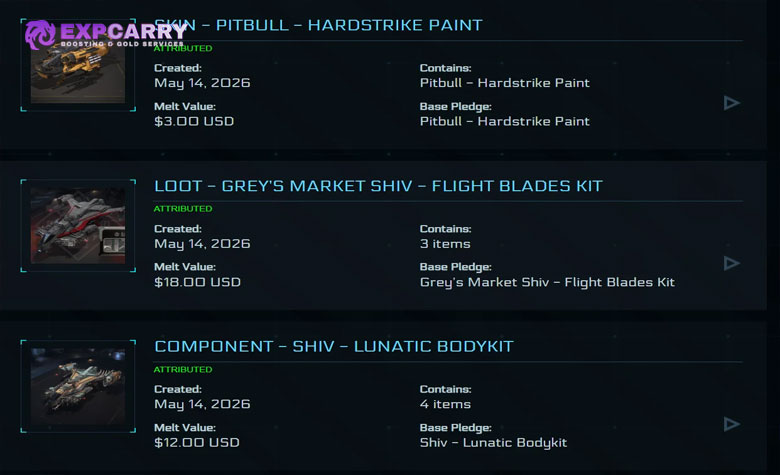
For Star Citizen pledge item recovery, a pledge on your RSI account proves that the entitlement exists on the web account, but the current in-game recovery feature still applies its own eligibility rules. This is why a player can own an item on the website and still not see a matching Claim entry in the Freight Manager. The current support article describes this as an early, limited iteration, with broader pledge recovery planned for the future rather than already available for every personal item.
Alpha 4.10 made one useful expansion: the Star Citizen Alpha 4.10 patch allows cargo containers to be reclaimed through global item recovery. Treat that as a container-specific expansion, not as a rewrite of the pledge-recovery rules. A container exposed by the recovery system can be reclaimed, but an arbitrary box bought, looted, or filled during gameplay is not automatically protected simply because cargo-container recovery exists.
Container recovery also does not automatically mean cargo recovery. Alpha 4.10 added ore and commodity containers obtained during and after the update to Long Term Persistence. CIG has separately clarified that ore pods supplied with ships are part of item recovery rather than LTP, so the ore inside those ship-provided pods does not persist with the recovered pod. In-game-purchased ore pods are handled through LTP instead. If your real loss is the contents rather than the container itself, do not assume an item-recovery claim will recreate what was stored inside.
The same caution applies to paints, modules, flair, and other account-linked items. Alpha 4.10.x also has an acknowledged issue where certain pledge items are not attributed correctly. The only safe answer for a specific item is to open Claim Mode and check the actual list. If it is not there, do not use a community spreadsheet or an old PTU screenshot as proof that recovery is guaranteed.
Claim Mode Walkthrough
The current Star Citizen Claim Mode flow uses the Freight Manager in your personal hangar. It is intentionally tied to the freight elevator state, which explains why the button can appear unavailable when you first open the kiosk. Follow the sequence in order before treating a dimmed button as an error.
- Go to the Freight Manager kiosk in your personal hangar.
- Press F and enter the Freight Manager interface.
- Look at the upper-right corner for the green CLAIM MODE button. It starts dimmed and cannot be selected yet.
- Use the arrow controls in the lower-left area to lower the freight elevator.
- Wait for the elevator state to update. CLAIM MODE should become active.
- Select CLAIM MODE to open the list of currently claimable items.
- Find the exact item you lost and verify that you are selecting the intended entry.
- Press CLAIM once.
- Check Local Inventory. RSI states that the replacement is sent there immediately after the claim is accepted.
Do not mass-claim everything in the window simply because it is available. Claiming creates a replacement and bricks the previous iteration of that same item. If the old copy later appears in storage or on another ship, it will be unusable. The cleanest recovery workflow is therefore one loss, one verified entry, one claim, followed by an inventory check before you recover anything else.
For players managing multiple similar modules or containers, record what was actually lost before opening Claim Mode. Matching the exact entitlement first reduces unnecessary claims and makes later cleanup easier. It also helps separate a genuine recovery failure from a case where the original item was simply stored at another location.
Explore services related to this guide, selected from our Star Citizen catalog.
View All Star Citizen Services

Unavailable Claim Button
An unavailable Claim button can mean several different things: the Freight Manager is still in its normal pre-claim state, the item is not eligible, or the interface/account state is malfunctioning. Troubleshooting should follow that order. Jumping straight to Character Repair or repeatedly attempting claims can create more confusion than the original loss.
- Confirm the location. Use the Freight Manager in your personal hangar rather than assuming every cargo kiosk exposes the recovery flow.
- Lower the freight elevator. A dimmed CLAIM MODE button before this step is expected behavior according to RSI's own walkthrough.
- Reopen the interface if the state does not refresh. Close the kiosk, let the elevator finish its movement, then interact with the Freight Manager again.
- Check the item source. In-game purchases and loot are excluded from pledge recovery, while FPS pledge recovery is not yet documented as a generally available category.
- Check current known issues. Alpha 4.10.x has an acknowledged problem with certain pledge items not being attributed in game. That can make an account-owned item appear missing even before Claim Mode is considered.
- Escalate reproducible failures to the Issue Council. Capture the build, location, item name, account ownership evidence, and what the Freight Manager displayed. RSI Support states that it cannot manually recover lost pledge items.
For the current pledge-attribution issue, CIG has reported that some players have had success with Character Repair. That is a troubleshooting path for an account-state problem, not a guaranteed item-recovery method. If you use it, follow the current RSI repair instructions exactly and do not interact with the account until the repair process has completed; RSI currently notes that the process can take around 30–60 minutes or longer.
If the missing object is ordinary loot, a store-bought weapon, or personal gear that the current recovery system does not list, sourcing a replacement is separate from repairing Claim Mode. Players replacing scarce in-game equipment can use a Star Citizen items service as a sourcing option, but that does not convert the replacement into an RSI pledge claim or restore the original lost copy.
Bricked Items
Star Citizen bricked items are the main reason Claim Mode should be used carefully. In RSI terminology, a bricked ship, vehicle, component, or item has been rendered inert and unusable. When you recover an eligible item through Claim Mode, the new copy becomes the valid replacement and the previous iteration is bricked. This prevents the recovery system from functioning as a duplication mechanic.
| Situation | What Becomes Bricked | Recommended Cleanup |
|---|---|---|
| Claim an eligible item through Freight Manager | The previous iteration of that recovered item | Keep the new valid copy and discard the bricked duplicate if it later appears. |
| File an insurance claim on a ship or vehicle | The previous ship or vehicle copy and the components installed on it | Use the ASOP scrap option for the old bricked copy when available, after checking its cargo. |
| Refund or reclaim a pledge for store credit | Items belonging to that reclaimed pledge | Remove the unusable in-game copies rather than treating them as active entitlements. |
| Loose bricked equipment or items | The individual unusable objects | Send them out through a freight elevator or place them in a ship you intend to scrap. |
Before scrapping a bricked ship, check the cargo hold. RSI specifically says you can enter the old copy and retrieve remaining cargo before using the scrap option. For loose bricked items, the documented cleanup methods are to send them out through a freight elevator or load them into a ship that will be scrapped. Keeping piles of invalid duplicates in storage only makes it harder to tell which copy is usable later.
Do not treat bricking as evidence that the new claim failed. The old copy becoming unusable is the intended consequence of a successful replacement. The real failure case is different: no usable replacement appears, the eligible item is absent from the recovery list, or the interface cannot complete the claim. Those cases belong in troubleshooting and Issue Council reporting rather than repeated claims.
Recovery vs Ship Insurance
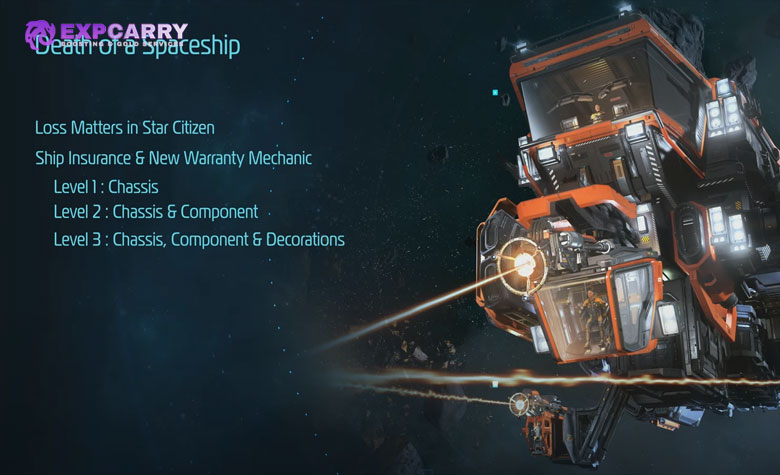
Item Recovery and ship insurance solve related loss problems but operate on different scopes and interfaces. Claim Mode is for supported individual account-linked items exposed through the Freight Manager. Ship insurance is the ASOP system for replacing a destroyed, stolen, or otherwise claimable ship or vehicle, while loadout insurance determines whether an insured custom equipment configuration returns with that replacement.
| System | Interface | What It Protects | Important Limitation |
|---|---|---|---|
| Item Recovery / Claim Mode | Freight Manager in personal hangar | Currently supported ship-related pledge items and other recovery-supported entries such as eligible cargo containers | Does not restore normal in-game loot or purchases, and FPS pledge recovery is not yet a generally documented current category. |
| Basic ship insurance | ASOP Terminal | Ship or vehicle replacement | It is a vehicle claim system, not a general personal-item restore service. |
| Loadout insurance | ASOP Terminal, Insure Loadout | The insured custom weapons and ship equipment configuration | You must insure the intended configuration; insuring a new loadout overrides the previously insured configuration. |
The current RSI Ship Insurance FAQ states that ships and vehicles in the Alpha and PTU environments currently receive a basic insurance plan that does not expire during testing, while loadout insurance can be purchased individually for each ship. After changing components, use the ASOP terminal, select the ship, choose Insure Loadout, review the exact equipment list, and confirm it. Loadout insurance can be purchased repeatedly, so buying it again without changing the setup can waste aUEC because the newly insured configuration overrides the previous insured loadout.
This is why Claim Mode should not be used as a substitute for ship-loadout planning. If you lose the hull, claim the ship through ASOP. If you want upgraded weapons and modules to return with it, maintain the correct loadout insurance. If you lose an individually supported pledge item, use Freight Manager Claim Mode. If your problem is rebuilding a broader ship setup or coordinating the work after a loss, Star Citizen hourly assistance can cover the gameplay and logistics side without being presented as an item-recovery entitlement.
One consequence is shared between the systems: replacement claims invalidate the previous copy. A ship insurance claim bricks the previous ship or vehicle and its installed components, while an item recovery claim bricks the previous iteration of the recovered item. Before pressing either claim button, make sure you are actually replacing a lost or unusable asset rather than creating cleanup work for a copy that still exists somewhere in your inventory network.
Conclusion
To decide whether a lost Star Citizen item can be recovered, start with its source and then check the live recovery interface. A supported ship-related pledge item that appears in Freight Manager Claim Mode can be reclaimed, and Alpha 4.10 also allows supported cargo containers to be reclaimed through global item recovery. A ship or vehicle belongs in the ASOP insurance flow instead. In-game purchases, loot, and ordinary earned equipment are not restored through pledge recovery, and current RSI documentation does not promise general FPS weapon or armor recovery yet.
Use the personal-hangar Freight Manager, lower the freight elevator, activate Claim Mode, select only the item you genuinely lost, and verify the replacement in Local Inventory. If the button never activates or an expected account item is absent, distinguish a category limitation from the current pledge-attribution issues before reporting a reproducible problem to the Issue Council. Most importantly, do not mass-claim items: every successful replacement bricks the previous iteration, so accurate identification before recovery is part of keeping your inventory usable.