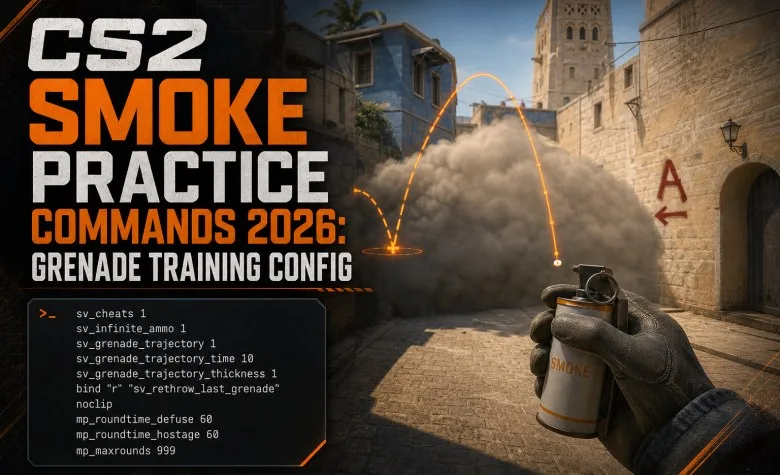
The fastest way to learn CS2 smokes is to turn a private Practice server into a grenade lab. With the right console commands you can get infinite utility, preview grenade landings, instantly rethrow the last grenade, fly to the landing position with noclip and stop the round from constantly restarting.
This guide uses current CS2 commands rather than outdated CS:GO commands that no longer work.
Best CS2 Smoke Practice Commands
| Command | What It Does |
|---|---|
sv_cheats 1 | Enables cheat-protected practice commands on your private server. |
sv_infinite_ammo 1 | Gives unlimited ammunition and utility for repeated throws. |
ammo_grenade_limit_total 5 | Lets you carry the full grenade set. |
sv_grenade_trajectory_prac_pipreview 1 | Shows a picture-in-picture preview of the grenade landing area. |
sv_grenade_trajectory_prac_trailtime 8 | Keeps the grenade trajectory trail visible. |
cl_grenadepreview 1 | Shows a live grenade trajectory preview while preparing the throw. |
sv_rethrow_last_grenade | Repeats the previous grenade throw. |
noclip | Lets you fly through the map to inspect grenade coverage. |
cl_showpos 1 | Shows your coordinates, movement speed and view angles. |
mp_ignore_round_win_conditions 1 | Stops normal win conditions from ending the practice round. |
Full CS2 Grenade Practice Config
Paste this into the console after starting a private Practice match:
sv_cheats 1
mp_warmup_end
mp_freezetime 0
mp_roundtime_defuse 60
mp_ignore_round_win_conditions 1

mp_buy_anywhere 1
mp_buytime 9999
mp_maxmoney 65535
mp_startmoney 65535

sv_infinite_ammo 1
ammo_grenade_limit_total 5

sv_grenade_trajectory_prac_pipreview 1
sv_grenade_trajectory_prac_trailtime 8
cl_grenadepreview 1

cl_showpos 1

bot_kick

bind "n" "sv_rethrow_last_grenade"
bind "v" "noclip"
bind "m" "ent_fire smokegrenade_projectile kill"

mp_restartgame 1How to Enable the Developer Console
- Open CS2.
- Go to Settings → Game.
- Set Enable Developer Console (~) to Yes.
- Start a private Practice match.
- Press ~ to open the console.
Explore services related to this guide, selected from our Counter Strike 2 catalog.
View All Counter Strike 2 Services

How to Start a Smoke Practice Server
- Choose Play.
- Start a private Practice session on the map you want to learn.
- Open the console.
- Paste the practice config.
- Practice one grenade target at a time.
Rethrow the Last Grenade
sv_rethrow_last_grenade is one of the most useful CS2 grenade-practice commands.
Instead of walking back to the lineup position and throwing again, you can repeat the exact previous throw.
Recommended bind:
bind "n" "sv_rethrow_last_grenade"Use it to:
- watch a smoke from the CT side;
- test whether a flash actually blinds the target;
- inspect smoke gaps;
- compare several defensive positions;
- test how a molotov spreads.
Noclip Bind
Noclip lets you fly through walls and quickly move between the lineup position and the grenade landing area.
bind "v" "noclip"A good training workflow is:
- throw the smoke;
- press V;
- fly to the target area;
- look at the smoke from the defender's position;
- press N to rethrow it.
Grenade Landing Preview
The current CS2 practice preview uses:
sv_grenade_trajectory_prac_pipreview 1This provides a picture-in-picture preview of the expected landing point while you are preparing utility.
Grenade Trajectory Trail
sv_grenade_trajectory_prac_trailtime 8The trail makes it easier to understand:
- wall bounces;
- roof bounces;
- why a smoke lands too deep;
- why a molotov clips an object;
- whether your movement changes the trajectory.
Live Grenade Preview
cl_grenadepreview 1This is useful when learning the relationship between your aim point and the grenade's path before release.
Old CS:GO Grenade Commands You Should Not Use
Many older guides still recommend:
sv_grenade_trajectory 1
sv_grenade_trajectory_time 10
Those are old CS:GO-era commands and are not the correct current CS2 practice method.
Use instead:
sv_grenade_trajectory_prac_pipreview 1
sv_grenade_trajectory_prac_trailtime 8
cl_grenadepreview 1
Infinite Grenades
Use:
sv_infinite_ammo 1
ammo_grenade_limit_total 5
This lets you repeat lineups without constantly returning to the buy menu.
Give Yourself Individual Grenades
You can also spawn utility directly:
give weapon_smokegrenade
give weapon_flashbang
give weapon_hegrenade
give weapon_molotov
give weapon_incgrenade
The Molotov is used by Ts and the incendiary grenade by CTs.
Remove Active Smokes Instantly
Waiting for every smoke to disappear wastes practice time.
You can remove active smoke grenade projectiles with:
ent_fire smokegrenade_projectile killRecommended bind:
bind "m" "ent_fire smokegrenade_projectile kill"Show Your Exact Position
cl_showpos 1This displays position, velocity and view angles.
It is especially useful for:
- running throws;
- spawn-based smokes;
- comparing movement speed;
- checking whether you are standing in exactly the same location.
Long Practice Rounds
These commands prevent constant round resets:
mp_roundtime_defuse 60
mp_ignore_round_win_conditions 1
mp_freezetime 0
Buy Anywhere
mp_buy_anywhere 1
mp_buytime 9999
mp_maxmoney 65535
mp_startmoney 65535
This is useful if you want to practice weapons and utility in the same session.
How to Create a CS2 Grenade Practice CFG
Instead of pasting the commands every time, create a config file.
1. Open the CS2 Config Folder
On a normal Windows Steam installation:
...\Steam\steamapps\common\Counter-Strike Global Offensive\game\csgo\cfg\The folder is still named Counter-Strike Global Offensive and csgo even though the game is CS2.
2. Create the File
Create:
grenade_practice.cfgPaste the full practice config from this guide into the file and save it.
3. Load It in CS2
Open your private Practice match and enter:
exec grenade_practiceor:
exec grenade_practice.cfgOptional Bot Commands
For pure grenade practice, bot_kick is usually simplest.
If you want to test flashes, peeks or utility against fixed targets:
bot_add_ct
bot_stop 1
bot_dont_shoot 1
bot_place
You can position a bot on the angle you want to test and use the rethrow command to see exactly how the grenade affects that position.
How to Test a Smoke Properly
Do not stop after seeing that the smoke lands approximately in the right area.
- throw the lineup five times;
- confirm all five throws land consistently;
- noclip to the defender's position;
- look for one-way gaps;
- rethrow the grenade;
- move left and right behind the smoke;
- check whether an AWP can see around the edge;
- test the lineup from a realistic round timing.
How to Practice a Flash
A flash is not good simply because it explodes near the target.
Check:
- does it blind the intended CT position?
- does it also blind your entry?
- does the opponent have time to turn?
- can your teammate swing as it pops?
Use a stationary bot to test the actual effect.
How to Practice Molotovs
For a molotov, check the final spread rather than only the landing point.
A useful molotov should force the defender completely out of the intended position.
Freeze-Time Grenade Crosshair for Insta-Smokes
Valve enabled grenade crosshairs during freeze time in September 2026.
Hold a grenade attack button during freeze time to display the grenade crosshair.
This is especially useful for:
- Mirage instant Window smokes;
- spawn-based utility;
- repeatable running throws.
Best Way to Memorize Smokes
Do not try to learn 30 grenades in one session.
A better sequence is:
- learn one standing position;
- learn one aim reference;
- remember the throw type;
- land it five times;
- understand what angle it blocks;
- use it in real matches;
- only then add another lineup.
CS2 Smoke Guides by Map
Once your practice server is ready, use our current map-specific lineup guides:
- Cache Smokes & Lineups
- Anubis Smokes & Lineups
- Ancient Smokes & Lineups
- Dust II Smokes & Lineups
- Inferno Smokes & Lineups
- Mirage Smokes & Lineups
- Nuke Smokes & Lineups
Common CS2 Smoke Practice Problems
The Grenade Trajectory Command Does Not Work
If you are using sv_grenade_trajectory, you are probably following an old CS:GO guide.
Use the current CS2 practice commands instead.
sv_rethrow_last_grenade Does Nothing
Make sure:
- you are on a private server you control;
sv_cheats 1is enabled;- you have already thrown a grenade.
Noclip Does Not Work
Enable:
sv_cheats 1and then use noclip.
The Round Keeps Restarting
Use:
mp_roundtime_defuse 60
mp_ignore_round_win_conditions 1
I Run Out of Grenades
Use:
sv_infinite_ammo 1
ammo_grenade_limit_total 5
Complete Practice Workflow
- start the map;
- run
exec grenade_practice; - choose one lineup;
- throw it five times;
- noclip to the landing area;
- use grenade rethrow;
- check the defender's view;
- practice the real route to the lineup;
- repeat with a flash or molotov;
- use the grenade in actual matches.
For the maps currently available in Premier, see our CS2 Premier Map Pool.
Last verified: October 2026. The guide uses current CS2 grenade-practice commands and does not rely on the removed CS:GO sv_grenade_trajectory command.