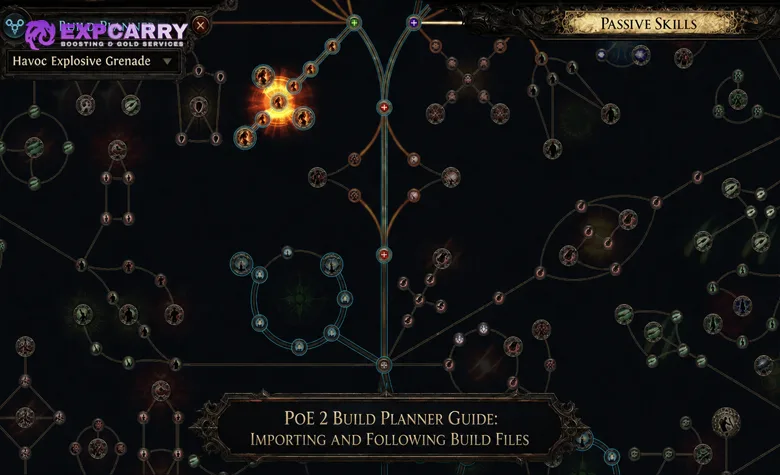
Path of Exile 2's Build Planner imports guidance into the game so a character can follow passive, skill, support, Ascendancy, and equipment recommendations without repeatedly returning to an external page. The format is official, but the build advice usually is not: GGG's official Build Guide says that it does not provide official builds and recommends that players develop their own guides.
A file loading successfully therefore proves only that the planner can read it. It does not certify the author's choices, patch compatibility, damage, defences, price, or progression order. The safe workflow is to obtain a genuine .build file or website subscription, select the correct variant, inspect every layer, and compare build-defining recommendations with the live game before spending points or currency.
This guide covers the official website and local import routes, explains what each documented field can communicate, and provides a complete version-mismatch and troubleshooting process. Players who still need to choose an archetype can use the PoE 2 guides hub to compare current class, build, campaign, and endgame information before importing one plan.
What the PoE 2 Build Planner Is
GGG describes the planner as a game-wide build instructor integrated with skills, crafting, passives, and Ascendancy. The official Build Planner documentation defines the current Build object as Version 1 and marks the format experimental. It also states that creating or editing builds inside PoE 2 is not currently supported.
The planner is an instruction layer, not an automatic character builder. It can highlight or display author recommendations at the relevant interfaces, but it does not spend passive points, cut gems, equip items, perform crafts, or prove that the final setup reaches a claimed performance threshold.
| Planner area | Documented guidance | Not verified automatically |
|---|---|---|
| Passive Skill Tree | Passive identifiers, optional level ranges, optional weapon-set index, and hover text | Efficient pathing, point order, current node value, and respec cost |
| Skills and supports | Skill identifiers, linked support recommendations, optional level ranges, and notes | Compatibility, attributes, socket capacity, resource use, and damage output |
| Ascendancy | An optional intended Ascendancy plus any Ascendancy passives included in the passive list | Trial completion, allocation order, or suitability for the selected variant |
| Inventory | Slot hints, optional level ranges, optional unique names, and author text | A complete rare item, affix tiers, resistance totals, price, or availability |
A .build File Is Not a PoB Export
The local Build Planner expects a file ending in .build whose contents are JSON with one Build object. A Path of Building export code, a pobb.in link, an image of a tree, or a creator's written gear list is not the same file type. Those resources must be exported or converted into the documented .build schema by a compatible external tool before PoE 2 can read them.
| Resource | Can PoE 2 import it directly? | Correct action |
|---|---|---|
| Official-format .build file | Yes, if the JSON and identifiers are valid | Upload it through the account or place it in the documented local directory |
| Website subscription | Yes, through the account-based subscription system | Confirm the subscription while signed into the correct PoE account |
| Path of Building export or pobb.in code | No, not as a raw Build Planner file | Use a source that provides an actual .build export and validate the converted result |
| ZIP or other archive | No | Extract the archive and locate the actual .build file |
| Executable installer | Not required by the official format | Do not run it merely to import a build; return to the genuine creator page |
Do not rename an unrelated text or export file to .build and expect it to work. Changing the extension does not convert the contents to the required JSON structure. Obtain the export from the original guide or a tool that explicitly supports GGG's Build Planner format.
Choose the Correct Import Route
There are three documented ways to deliver a plan: subscribe to a creator's build through the website, upload your own .build file to the account, or add a valid file to the local BuildPlanner directory. The best route depends on how the creator distributes the build and which platform is being used.
| Route | Best use | Update behavior | Platform note |
|---|---|---|---|
| Website subscription | The creator provides a supported Subscribe option | GGG says creator updates are received automatically in game | Officially announced for PC and consoles |
| Account upload | The creator provides a raw .build file | Do not assume the uploaded copy tracks later source changes | Uses the official account website rather than a local game folder |
| Local file | Direct file control on a documented PC environment | The file watcher detects local changes, but it does not subscribe to the creator | GGG documents local paths for Windows and SteamOS |
Before choosing any route, match the plan to the intended class, Ascendancy, main skill, campaign or endgame stage, budget, and content goal. A PoE 2 starter build setup can establish a defined starting configuration when that selection is the main obstacle, but the imported guide still requires the same source and version checks.
Explore services related to this guide, selected from our Path of Exile 2 catalog.
View All Path of Exile 2 Services

Subscribe to a Creator Build on the Website
Website subscription is the simplest route when a supported guide page provides it. GGG's official website subscription announcement states that subscribed builds load automatically in game, receive creator updates automatically, and work on both PC and consoles.
- Open the creator's current build page and select its supported Subscribe option.
- Confirm that the authorization or confirmation page uses the official pathofexile2.com domain.
- Sign in with the same PoE account linked to the intended game profile.
- Approve the subscription and then open or return to the game.
- Open the Passive Skill Tree, use the Build Planner control, and select the subscribed build.
- Confirm its name, author, variant, and revision context before following any recommendation.
Automatic updates do not mean automatic validation. The system delivers whatever revision the creator publishes. It does not guarantee that the creator has revised the plan for the newest passive, gem, item, or Ascendancy changes. GGG's announcement also does not promise a separate change notification, so check the creator's changelog when a major balance update arrives.
Upload Your Own .build File
When a creator supplies a raw .build file without a subscription button, the official account site supports personal uploads. Sign in at pathofexile2.com, open My Account, go to Builds, choose Upload Build, and select the extracted .build file. This is an account route and does not require placing the file in a local folder.
- Download the file from the creator's genuine guide or profile.
- Extract it first if the download arrived inside an archive.
- Verify that the selected file actually ends in .build.
- Upload it through My Account, Builds, and Upload Build.
- Open the in-game planner and confirm that the expected build appears.
- Compare the displayed plan with the source page before using it.
A personal upload should be treated as a snapshot. The official automatic-update statement applies to subscribed creator builds; it does not establish that an independently uploaded file follows its source. Record the download date and replace the upload when the author publishes a newer verified file.
Import a Build Locally on Windows or SteamOS
Local import requires at least one valid .build file in the BuildPlanner directory. GGG documents a file watcher for that directory, meaning the game is designed to detect local additions or replacements. Only Windows and SteamOS default paths are specified in the current official documentation.
| Platform | Official default BuildPlanner directory |
|---|---|
| Windows | C:/Users/Name/Documents/My Games/Path of Exile 2/BuildPlanner |
| SteamOS | Prefix: /home/deck/.local/share/Steam/steamapps/compatdata/2315204395/pfx/drive_c/users/steamuser/Documents/ Subdirectory: My Games/Path of Exile 2/BuildPlanner |
- Extract the download if it is packaged as an archive.
- Open the BuildPlanner directory used by the current installation.
- Place the actual .build file in that directory, not the archive or its containing folder.
- Open the Passive Skill Tree and look for the Build Planner button at the upper-left of the interface.
- Select the intended file from the available builds.
- If it does not appear, verify the extension, directory, and untouched source copy before changing the character.
Windows can redirect Documents through OneDrive. If the official default is empty, determine which Documents location the current installation uses. A practical check is to use the in-game item-filter file-location control and inspect the same Path of Exile 2 data folder for BuildPlanner. Treat this as troubleshooting for redirected Windows folders, not as a different official default path.
Select the Correct Build and Variant
Opening the planner is not the end of the import. A creator may provide separate files for leveling, early endgame, high budget, mapping, bossing, or a different weapon package. Selecting a valid but wrong variant can produce guidance that looks broken even though both the file and game are functioning correctly.
- Match the build name and author to the source page.
- Confirm the intended class and Ascendancy.
- Identify whether the file is for leveling or a finished endgame character.
- Check whether it assumes Trade, Solo Self-Found, or a specific budget.
- Verify the main skill, weapon type, and any build-enabling unique.
- Read the source description and changelog before allocating points.
The Build object's name is required, while author, link, description, and Ascendancy are optional. Missing optional metadata is not a parsing error, but it makes source verification harder. If the file does not identify its creator or revision, validate it from the page where it was downloaded rather than trusting the filename.
If the correct file targets a later character stage and reaching that stage is the immediate barrier, a PoE 2 leveling option can address progression. It cannot make an outdated identifier, unsuitable variant, or invalid recommendation correct.
Follow Passive Recommendations Without Copying Blindly
The passives array can contain simple identifier strings or detailed BuildPassive objects. A detailed entry may add a level range, a weapon-set index from 0 through 2, and hover text. All of those additions are optional. A file made mostly from simple strings may show destinations without giving a dependable leveling order.
The official schema defines the accepted weapon-set index range but does not explain each value's in-game meaning on the documentation page. Do not infer an allocation rule from the number alone. Use the displayed in-game state and the creator's written instructions, especially when the build relies on more than one weapon set.
- Check which recommendations are visible at the character's current level.
- Trace a connected route from already allocated nodes to the next useful destination.
- Count every travel point instead of evaluating only the final Notable or Keystone.
- Verify current node wording and connections in the live tree.
- Confirm any weapon-set assignment against the creator's explanation.
- Recheck attributes, recovery, defence, and resource sustain after each cluster.
The PoE 2 Passive Skill Tree guide explains efficient pathing, weapon-set points, and safe respec planning outside the overlay. Compare the route with the live tree before committing points or paying a respec cost.
Check Ascendancy Guidance Separately
The Build object can name an intended Ascendancy, and its passive list can contain Ascendancy passive identifiers. Neither fact guarantees a complete point-by-point Ascendancy sequence. If the creator did not provide suitable level ranges or notes, use the written guide to determine which notable comes first.
Verify that the selected Ascendancy still contains the effects required by the build. A file can remain syntactically valid after an Ascendancy rework because the JSON format and some identifiers still parse. The strategic recommendation can nevertheless be obsolete.
Follow Skill and Support Recommendations
The skills array can contain simple skill identifiers or BuildSkill objects. Detailed skill objects may include a level range, hover text, and a support_skills list. Support entries can also carry their own level range and notes. Skill recommendations are accessed from an Uncut Skill Gem and/or Uncut Spirit Gem; support recommendations are accessed from an Uncut Support Gem and/or Uncut Spirit Gem.
Meta Gems are explicitly unsupported in the current Version 1 documentation. A missing Meta Gem is therefore a known format limitation, not automatic proof of a bad file. Use the creator's current written guide for the Meta Gem, its socketed skills, trigger condition, and Spirit requirements.
- Confirm that the active skill matches the selected variant and weapon.
- Check the recommendation's level range before expecting it to appear.
- Verify support compatibility in the live gem-cutting interface.
- Check attributes, weapon restrictions, sockets, Spirit, Mana, and other resource costs.
- Follow the author's stated priority when not every support is available.
- Test the setup before investing in expensive quality or equipment changes.
The PoE 2 Skill Gems and Support Gems guide covers the surrounding compatibility rules. If a verified plan requires an unobtained support, a PoE 2 Uncut Support Gems option addresses acquisition only; it does not validate the guide or repair an incompatible combination.
Read Inventory Hints as Author Notes
BuildInventorySlot entries identify an inventory position and can add a level range, an exact unique name, and additional text. The schema does not contain a complete rare-item object with all affixes and rolls. Most gear guidance is therefore an author-written target, not an item that the planner has calculated for the character.
| Displayed hint | What it means | What still requires checking |
|---|---|---|
| Exact unique name | The author specified that unique for the slot and applicable range | Current modifiers, required roll, availability, price, and whether it is mandatory |
| Base or stat priority | The author supplied descriptive text for the slot | Legal affixes, item level, tiers, requirements, and total defensive balance |
| Temporary leveling item | The note applies only during a defined progression stage if a range was supplied | The replacement point and which essential stats must be preserved |
| No hint | The file has no applicable inventory entry for that slot or level | The source guide and current character needs |
Prioritize required build interactions, then basic defences, attributes, and resource stability before luxury damage. The PoE 2 crafting guide can help translate a broad slot note into a valid base and affix plan. Confirm current modifier availability before committing valuable crafting resources.
Detect a Build Version Mismatch
Version 1 is the documented schema version, not the PoE 2 balance patch for which the advice was written. The listed Build object has no game-patch, league, or balance-version field. A structurally valid file can load while containing an outdated passive route, changed gem package, obsolete unique interaction, or old Ascendancy recommendation.
Before making an expensive change, compare the creator's latest revision with the official PoE 2 patch notes released after the guide. The newest hotfix may contain no Build Planner change while an earlier content update still altered the build itself, so review the complete period since the creator's date.
| Audit target | Required comparison | Mismatch evidence |
|---|---|---|
| Source revision | Guide update date and changelog against relevant patches | No revision date, an older patch label, or no response to a build-defining change |
| Passive tree | Current node identifiers, wording, position, and connections | Missing highlights, disconnected travel, or a changed Keystone interaction |
| Ascendancy | Current notable effects and intended allocation | The file expects a removed, moved, or fundamentally changed effect |
| Skills and supports | Live compatibility, requirements, costs, and behavior | A listed support is unavailable, incompatible, or no longer produces the required result |
| Gear | Current unique text, base type, affix availability, and requirements | The core item or modifier no longer enables the advertised mechanic |
| Performance proof | Gameplay from the same patch, variant, content, and approximate budget | Only footage or claims from an older or different setup exist |
Do not diagnose a mismatch from one missing hint. Optional fields may have been omitted, a level range may hide the recommendation, or the missing component may be a Meta Gem. First rule out format limitations and the wrong variant; then verify the underlying game mechanic.
If the audit requires coordinated leveling, farming, or live testing beyond the file import, PoE 2 hourly progression support can be assigned a defined objective. It does not replace the version audit or prove that the imported recommendations are correct.
Troubleshoot Import and Display Problems
Import failures and content failures require different fixes. A build that never appears points to account, file, path, or JSON problems. A build that appears but recommends questionable choices requires variant and version analysis.
| Symptom | Likely causes | Next action |
|---|---|---|
| No planner build appears after subscription | Wrong account, incomplete confirmation, or the wrong creator profile | Verify the official account and subscription, then reopen the planner interface |
| Local Build Planner button or file is missing | Wrong Documents location, archive copied instead of .build, invalid file, or OneDrive redirection | Locate the active data folder and test an untouched extracted file |
| Filename ends in .build.txt | Windows or an editor added a hidden text extension | Enable extension display and restore the genuine .build filename |
| File stopped loading after manual edits | Broken JSON or invalid identifiers | Restore the original download rather than guessing at syntax repairs |
| Passive highlights look incomplete | Wrong variant, level-range filtering, optional omissions, or stale identifiers | Match the source stage, then compare the live tree with the creator's revision |
| Skill recommendation is absent | Wrong gem interface, level range, omitted field, unsupported Meta Gem, or outdated data | Check the file's documented scope and verify the live gem setup |
| Gear note conflicts with the guide page | Different file revision, level stage, or budget profile | Use the newest dated source and replace the mismatched file |
Change Builds Without Wasting Currency
Selecting another guide is reversible; rebuilding the character to match it may not be cheap. Keep the old configuration until the replacement passes a build-defining audit. For local files, preserve an untouched copy outside the watched folder. For account builds, retain the creator page and revision information.
- Record the current passive allocation, gem setup, attributes, resistances, and resource behavior.
- Import the replacement and verify its identity without immediately changing the character.
- Compare the main skill, Ascendancy, essential passives, and mandatory item interactions.
- Estimate the respec, gem, and equipment cost.
- Change one functional layer at a time.
- Test the new configuration in safe content before selling or destroying the old setup.
Final Verdict
The safest PoE 2 Build Planner route is a maintained website subscription because creator revisions are delivered automatically. When only a raw file exists, upload the genuine .build through the official account page or place it in the documented Windows or SteamOS directory. Never confuse a PoB code, archive, or renamed text file with the JSON format the game expects.
Follow the planner as contextual guidance, not automation. Optional level ranges and notes determine how much progression detail a file actually contains, Meta Gems remain unsupported, and the schema records no game-patch version. Validate the passive tree, Ascendancy, skills, supports, and core gear against the live game before committing points or currency.