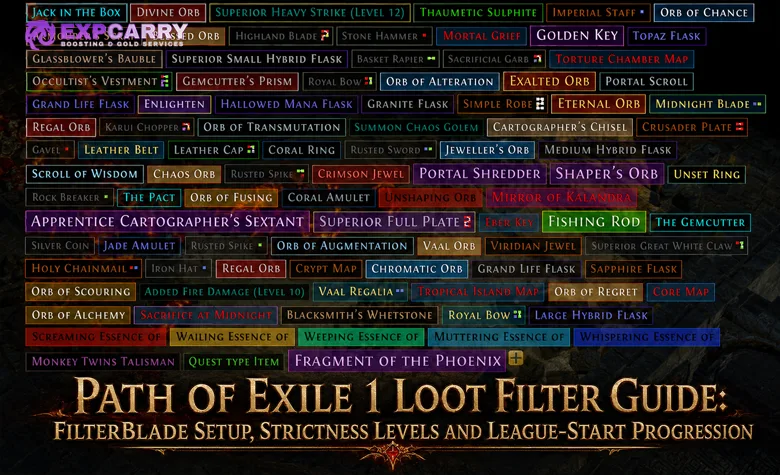
A Path of Exile 1 loot filter should come from FilterBlade.xyz, NeverSink's web customizer for the NeverSink filter. Select PoE 1 at the top of the site before changing anything, because FilterBlade also supports Path of Exile 2 and the two games use separate filter rules, item classes, folders, and progression. For a first character, start with Semi-Strict, sync or export it to the same Path of Exile account used in game, and raise strictness only when visible loot regularly interrupts movement.
This guide covers the PoE 1 setup: where to get the filter, account sync, manual PC installation, the seven standard NeverSink strictness levels, league-start progression, and the bases that should remain visible. Readers looking for the other game should use the separate PoE 2 loot filter guide instead of copying this file or its recommendations.
Where to Get the Path of Exile 1 Loot Filter
FilterBlade.xyz is the recommended source for most players because it uses NeverSink's maintained rules and adds a visual editor, loot simulation, saved profiles, styles, and direct Path of Exile account export. NeverSink writes and maintains the underlying filter; FilterBlade is the companion interface used to configure and deploy it. The filter and its normal updates are free.
| Source | Best for | Updates | Main limitation |
|---|---|---|---|
| FilterBlade.xyz | Custom strictness, build rules, colours, sounds, saved profiles, and account sync | Open the saved filter in My Filters, review changes against the current base and economy data, then Sync or download it again | Standard Sync is not continuous automatic updating; FilterBlade's Auto-Updater is a separate paid feature |
| Path of Exile Filter Ladder | Fast setup with a followed NeverSink preset | Followed filters update when the author updates them | No personal FilterBlade customisation, styles, or custom sounds in the followed preset itself |
| NeverSink GitHub | Manual files, source access, version history, and developers | Download and replace files manually | Local files do not auto-update |
Do not download a repack from a random file host or accept a page that asks for a Path of Exile password directly. FilterBlade authentication should redirect to an official Path of Exile authorisation page. NeverSink also identifies FilterBlade and the NeverSinkDev GitHub repository as the trusted locations for obtaining the filter.
Fastest Setup for a New Player
Open FilterBlade, confirm that the game selector says PoE 1, choose Softcore or the mode matching the character, and set Strictness to Semi-Strict. The default visual style is easier to learn than a novelty style because the colour, border, beam, minimap icon, and sound hierarchy remains familiar across future updates.
- Open FilterBlade.xyz and select PoE 1.
- Choose the correct game mode, usually Softcore, Hardcore, or Ruthless.
- Select Semi-Strict for a new league or first character.
- Use Auto-Adjust for Build only after confirming the weapon, armour, gem, and other build priorities it changes.
- Open Export to PoE and sign in through the official Path of Exile authorisation page.
- Name the filter clearly and use Sync to upload it to the account. In the current FilterBlade workflow, syncing or downloading also updates the saved profile in My Filters.
- In PoE 1, open Options, find the Filters or Item Filter selector, and select the new filter.
- Test several ordinary drops before hiding additional categories.
The build auto-adjust tools are helpful, but they should not decide the whole filter. A caster can still need an off-type shield base, an attack build may collect a weapon for a second character, and an SSF player may need crafting materials that have little trade value.
Players who want to reach maps with the filter already matched to the campaign stage can combine this setup with a PoE 1 campaign progression route. The filter still needs to remain loose enough to show personal gear upgrades during the run.
How to Install and Sync a FilterBlade Filter
Path of Exile 1 supports account-stored filters and local filter files. Account sync is the simplest method and works without moving files, while a local download is useful for custom sound packs, offline backups, or manual editing on PC. These methods can coexist, but similarly named copies make troubleshooting harder.
Sync to a Path of Exile Account
After finishing the setup, open Export to PoE, enter a recognisable name, and select Sync. This sends the generated filter to the authorised Path of Exile profile and updates its saved FilterBlade profile. In PoE 1, open Options, locate the Filters or Item Filter selector, choose the synced name, and apply it. If a newly synced version does not appear immediately, refresh the filter list when possible or restart the client.
FilterBlade's current workflow combines saved configurations and deployed filters more closely than older versions did. Syncing or downloading a filter also updates its saved entry in My Filters, so a separate manual Save step is normally unnecessary. However, the generated filter on the Path of Exile account or local drive is still a snapshot: after NeverSink base or economy updates, reopen the filter in My Filters, review the changes, and Sync or download it again. Continuous automatic updating is provided separately through FilterBlade's paid Auto-Updater.
Manual PC Installation
For a local install, export a .filter file from FilterBlade or download the current PoE 1 release from NeverSink's repository. Place the file in the Path of Exile folder under Documents, not the Path of Exile 2 folder. The standard location is Documents/My Games/Path of Exile. Using the folder button beside the in-game filter selector is safer than typing the path manually.
- Download or extract the selected PoE 1 .filter file.
- Open Documents/My Games/Path of Exile, preferably through the in-game folder shortcut.
- Place the .filter file directly in that directory.
- Place required custom sound files in the location specified by the exported package.
- Return to Options and find the Filters or Item Filter selector.
- Refresh the list if necessary and select the local filter.
If Windows displays the file as name.filter.txt, file-name extensions are hidden and the game may not recognise it. Enable extensions in File Explorer and remove the final .txt. A GitHub ZIP must be extracted; pointing the game at a file still inside an archive will not work.
Console Installation
Console players cannot use the ordinary local PC folder route. Use a filter followed on the Path of Exile website or a FilterBlade export synced to the correct account and platform. Then select it from the in-game filter list. Custom local sound files are a PC feature, so use built-in alert sounds for a profile intended to work across platforms.
NeverSink Strictness Levels Explained
The standard NeverSink preset ladder uses seven familiar strictness levels from Soft through Uber Plus. Higher strictness shows fewer items; it does not increase drop rates, improve item rolls, or delete hidden loot. FilterBlade can also generate additional extreme strictness levels above the standard ladder for specialised high-density farming, but those are not appropriate as general presets. The correct strictness depends on clear speed, current gear, trade or SSF rules, the farming strategy, and what the player will actually stop to pick up.
| Strictness | Practical use | Do not use it when |
|---|---|---|
| Soft | Learning what drops, testing hidden rules, or supporting a specialised SSF and vendor-recipe plan | Normal campaign clutter already slows movement |
| Regular | First league, cautious beginner, broad campaign upgrades, or early SSF | Most visible rare items are being ignored |
| Semi-Strict | Recommended default for a new player, league start, campaign, and early mapping | The screen remains crowded during fast map clears |
| Strict | Established campaign character, white and yellow maps, or moderate-speed farming | The character still needs broad rare upgrades or recipe bases |
| Very Strict | Geared red-map character and efficient endgame mapping | Atlas sustain, crafting projects, or SSF needs are not protected by overrides |
| Uber Strict | Fast, high-density endgame where low-value stops reduce profit per hour | The player cannot name what the preset hides and why it is safe to lose visibility |
| Uber Plus | Highly optimised juiced mapping with narrow pickup rules and custom safeguards | Leveling, general bossing, early Atlas progression, SSF, or a first endgame character |
Strictness is not a character-level achievement. A level 95 SSF character searching for a specific common Unique or crafting base may need a looser filter than a level 92 trade character running high-density maps. Raise strictness because loot density and pickup standards changed, not because a guide assigned one preset to a level range. The additional extreme FilterBlade strictness options should be treated as specialised tools, not the next mandatory progression step after Uber Plus.
Explore services related to this guide, selected from our Path of Exile catalog.
View All Path of Exile Services

League-Start Filter Progression
A good league-start filter changes in steps. Begin broad enough to build the character, tighten it when ordinary drops stop being upgrades, and create a specialised endgame copy before hiding entire economic tiers. Keep the previous version so a new character, SSF project, or recovery session does not require rebuilding it.
Acts 1-5: Regular or Semi-Strict
Semi-Strict is the safe default for most beginners. Regular is better when learning vendor recipes, playing SSF, or using a build that depends on an uncommon weapon or armour base. During the first acts, show linked items, relevant weapon upgrades, useful armour bases, current flask tiers, gems required by the build, and basic currency. Do not pick up every visible item; the filter is a shortlist, not an instruction to empty the zone.
In current PoE 1, socket colour no longer prevents a gem from being inserted. Links still determine which support gems connect, while a red, green, or blue gem gains +10% Quality when its colour matches the socket. Equipment sockets are white by default, with generated sockets having a chance to appear red, green, or blue. A linked item on the right defence or weapon base is therefore usable even with white or mismatched sockets, while matching coloured sockets provide an additional Quality bonus.
Acts 6-10 and White Maps: Semi-Strict or Strict
Move to Strict when the character has a working main link, capped or nearly capped elemental resistances, and enough currency to repair individual gear slots. Keep the best base types for the build, higher-link items, maps required for progression, useful flasks, and any item class needed by the league-start strategy. If a normal rare has almost no chance to be identified or crafted into an upgrade, its label is becoming clutter.
Early Atlas progression needs more map visibility than a mature farming setup. The PoE 1 Atlas Passive Tree guide explains why completion and sustain come before specialised profit nodes. Players completing missing objectives can also use a PoE Atlas progression route, but their filter should still show every Map tier and special objective item needed by the remaining Atlas.
Yellow and Red Maps: Strict or Very Strict
Strict remains appropriate while rare equipment can still produce upgrades or while the player is building a crafting inventory. Switch to Very Strict after the main gear slots are stable and visible low-tier bases are routinely left behind. Before exporting, re-enable the exact armour, weapon, jewellery, flask, jewel, and map bases used by the build.
Trade-league value also moves during the first days. Economy tiering is useful, but no automatic list understands a personal craft, a private-league shortage, or a planned reroll. Use the PoE 1 currency guide to separate crafting supplies from items that are only being collected because they have a familiar alert sound.
Juiced Endgame: Very Strict, Uber Strict, or Uber Plus
High-density farming rewards fewer interruptions. Start from Very Strict, record which visible items are ignored across several maps, then hide or downgrade only those categories. Move to Uber Strict when the build clears quickly enough that small pickups cost more time than they return. Uber Plus should be a customised farming profile, not an untouched general-purpose preset. FilterBlade's additional extreme strictness levels are intended only for even narrower high-end scenarios where the player already understands exactly what is being hidden.
Keep a separate boss filter. NeverSink's boss-drop Unique tier can be hidden on Uber Plus, and an unidentified Unique base may represent several different items. Use the Show Hidden Items key after a boss kill when testing a strict profile, or switch to a bossing copy that restores boss Uniques and encounter-specific rewards.
PoE 1 Bases You Should Not Hide
No static list of named bases stays correct for every build and league. The safe approach is to protect categories tied to the current character, craft, Atlas goal, and farming mechanic. The table below identifies the checks that should be completed before increasing strictness.
| Category | Keep visible when | Safe test before hiding |
|---|---|---|
| Build weapon bases | Weapon damage, attack speed, critical chance, gem levels, or an implicit is central to the build | Confirm no shown tier can beat or cheaply replace the equipped weapon |
| Build armour bases | The character needs Armour, Evasion, Energy Shield, Ward, or a specific implicit and attribute profile | Check the desired defence type and affix item-level requirements |
| Linked items | The campaign or early mapping setup still needs a larger link group | Protect the required link count independently of rarity |
| Coloured sockets | A matching red, green, or blue socket grants a useful +10% Quality bonus to the socketed gem | Compare the actual gem Quality effect before valuing colour over the base |
| High-item-level craft bases | A current or planned craft requires a particular affix threshold | Verify the exact modifier requirement rather than assuming every item must be level 86 |
| Fractured, influenced, or special bases | The special property creates trade or crafting value | Review the base, item level, and special modifier together |
| Maps and progression items | Atlas completion, sustain, boss access, or a chosen farming loop still needs them | Hide only tiers and types that the account will not run, sell, or convert |
| Ambiguous Unique bases | Several Unique items share the same base and the filter cannot identify the result before pickup | Check the item after a boss or use a dedicated Unique rule |
| SSF project items | A recipe, future build, chance attempt, or self-crafted upgrade depends on them | Never use trade price alone as the hide condition |
Do not protect every high-item-level rare by default. Item level only opens modifier possibilities; the base type determines whether those modifiers are useful. A top-tier Energy Shield helmet can be valuable to one build while an equally high-level low-defence base is still clutter. FilterBlade's build and crafting sections should name the desired base family instead of showing every rare above one threshold.
Campaign Weapons, Armour, Links, and Flasks
Attack builds should show the weapon families their skill can use and enough nearby tiers to find frequent damage upgrades. Spell builds normally care less about weapon physical damage and more about caster implicits, gem-related modifiers, shields, and survivability. Armour rules should follow the defence plan instead of the character class name alone.
Protect linked items until the main and utility setups are established. Because the live 3.29 system allows any gem colour in any equipment socket, the official PoE 1 socket changes make the base, links, and useful coloured sockets more important than old advice that rejected an item solely for mismatched colours. A red, green, or blue gem gains +10% Quality when placed in a socket of the same colour.
Show current Life, Mana, and Utility Flask bases until the correct tiers and types are equipped. Once the flask set is finished, hide ordinary obsolete tiers but preserve any bases needed for crafting, alternate content, or another saved build.
Crafting Bases in Maps
A crafting-base rule needs four checks: base type, item level, influence or special state, and the intended modifier. Do not use item level 86 as a universal answer. Some crafts need a lower threshold, some need 84 or 85, and others require a specific influence, fracture, league source, or implicit. Showing every possible base defeats the purpose of a strict filter.
Normal and Magic items can be valuable crafting starts even when random Rare items on the same base are hidden. Keep rules for current premium bases separate from rules for items that will be identified on the ground. In trade league, check recent listings and realistic sale volume; a theoretical price with no buyers is not a reason to stop every map.
Special Drops and Shared Unique Bases
Filters can react to item properties exposed by the game, but they cannot identify which Unique an unidentified shared base will become. NeverSink specifically notes that several Uniques can share one base type, so a filter cannot always separate the expensive version from the cheap one before identification. This is why strict profiles may still show a base that usually produces a low-value Unique.
Fractured items, influenced bases, special implicits, league-specific rewards, high-quality gems, and encounter access items need their own rules. Their value depends on the visible special property and the current economy, not just rarity. Review each section in FilterBlade before using a global hide action.
How to Customise FilterBlade Without Hiding Upgrades
Begin with the closest NeverSink preset and make narrow changes. Global hide actions create more risk than targeted rules because they can suppress a valuable exception that happens to share an item class. Use FilterBlade's search, loot simulator, and review tools after every meaningful edit.
Build Rules and Auto-Adjust
Auto-Adjust for Build is a starting point. Apply the relevant build adjustments, then inspect weapons, armour, links, flasks, gems, and crafting bases individually. Do not hide all off-build items if playing SSF, gearing a second character, or selling desirable bases in trade league.
The filter cannot evaluate unidentified affixes like Life, resistance, Movement Speed, or Spell Suppression before an item is identified. It can narrow the candidate pool by base, rarity, item level, sockets, influence, and other exposed properties, while identified-item rules can react to modifiers that are actually visible. An unidentified rare still has to be identified before its hidden rolls can be judged.
Currency, Divination Cards, and Economy Tiering
Keep important basic currency visible at league start, then lower the label size or remove the cheapest pickup tiers only when they are no longer collected. Do not apply old assumptions to Chromatic Orbs in 3.29: they became rarer, are no longer sold by town vendors for Jeweller's Orbs, and NeverSink retiered their treatment for the new socket economy. Economy-updated tiers are useful in trade leagues, but values can move faster than any static recommendation. A card or crafting item needed personally should receive an override even if its market tier falls.
Players with an expensive late-game trade target may prefer fewer small pickups and a clearer high-value alert hierarchy. A broader Path of Exile progression service can support campaign, Atlas, boss, item, or currency goals, but the filter should still be configured around the exact activity being played rather than a generic wealth threshold.
Sounds, Beams, Icons, and Accessibility
Reserve the loudest sound, largest label, persistent beam, and strongest minimap icon for drops that justify stopping or backtracking. If ten categories share the maximum alert, the alert no longer communicates priority. Use quieter sounds and smaller labels for routine supplies that should be collected only when convenient.
Choose a high-contrast style that remains readable during Delirium, dense league encounters, dark maps, and party play. Test valuable and ordinary simulated drops in FilterBlade before export. Custom sounds require the matching local files, so a synced cross-platform profile should rely on built-in sounds unless every compatible PC installation has the required assets.
Trade, SSF, Ruthless, and Party Filters
The same strictness name does not produce the same practical result for every mode. FilterBlade must be set to the correct game mode before export, and personal overrides should reflect which missing items can be acquired from other players.
- Trade league: hide low-demand items once replacement gear and basic supplies can be purchased, but retain liquid currency and bases with real sale volume.
- Solo Self-Found: keep more currency, common Uniques, Divination Cards, crafting bases, recipe components, and gear for future characters because trading cannot repair a hidden shortage.
- Hardcore: preserve defensive bases, flasks, resistance fixes, and recovery gear longer than a speed-focused Softcore preset.
- Ruthless: select the dedicated Ruthless mode. Do not reuse a normal-mode file because the item environment and filter rules differ.
- Party play: coordinate alert sounds and valuable-drop visibility, especially when allocation rules and screen density make ownership difficult to read.
Create separate saved profiles instead of repeatedly transforming one filter. A campaign copy, a general mapping copy, a juiced farming copy, and a bossing copy preserve useful rules and reduce the risk of entering the wrong activity with an overly strict setup.
How to Update a NeverSink Filter Safely
Update before every new league and after important economy or content revisions. The official NeverSink PoE 1 repository states that its manual GitHub files do not update themselves. Followed Filter Ladder presets update when NeverSink updates them, while a custom FilterBlade export must be reopened and Sync'd or downloaded again to receive current base and economy changes unless the separate Auto-Updater is being used.
- Keep the existing working filter active until the replacement is tested.
- Open the existing profile from My Filters instead of rebuilding it from memory.
- Read migration or compatibility warnings for renamed, removed, or newly introduced item classes.
- Review strictness, build bases, maps, currency, league items, sounds, and custom overrides.
- Use the loot simulator and available review tools before deployment.
- Export under a clear versioned name or preserve a backup copy.
- Sync or download the new output, refresh the in-game filter list if necessary, and test an ordinary area.
- Delete old copies only after the replacement appears and behaves correctly.
An economy update does not require immediate blind adoption. If a stable profile intentionally protects SSF supplies or a personal craft, confirm those overrides survived the update. If an item suddenly appears with an unfamiliar high-value alert after a filter update, check the current economy before downgrading it.
Loot Filter Troubleshooting
Most filter failures come from selecting the wrong game, exporting to the wrong account or platform, placing a local file in the PoE 2 directory, using a hidden .txt extension, or forgetting to select the filter in game. Diagnose the installation route first, then the individual rule.
- The filter is missing from the list: confirm PoE 1 was selected, verify the synced filter on the correct account, refresh the filter selector, or restart the client. For a local file, use Documents/My Games/Path of Exile and confirm the .filter extension.
- The filter loads but nothing looks different: open Options, select the intended filter in the Filters or Item Filter selector, apply the choice, then drop a low-value item for comparison.
- All item labels vanished: press the default item-highlight toggle key, Z, before changing the filter. Hold the Show Hidden Items key, Alt by default on PC, to inspect items intentionally hidden by the active rules.
- A wanted base is hidden: lower strictness temporarily, import or reproduce the item in FilterBlade's simulation tools, find the matching rule, and add a narrow Show override.
- Custom sounds do not play: confirm the sound files and exact file names are present. Re-export with built-in sounds for a console or profile that should not depend on local sound assets.
- The client reports a filter error: return to the last valid export. Manual text edits can break syntax or rule order, so use FilterBlade unless the error line and item-filter language are understood.
- A synced filter is outdated: open its profile in My Filters, review the current NeverSink base and economy changes, Sync again, and refresh the in-game filter selection. Standard Sync is not the same as the continuous Auto-Updater.
Do not solve a single missing base by moving the whole filter from Uber Strict to Regular during juiced mapping. Add the exact base or category as an override. Conversely, if dozens of unwanted labels remain, raise the base strictness rather than writing dozens of fragile hide rules.
Path of Exile 1 Loot Filter FAQ
These answers cover the installation, strictness, update, and hidden-item questions that appear most often among new and returning PoE 1 players.
What website should I use for a PoE 1 loot filter?
Use FilterBlade.xyz and select PoE 1. FilterBlade is NeverSink's web customizer for his filter; it is not a Grinding Gear Games tool. The official NeverSinkDev GitHub repository is the alternative for manual files and source access, while the Path of Exile Filter Ladder is the easiest option for following an automatically updated preset.
Which strictness is best for a beginner?
Start with Semi-Strict. Use Regular if learning recipes, playing SSF, or needing a wider selection of campaign upgrades. Raise strictness only when too many visible items are being ignored.
Does FilterBlade Sync update automatically?
No. Syncing or downloading also updates the saved profile in My Filters, but the deployed filter is not continuously rewritten when NeverSink or economy data changes. Reopen the profile, review the latest changes, and Sync or download it again. Continuous automatic updating is a separate paid Auto-Updater feature, while followed Filter Ladder presets update through their author.
Where do I put the PoE 1 filter file?
On PC, place the extracted .filter file in Documents/My Games/Path of Exile, then open Options and select it from the Filters or Item Filter selector. Do not use the Path of Exile 2 folder.
Can I use FilterBlade on console?
Use account Sync or follow a compatible filter through the Path of Exile website. Console does not use the ordinary local PC folder method, and custom local sound files are not available through that route.
Can a loot filter delete an item?
No. It changes labels, sounds, beams, icons, and visibility. Hold the Show Hidden Items key to inspect hidden drops. Leaving a hidden item behind has the same practical result as not picking it up, so strict rules still require testing.
Does a stricter filter protect every valuable drop?
NeverSink contains safeguards and economy-based tiering for many valuable drops, but no preset understands every personal craft, SSF need, or sudden market change. Uber Plus also hides the boss-drop Unique tier by design. Add overrides and use a separate bossing profile when necessary.
Should I hide all Rare items in endgame?
Only after protecting valuable base types, item levels, influences, fractures, special implicits, links, and personal crafting projects. Rarity alone is not enough to judge a base.
Why can the filter not show only boots with Movement Speed?
An unidentified item's hidden affixes are not available to the filter. It can show promising boot bases, rarity, item level, sockets, and other exposed properties, and it can react to Movement Speed once the item is identified, but it cannot know an unidentified boot's hidden Movement Speed roll.
Do socket colours still matter in PoE 1?
Yes, but differently after 3.29. Any gem can enter any equipment socket. A red, green, or blue gem gains +10% Quality when its colour matches the socket, while links still control support connections. Equipment sockets are white by default, so matching coloured sockets are a bonus rather than a requirement for inserting the gem.
Conclusion
Get the PoE 1 filter from FilterBlade.xyz, choose the correct game and mode, start on Semi-Strict, and use account Sync for the simplest installation. Keep a local or previous-version backup, confirm the correct filter is selected in Options, and remember that a custom FilterBlade export must be reviewed and Sync'd or downloaded again after relevant NeverSink or economy updates unless you use the separate Auto-Updater.
Progress from Semi-Strict to Strict, Very Strict, and only then an individually reviewed Uber profile as clear speed and pickup standards improve. Treat FilterBlade's additional extreme strictness options as specialised endgame tools rather than mandatory progression. Protect build-specific weapons and armour, links, useful coloured sockets, precise crafting bases, Atlas items, special drops, ambiguous Unique bases, and every SSF project before hiding broader categories. The best loot filter is not the one that shows the least; it is the one that shows every item the current character will actually use, sell, or craft while removing the rest.