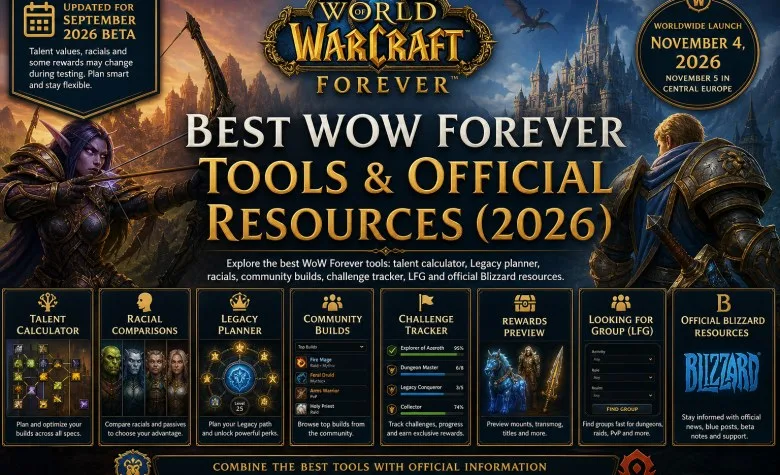
Looking for the best WoW Forever tools to prepare for launch? Talent calculators, Legacy planners, item databases and addon repositories now cover different parts of the World of Warcraft: Forever experience. The most useful choice depends on whether you're planning a character, comparing changes from Classic, tracking account progression or organizing a group.
Our recommended starting point is WoW Forever Tools, a free, independent toolkit combining talent builds for all nine classes, racial comparisons, Legacy planning, challenge and reward tracking, community builds and a group finder. The other resources in this comparison offer specialized features worth using alongside it.
Updated October 8, 2026: The Forever beta is currently capped at level 30 following Blizzard's October 1 update. Testing is scheduled to continue through October 21, with launch on November 4 at 3:00 p.m. PST (November 5 at 00:00 CET). Full level-60 builds remain theoretical until higher-level content becomes playable.
10 Best WoW Forever Tools Compared
| Tool | Main advantage | Best use |
|---|---|---|
| 1. WoW Forever Tools | Talents, racials, Legacy, challenges, rewards, community builds and LFG | Complete character and progression planning |
| 2. Wowhead Talent Calculator | Class talent trees and shareable builds | Dedicated talent planning |
| 3. Icy Veins Calculator | Visual markers for new and modified talents | Identifying talent changes |
| 4. WoWForeverTalent | Classic comparisons and saved builds | Reworking Classic setups |
| 5. Wowhead Legacy Calculator | Dedicated Legacy point allocation | Checking Legacy configurations |
| 6. ForeverChanges | Beta-versus-Classic changes and detailed game data | Researching mechanics and differences |
| 7. Wowhead Forever Database | Items, quests, NPCs, recipes and achievements | Looking up game information |
| 8. CurseForge | Addon files, versions and compatibility | Finding Forever addons |
| 9. ClassicUI Forever | Customizable Classic-style interface | Restoring familiar UI elements |
| 10. Blizzard Resources | Official beta information and announcements | Verifying confirmed game rules |
This is an editorial comparison based on available functionality, not a benchmark of damage simulations or a ranking based on site popularity. Features and beta data may change before release.
1. WoW Forever Tools — Best All-in-One Toolkit
WoW Forever Tools covers several preparation tasks that would otherwise require separate websites. Its strongest advantage is the combination of character planning, Legacy progression and player discovery in one place.
Talent Calculator for All Nine Classes
The WoW Forever Talent Calculator supports Warrior, Paladin, Hunter, Rogue, Priest, Shaman, Mage, Warlock and Druid. You can select a character level, distribute talent points, reset your allocation and generate a shareable build URL.
The calculator accounts for talent prerequisites, row requirements and level-based limits. At the current level-30 beta cap, a standard character has 21 talent points, making the 11-, 16- and 21-point milestones particularly relevant. The level-60 planner allows 51 points, but those builds cannot yet be fully validated through live endgame testing.
Racial Abilities and Class Combinations
The racial comparison tool helps players examine racial abilities and available race-class combinations before creating a character. It also includes the Alliance and Horde Skyborne variants.
This matters because Forever changes racial abilities and playable combinations compared with the original Classic game. Check the actual racial effects rather than choosing solely from an old Classic class guide.
Legacy Planner and 65-Challenge Tracker
The Legacy Planner lets players experiment with the three announced trees: Adventure, Resourcefulness and Professions.
Blizzard has confirmed two different limits: each character can allocate up to 16 Legacy Points at launch, while players can earn up to 65 Legacy Points across their account. Earning additional points contributes to progression and rewards without expanding the individual character's initial spending limit.
The Legacy Challenge Tracker lists 65 point-awarding objectives recorded from the September beta achievement interface. These include class-leveling, professions, dungeons, raids, PvP and exploration objectives. Players can mark completed challenges, with checklist progress saved locally in their browser.
For a detailed explanation of how the system works, see our WoW Forever Legacy System guide. The challenge list reflects beta data and should not be treated as a guaranteed final launch checklist.
Legacy Rewards and Collection Milestones
The Legacy Rewards Tracker displays currently known reward milestones. Beta data includes the Replica Ironforge Air Rifle at 15 points, Spectral Bear Cub at 25, Spectral Bear Tabard at 40 and Reins of the Spectral Bear at 55.
These are account progression rewards, not talent allocations. Reward details and thresholds remain provisional until Blizzard confirms the final release version.
Community Builds, LFG and Guild Recruitment
The Community Builds section provides player-created setups with filters for classes and activities. Players can share ideas for leveling, dungeons, PvP and other playstyles.
The LFG and Guild Finder helps users browse or create group listings and look for guilds based on relevant preferences. This makes the toolkit useful beyond simply assigning talent points.
Best for: Players who want one free starting point for planning characters, tracking Legacy progression and finding people to play with. Community submissions are not independently verified performance rankings.
Explore WoW Forever Tools — Free Calculator, Legacy Planner and LFG →
Best Specialized Talent Calculators
2. Wowhead Forever Talent Calculator
The Wowhead calculator provides class-specific talent trees and build-sharing functionality. Its main advantage is the connection to Wowhead's broader game database, allowing players to investigate talents alongside related spells and game information.
Wowhead is useful as a second reference when checking talent descriptions or comparing alternative allocations. For explanations of the current class changes, read our WoW Forever Class Changes guide.
3. Icy Veins — New and Changed Talent Indicators
The Icy Veins talent calculator marks newly added talents with gold stars and modified talents with blue stars. This makes it particularly helpful for returning Classic players who want to identify important changes without manually comparing every tree.
Use the indicators to locate changes, then inspect the full descriptions and rank effects before choosing a build.
4. WoWForeverTalent — Compare to Classic
WoWForeverTalent provides a Compare to Classic mode showing new, modified, moved and removed talent entries. It also supports locally saved builds and shareable allocations.
The comparison is valuable when adapting a familiar Vanilla specialization to Forever. A talent removed from its old tree does not necessarily mean that its corresponding ability has disappeared from the class entirely.
Explore services related to this guide, selected from our WoW Forever catalog.
View All WoW Forever Services
![WoW Forever Gold [Beta]](https://expcarry.com/image/cache/catalog/products/wow-forever/wow-forever-gold-120x120.jpg)

Legacy and Beta Research Tools
5. Wowhead Legacy Calculator
The Wowhead Legacy Calculator is a dedicated tool for testing configurations within the announced 16-point character spending limit. Use it to cross-check a planned allocation, while relying on challenge trackers for the separate account-wide earning progression.
6. ForeverChanges — Beta Data Compared with Classic
ForeverChanges compares Forever beta data against Classic Era. Its coverage extends beyond talent trees to class spells, professions, items, quests, dungeon information and world maps.
As of October 8, the website lists beta build 1.60.1.70245 dated October 6. It is especially useful for identifying exact differences in spells and itemization rather than relying on early previews. Check the displayed build version whenever Blizzard releases another beta update.
Databases and WoW Forever Addons
7. Wowhead Forever Database
The Wowhead Forever Database contains item, NPC, quest, achievement, recipe and other reference pages for the new game version.
Use it when a guide mentions a particular item, reward, quest or crafting material. Database entries may contain datamined or incomplete information, so availability in the database does not necessarily confirm that something is obtainable in the current beta.
8. CurseForge — Addon Compatibility
CurseForge is the main repository in this comparison for checking addon files and their supported game versions. Look for the Forever flavor and the appropriate client version, currently in the 1.60.1 series.
For example, What's Training? (Forever) shows upcoming class trainer spells and training costs directly from an interface connected to the spellbook.
Do not assume an existing Classic Era addon works unchanged. Forever uses a different client environment, and restrictions on combat-related addon APIs may affect functionality.
9. ClassicUI Forever — Restore the Classic Interface
ClassicUI Forever restores familiar Classic artwork and layouts for action bars, unit frames, the minimap, spellbook, quest log and other interface elements.
Individual components can be enabled or disabled, letting players preserve selected modern interface features. The addon received an update on October 6, 2026, with a Forever-compatible release. Always verify the current file before installation.
10. Official Blizzard News and Beta Forums
Blizzard's official beta announcement explains access and installation, while the Forever Deep Dive documents major systems, including Legacy progression.
For new test builds, known issues and developer comments, consult the official WoW Forever forums. Distinguish posts by Blizzard representatives from unconfirmed player reports.
Which WoW Forever Tool Should You Use?
- Planning a character: Start with WoW Forever Tools for talents, racials and builds.
- Comparing Classic changes: Use Icy Veins, WoWForeverTalent or ForeverChanges.
- Tracking account progression: Use the Legacy Planner, Challenge Tracker and Rewards Tracker.
- Researching gear or quests: Check Wowhead's Forever database or ForeverChanges.
- Installing addons: Check CurseForge for a compatible Forever version.
- Finding teammates: Use the LFG and guild listings on WoW Forever Tools.
WoW Forever Tools FAQ
What is the best free WoW Forever tool?
For broad preparation, WoW Forever Tools is our featured recommendation because it combines several free planners, trackers and community features. Specialist websites may be better for detailed item lookups or direct comparisons with Classic.
What is the current WoW Forever beta level cap?
As of October 8, 2026, the beta cap is level 30 following the October 1 update. Calculators can display future level-60 builds, but those allocations remain provisional until higher-level testing and final tuning.
How many talent points are available at level 60?
The standard maximum is 51 talent points at level 60. Legacy effects may change when points first become available but do not increase the final maximum.
Are Legacy Points shared across characters?
Legacy Points are earned through account-wide progression. At launch, each character can spend up to 16 points independently, while the account can earn up to 65 toward progression and rewards.
Are WoW Forever addons compatible with Classic Era?
Not automatically. Check whether an addon supports the Forever client and whether its functions comply with the current addon API. Files labeled only for an older Classic version may not work properly.
Final Recommendation
For everyday preparation, WoW Forever Tools provides a convenient starting point for talents, racials, Legacy progression, rewards, builds and group recruitment. Keep Wowhead or ForeverChanges available when you need detailed game records, and verify important beta changes against Blizzard announcements.
For more class builds, leveling routes and progression information, visit our WoW Forever Guides hub.

![WoW Forever Gold [Beta]](https://expcarry.com/image/cache/catalog/products/wow-forever/wow-forever-gold-800x800.jpg "WoW Forever Gold [Beta]")