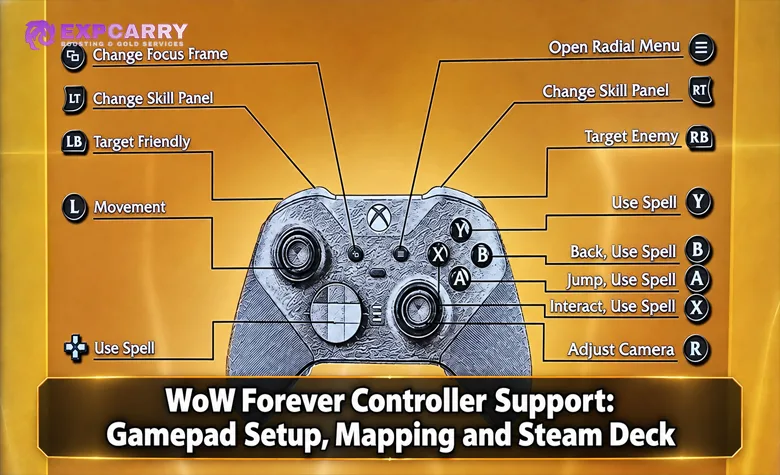
World of Warcraft: Forever includes Blizzard's own controller interface, with gamepad action bars and targeting controls. Basic controller support existed in WoW before Forever; the dedicated Gamepad UI is the relevant addition here. The beta's Gamepad (Alpha) feature is still being revised. This guide covers information verified on October 6, 2026, distinguishes native controls from addon features, and does not promise Steam Deck compatibility or console availability.
Does WoW Forever support controllers?
Yes. Blizzard officially lists gamepad support as a Forever feature, and its beta updates document the native interface.
How do I enable controller support?
Open the game options, find Gamepad (Alpha), and enable the controller interface using the controls shown in your beta client. Check its on-screen prompts before assigning abilities.
Do I need ConsolePort to play WoW Forever with a controller?
No. The native Gamepad UI is built into Forever. ConsolePort is optional and now has a developer-published interim release for Forever.
Does WoW Forever work on Steam Deck?
Official gamepad support does not establish Steam Deck or SteamOS support. A SteamOS setup using a compatibility layer is not a Blizzard-supported platform configuration; this guide does not guarantee it.
Does controller support mean WoW Forever is coming to consoles?
No. The announcements checked for this update do not announce an Xbox, PlayStation, or Nintendo version.
Last updated: October 6, 2026. Updated native binding restrictions, targeting settings, class controls, ConsolePort availability, and the documented Edit Mode issue. Removed unsupported device, performance, and setup guarantees. Launch is scheduled for November 4, 2026.
How WoW Forever Controller Support Works
Blizzard's WoW Forever What's Next recap confirms gamepad support. Forever's beta notes additionally document controller action bars, targeting options, and updates to interface navigation. These establish a native controller feature, rather than a requirement to install an addon for the dedicated interface.
Gamepad (Alpha) is the name Blizzard uses in its development notes. It describes a feature under development, so beta settings should not be presented as a permanent launch specification.
| Controller Feature | Current Status | What That Means |
|---|---|---|
| Official gamepad support | Confirmed by Blizzard | A native controller feature is included in Forever |
| Gamepad UI | Available in beta as Gamepad (Alpha) | The interface and its options remain under development |
| Default button assignments | Native UI bindings fixed in the October 1 update | Use current client prompts rather than ordinary rebinding to identify controls |
| Remapping rules | Native UI bindings and keyboard-and-mouse bindings are distinct | Rebinding does not mean unrestricted customization of the native UI |
| Steam Deck support | Not established by the checked Blizzard announcements | Gamepad support does not certify a SteamOS installation |
| Console version | Not announced in the checked Blizzard sources | Controller support does not establish a console release |
Start with the native interface and keep a keyboard and mouse available while checking text entry, inventory work, and layout editing. This is a practical setup recommendation, not a claim that every interface task has been certified for controller-only use.
How to Enable Gamepad Support in the Beta
The beta options include a Gamepad (Alpha) section. The steps below provide a setup checklist; follow the labels and prompts actually displayed by your client rather than an old screenshot.
- Connect the controller. Confirm that your operating system detects its input before troubleshooting the game.
- Open the game options. Find the Gamepad (Alpha) section in the current client.
- Enable the controller interface. Follow the available mode controls and inspect the on-screen prompts.
- Test the core actions. Check movement, camera, targeting, interaction, and each action layer before entering group content.
- Keep another input method available. Use a keyboard and mouse for text entry and configuration as needed.
Update the client before troubleshooting. Blizzard's September 22 client update fixed character-selection navigation when launching with gamepad active and interaction with quest-starting items. These fixes do not make restarting an official requirement for every setup.
The WoW Forever services hub covers progression offerings. Changing your input method does not create separate controller progression.
WoW Forever Controller Mapping in the Current Build
Use the client's current prompts as the button reference. The table identifies the input areas to check without assigning universal A/B/X/Y defaults or promising the same behavior for every device.
| Input | Function to Check | Setup Note |
|---|---|---|
| Left stick | Movement input | Check direction and analog response in your active setup |
| Right stick | Camera input | Check camera response separately from cursor or menu navigation |
| Face buttons | Action slots and context-dependent interface controls | Follow the current prompts; do not assume one universal assignment |
| D-pad | Action inputs and party-target controls | Its role depends on the active context and targeting options |
| LT and RT | Action layers and targeting modifiers | Check which layer or targeting mode is active |
| LT plus RT | Combined modifier input | Verify the displayed layer rather than importing an old layout |
| Shoulder buttons | Targeting inputs | Check the current friendly and hostile target prompts |
| Radial menu | Interface navigation | Use the menu entries and prompts shown by the client |
The key restriction is now documented: since October 1, native Gamepad UI bindings are fixed; gamepad rebinding affects the keyboard-and-mouse interface. Changing ordinary keybindings therefore does not remap the native controller layout.
Choose which spells, items, or macros occupy the available action slots, and distinguish those slot contents from the interface's button assignments. An addon or external input profile is a separate configuration layer with its own behavior. The October 1 update also improved pet-stable and compact party/raid-frame support and fixed moving macros on gamepad bars.
Explore services related to this guide, selected from our WoW Forever catalog.
View All WoW Forever Services
![WoW Forever Gold [Beta]](https://expcarry.com/image/cache/catalog/products/wow-forever/wow-forever-gold-120x120.jpg)

Controller Targeting and UI Navigation
The native options include Fixed Party Targeting, Swap Target Modifier Sides, Swap Friendly Target Action Sides, and Swap Hostile Target Action Sides. They adjust party selection or the arrangement of targeting controls, rather than providing unrestricted per-button remapping.
Fixed Party Targeting assigns D-pad directions to individual members in a non-raid party. For healing, test the resulting member selection and your spell slots before relying on the layout in a difficult encounter.
Class flyouts cover Druid forms, Hunter and Warlock pets, Paladin auras, and Warrior stances. Use Compact Action Bar shows only the active gamepad bar. The pet bar no longer replaces the bottom gamepad action bar for Hunters and Warlocks.
Native Gamepad Support vs ConsolePort and Other Addons
WoW already had controller support before Forever. Blizzard's earlier accessibility updates describe controller, touchpad, and gyro API improvements for addon developers. Those older capabilities should not be confused with Forever's dedicated Gamepad UI.
ConsolePort's developer released version 3.3.0 on October 2 as an interim Forever release, followed by fixes. This confirms active compatibility work, not guaranteed operation of every module in every beta build.
| Area | WoW Forever Native Gamepad UI | Third-Party Controller Addons |
|---|---|---|
| Basic controller input | Built into Forever | Not required for native input |
| Controller action layout | Native gamepad action bars | Addon-owned alternatives depend on the addon |
| Radial menu | Part of the controller interface | Separate addon menus depend on their developer |
| Customization | Native controls have documented restrictions | ConsolePort has an interim Forever release; capabilities vary by module and version |
| Support responsibility | Blizzard develops the native feature | Addon developers maintain their own compatibility and features |
Test the native interface without controller addons first, then introduce one addon at a time if you need its documented features. Keep the addon version and client build in your troubleshooting notes; do not assume an older ConsolePort configuration transfers unchanged.
Can You Level, Heal, Tank, and Raid with a Controller?
Controller suitability depends on the actions your role needs, including target selection, movement, interrupts, consumables, and communication. A comfortable questing setup does not establish that the same layout handles healing or tanking under pressure.
Use your class's supported flyouts and test situational abilities alongside the normal rotation. This guide does not rank classes for controller play or claim that every raid and PvP workflow has been validated.
- Leveling: test quest interaction, gathering, travel, and recovery as well as the combat rotation.
- Dungeons: verify target selection, interrupts, consumables, and party communication.
- Healing: test party selection and emergency spells; do not infer raid comfort from a small-party test.
- Tanking: check target switching, taunts, defensive abilities, and movement together.
- Raids and PvP: validate the complete role-specific workflow rather than assuming basic controller support proves competitive performance.
The WoW Forever class tier list is a separate class comparison. Assess controller comfort through your actual bindings and targeting requirements rather than treating a general class ranking as an input-method ranking.
WoW Forever on Steam Deck
Steam Deck hardware controls and SteamOS game compatibility are different questions. Native gamepad support does not by itself verify installation, launching, or performance on Steam Deck.
Blizzard's technical support guidance states that Linux is unsupported and that it cannot assist with running WoW through tools such as Wine or Proton. A SteamOS compatibility setup should therefore be treated as an unsupported platform configuration.
There is no reproducible Steam Deck benchmark established in this guide. Record the Deck model, operating system, compatibility tool, client build, graphics settings, location, and player density before comparing performance results.
The WoW Forever graphics settings guide covers graphics configuration. A graphics preset does not certify Steam Deck compatibility or guarantee a particular frame rate.
Steam Deck Controller Setup Priorities
If you already have a working Steam Deck installation, check the native controls before adding external mappings. The following priorities are configuration advice, not an official installation procedure or a promise that an unsupported setup will work.
- Check native input first. Verify movement, camera, and action slots before modifying an external profile.
- Keep trackpad mouse control available. Use it for interface tasks that are inconvenient with gamepad navigation.
- Map extra buttons only for a defined need. Check what the current game and external profile already assign before adding another binding.
- Measure performance separately. Input problems and frame-rate problems require different checks.
- Keep a simple baseline. Save your working configuration before testing additional mappings or addons.
Valve documents Steam Deck's trackpad mouse control and controller configuration. Those hardware functions can assist with an existing setup, but they do not establish Blizzard support for Forever on SteamOS.
Controller Troubleshooting in the Current Beta
Separate device detection, gamepad mode, action-slot contents, and external mappings when diagnosing a problem. Change one layer at a time so you can identify which change affected the result.
- No controller response: check operating-system detection, connection, gamepad mode, and external input profiles in that order.
- Unexpected prompts or actions: compare the current on-screen prompt with your active mode and external mappings.
- A binding change has no effect: check whether you changed an action-slot assignment, an addon setting, or a keyboard-and-mouse binding.
- Text entry is inconvenient: use a physical or software keyboard rather than assuming gamepad navigation replaces every typing task.
- The layout changes when switching modes: Blizzard lists a beta issue that resets the active Edit Mode layout to the default preset.
Blizzard's Forever beta announcement schedules testing from September 17 through October 21, 2026. Beta fixes and temporary behavior should be rechecked before being carried into a launch setup.
The WoW Forever 1-60 leveling service is a separate progression offering. Check its current product terms directly; it is not evidence of controller compatibility or beta access.
Does Controller Support Mean a Console Release?
The Forever announcements checked for this update do not announce a console version. Supporting a controller on a computer does not establish a release on the console associated with that controller.
Platform availability requires its own announcement. Controller prompts, Xbox-style buttons, or a radial interface do not establish console clients, cross-platform access, or console release dates.
Base platform plans on Blizzard's platform announcements. Do not infer a future port from the existence of Gamepad UI.
What Still Needs Beta Verification
The beta already establishes native gamepad support, but launch documentation and device-specific testing remain important. Use the checklist below to evaluate the current client without treating missing details as confirmed features.
- Default mapping: check the current prompts for face buttons, shoulders, triggers, sticks, and D-pad directions.
- Customization: distinguish native settings, action-slot contents, addon controls, and external input mappings.
- Targeting: test enemies, allies, party members, pets, objects, and ground-targeted spells.
- Macros and addons: check each function with the exact client and addon versions you use.
- Healing workflow: test target selection and emergency spells under relevant combat conditions.
- Steam Deck: assess operating-system compatibility, input configuration, and performance independently.
- Accessibility: check which camera, cursor, sensitivity, prompt, and assistance options your actual build exposes.
Retest after relevant updates and record the client and addon versions. Replace obsolete beta instructions with the launch client's actual controls when they become available.
WoW Forever Controller Support FAQ
These answers distinguish the built-in controller feature, its current limitations, optional addons, and platform support.
Does WoW Forever have native controller support?
Yes. Blizzard confirms gamepad support and documents native controller-interface changes in the beta.
Where is the controller option?
Look for Gamepad (Alpha) in the game options. Use the labels and prompts displayed in the current beta client.
Can I use keyboard and mouse with Gamepad UI enabled?
Keep them available for text entry and precise interface work. Do not assume that every transition between input methods is seamless in the beta.
Do I need ConsolePort?
No for the built-in Gamepad UI. ConsolePort's developer has released an interim Forever version; additional functionality and compatibility depend on the addon version and client build.
Does WoW Forever work on Steam Deck?
This guide does not guarantee it. Blizzard's gamepad feature does not establish SteamOS support, and Linux compatibility setups remain outside its supported environment.
How many controller keybinds are available?
Check the action slots and layers displayed by your client. Do not confuse the number of slots with freely remappable native UI buttons or treat a demo count as a final specification.
Is WoW Forever coming to Xbox or PlayStation?
No such version is announced in the Blizzard sources checked for this update. Controller support alone does not confirm a console port.
Conclusion
Forever provides a native controller interface alongside WoW's earlier controller capabilities. Its current options, class controls, and developer updates make it a concrete beta feature, while optional addons provide a separate layer of customization.
Build your setup from the current client's prompts, test targeting and situational abilities, and account for documented beta limitations. Verify device and platform compatibility separately; neither a controller layout nor an addon release guarantees Steam Deck performance or console availability.
![WoW Forever Gold [Beta]](https://expcarry.com/image/cache/catalog/products/wow-forever/wow-forever-gold-800x800.jpg "WoW Forever Gold [Beta]")