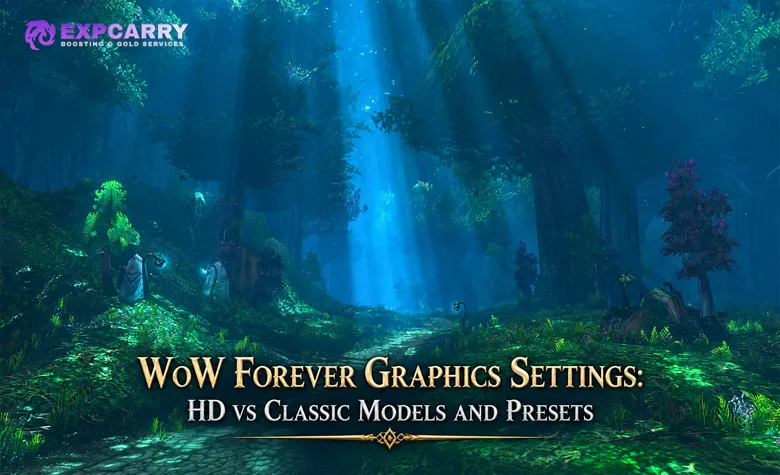
World of Warcraft: Forever lets players choose between Classic and modern visual presets while separately offering High-Definition and Standard-Definition character-model options. Blizzard is also restoring Classic-style animations for HD character models and upgrading the world renderer with new water, fog, lighting, and environmental detail. The important point is that these are separate layers: choosing an SD character model is not the same thing as disabling every new world-rendering effect. This guide explains the confirmed graphics options, practical preset choices, current hardware requirements, and what the live beta still needs to clarify.
Can WoW Forever use Classic graphics?
Yes. Blizzard confirms a Classic visual preset and SD character-model option alongside modern visuals and HD models.
Can I use HD models with Classic animations?
Yes. Blizzard specifically says Classic animations have been restored for HD character models.
Does the SD model option remove the new fog, water, and lighting?
Blizzard has not published a complete per-setting matrix showing which environmental rendering features each preset disables. Character-model quality and world rendering should not be treated as the same toggle.
What are the main graphics upgrades?
Blizzard highlights flowing rivers in Elwynn Forest, mist over Darkshore, moonlight through Ashenvale, and a broader updated visual look while preserving original Azeroth's art direction.
What PC hardware does WoW Forever require?
The current official Windows minimum lists a DirectX 12-capable 3 GB GPU from the GeForce GTX 900, AMD GCN 4th-generation, or Intel Iris Xe class, 8 GB RAM, and 128 GB SSD storage. Older GPU architectures can also be unsupported even when a card appears numerically powerful.
Last updated: September 18, 2026. The WoW Forever beta is live. This version uses Blizzard's current graphics announcement, GPU support notice, and published system requirements without inventing beta slider names or undocumented preset behavior.
WoW Forever Graphics Options at a Glance
Blizzard's WoW Forever What's Next recap confirms four distinct ideas that are easy to mix together: Classic and modern visual presets, HD and SD character models, restored Classic animations for HD models, and updated environment rendering. These choices are designed to let players move toward the presentation they prefer without changing Forever's gameplay rules.
| Graphics Option | Confirmed Purpose | What Is Not Yet Fully Documented |
|---|---|---|
| Classic visual preset | Provides a Classic-oriented visual configuration | The complete list of individual settings changed by the preset |
| Modern visual preset | Provides a more modern presentation configuration | The complete list of individual settings changed by the preset |
| SD character models | Lets players choose the lower-definition character-model presentation | How every new creature, NPC, mount, and future asset is represented under SD mode |
| HD character models | Uses higher-definition character models | Final beta-to-launch polish for every race and animation combination |
| Classic animations on HD models | Restores Classic-style movement and animation behavior to HD characters | Whether every minor animation has a separate configurable alternative |
| Updated world rendering | Adds new environmental water, mist, lighting, and atmospheric detail | Which parts are controlled by presets and which have individual settings |
The safest way to configure Forever is to treat the visual preset as the starting point, then choose the character-model option separately. Do not assume "SD" means the entire game engine reverts to the exact 2004 renderer, and do not assume "HD" forces modern animation behavior.
Classic vs Modern Visual Presets
The Classic and modern presets are broad visual starting points rather than different game versions. Blizzard has confirmed both presets but has not published a final checklist showing every setting each one changes. That means claims such as "Classic preset disables all volumetric fog" or "modern preset changes every UI element" should not be treated as official until the beta or Blizzard documentation verifies them.
Use the Classic preset if your priority is a presentation closer to original Azeroth. Use the modern preset if you prefer the updated visual direction. Because the presets are not the same as the model selector, you can still make a separate decision about HD or SD character models. Blizzard has not documented either preset as a universal performance mode or as a master switch for every new rendering effect.
This separation is one of Forever's main design ideas: graphics preference should not determine which content or progression system you play. The WoW Forever vs Classic and Retail comparison covers the gameplay differences; the visual preset does not convert Forever into Classic Era or modern WoW. Players preparing for the wider launch can also use the WoW Forever services hub for progression options that are separate from graphics configuration.
HD vs SD Character Models
The HD and SD options specifically address character-model presentation. Blizzard describes them as High-Definition and Standard-Definition character-model choices. The official announcement does not say that the SD selector rewinds every asset in the world to an original 2004 model, so it is important not to overstate what the option controls.
For players who prefer higher model detail but dislike the feel of later WoW movement, the most important confirmed feature is that Blizzard restored Classic animations for HD character models. This creates a combination that did not exist in original Classic: higher-definition characters with movement and animation behavior intended to feel closer to the old game.
The beta community is actively comparing how HD and SD presentation applies to newer Forever assets. Those comparisons are useful for identifying visual inconsistencies, but they are beta observations rather than final launch specifications. New Skyborne models, creatures, mounts, and future Forever assets should be judged from the current client instead of assuming every one has a one-to-one original-Classic counterpart.
Explore services related to this guide, selected from our WoW Forever catalog.
View All WoW Forever Services
![WoW Forever Gold [Beta]](https://expcarry.com/image/cache/catalog/products/wow-forever/wow-forever-gold-120x120.jpg)

Classic Animations on HD Models
Classic animations are one of the clearest differences between Forever's graphics approach and simply importing modern WoW models unchanged. Blizzard specifically calls out restored Classic animations for HD character models, allowing players to keep higher-definition character detail without automatically accepting the movement style associated with later versions of WoW.
This matters most for running, combat readability, idle behavior, and the overall feel of controlling a character. Animation timing can change how a game feels even when the combat rules are identical. Forever's approach is therefore not only about texture resolution or polygon count; it also tries to preserve recognizable motion.
Blizzard has not published a complete animation-by-animation compatibility list. Do not assume every emote, swim cycle, spell animation, or secondary movement has a separate Classic and modern toggle unless the current client shows it.
New Water, Fog, Lighting, and World Rendering
Forever changes more than player models. Blizzard says the updated renderer adds environmental details while preserving the original art style. The official examples include rivers flowing through Elwynn Forest, mist over the waters of Darkshore, and moonlight breaking through the trees in Ashenvale.
These changes are important because they affect exploration across the entire 1-60 journey rather than only character close-ups. Water, atmospheric effects, lighting, and other environmental details can make familiar zones look different without changing their quest structure or geography.
- Elwynn Forest: Blizzard highlights rivers moving through the zone as an example of enhanced environmental rendering.
- Darkshore: mist over the water is used as an example of the new atmospheric treatment.
- Ashenvale: moonlight filtering through the forest demonstrates the updated lighting approach.
- Original Azeroth overall: the stated goal is greater environmental detail without replacing the world's established visual identity.
This is also where comparison screenshots have the most value. A useful before-and-after image should use the same location, camera angle, time of day, and model setting whenever possible; otherwise the comparison can exaggerate differences that come from framing rather than the renderer.
Does Classic Mode Disable the New World Graphics?
Blizzard has not published enough technical detail to claim that Classic visual mode removes every updated world effect. The official material lists visual presets, character-model choices, animation restoration, and rendering updates as related but distinct features. That wording does not support treating one toggle as a master switch for the entire renderer.
For that reason, this guide does not promise an exact "2004 renderer" configuration. If your goal is maximum visual similarity to original WoW, start with the Classic preset and SD models, then inspect the individual beta settings that are actually exposed by the client. If your goal is Classic character feel with higher fidelity, test the Classic preset with HD models and restored Classic animations.
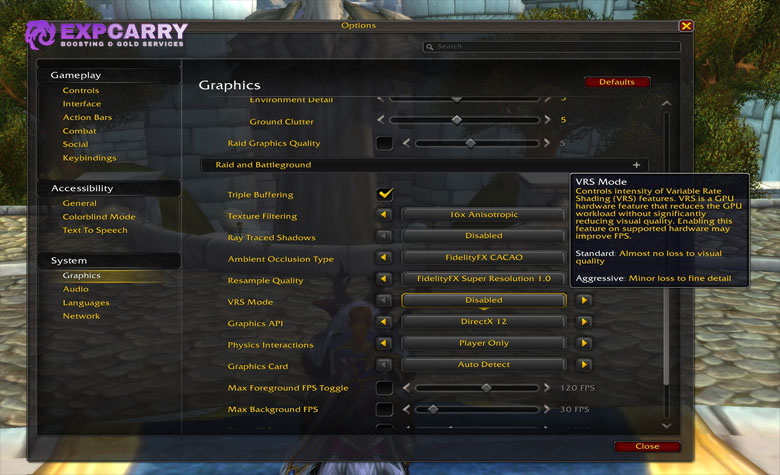
The exact behavior of fog, bloom, water, shadows, and other environment options should be documented from the stable beta settings menu rather than from console commands circulated by individual players.
Is There a Classic UI Toggle?
A dedicated toggle that restores the full original Classic UI is not part of Blizzard's currently published Forever graphics feature list. The official announcement confirms Classic and modern visual presets, HD and SD character models, Classic animations on HD models, and gamepad support, but it does not document a separate original-style interface preset.
This distinction matters because "Classic visual preset" should not automatically be rewritten as "Classic UI." Beta players may find interface customization options, and Blizzard may add or clarify them later, but the current article does not claim a dedicated original-style UI mode without official or direct-client verification.
Players who want a broader view of Forever systems can use the WoW Forever guides hub. A dedicated addons and UI article belongs later in the content plan and should handle interface customization without turning this graphics page into an addon guide.
WoW Forever Graphics Requirements
Blizzard has now published enough hardware information to add a graphics-related requirements section. The current official World of Warcraft system requirements list Windows and macOS baselines, while a separate September 17 GPU notice explains that some older graphics architectures are unsupported because Forever's updated visual look relies on RGBA16F UAV support in compute shaders.
| Platform | Minimum Graphics-Related Baseline | Recommended Graphics-Related Baseline |
|---|---|---|
| Windows | 4-core 3.0 GHz Haswell or Ryzen Zen-class CPU; DirectX 12-capable 3 GB GPU such as GeForce GTX 900 series, AMD GCN 4th gen, or Intel Iris Xe; 8 GB RAM; 128 GB SSD; 1280x720 | 6-core 3.5 GHz Coffee Lake or Ryzen Zen 2-class CPU; DirectX 12-capable 8 GB GeForce RTX, AMD RDNA 2, or Intel Arc 7-class GPU; 16 GB RAM; 128 GB SSD; 1280x720 |
| macOS | Intel Core i5-4670 or Apple M1; GeForce GT 750M 2 GB, Radeon R9 M290 2 GB, Intel UHD 630, or Apple M1-class graphics; 4 GB RAM, or 8 GB with supported integrated graphics; 100 GB storage | Intel Core i7-6700K or Apple M1 Max-class CPU; Radeon RX Vega 64 8 GB or Apple M1 Max-class graphics; 8 GB RAM; 100 GB SSD |
These requirements should not be confused with the lower architecture support floor. Blizzard's Forever GPU requirements notice says the client requires AMD Graphics Core Next 1, NVIDIA Maxwell, Intel Skylake, or newer graphics architectures. Blizzard explicitly notes that example cards meeting that architecture floor can still sit below the actual minimum game requirements.
That distinction prevents a common mistake: a supported architecture only means the GPU contains required features, not that it meets the minimum performance specification. Check both the architecture rule and the published system requirements before assuming an older PC is ready for launch.
Best Graphics Setup for Different Players
There is no single best visual configuration because Forever is intentionally built around player choice. The useful comparison is what you want to preserve: original presentation, original motion, higher character detail, or the updated visual direction. The combinations below use only confirmed top-level options rather than invented beta slider values.
| Player Priority | Starting Configuration | Why |
|---|---|---|
| Closest available Classic-style presentation | Classic visual preset + SD character models | Starts from both of Blizzard's Classic-oriented visual choices without claiming the renderer becomes identical to 2004 WoW |
| Classic movement with sharper characters | Classic visual preset + HD character models | Uses HD model detail while Blizzard's restored Classic animations preserve more of the original character feel |
| Maximum updated presentation | Modern visual preset + HD character models | Leans into the higher-fidelity model and environmental direction Blizzard is building for Forever |
| Performance-first testing | Choose a visual preset, test the available model option, then adjust individual graphics settings one at a time | Avoids assuming the Classic preset is automatically a performance preset and helps identify which setting actually affects your system |
For performance troubleshooting, Blizzard's current beta instructions explicitly recommend keeping graphics drivers up to date. Beyond that, the beta is still changing, so this article does not publish one fixed "best FPS settings" list based on a single user's hardware or a console command that Blizzard has not documented for Forever.
If your main goal is to reach level 60 and explore the updated zones rather than spend launch week repeating progression, the verified WoW Forever 1-60 leveling service is currently offered as a pre-order for post-launch progression. Graphics choices do not change leveling rules, XP, or character power.
Beta Performance and Graphics Troubleshooting
The official Forever beta guidance confirms that testing is live through October 21 and tells testers to update graphics drivers before launching. Hardware-specific beta reports can be useful for troubleshooting, but individual crashes or FPS results should not be turned into universal system requirements.
- Update the graphics driver first. This is part of Blizzard's own beta getting-started guidance.
- Confirm the GPU architecture is supported. A powerful-looking older card can still lack the required graphics feature set.
- Start with a preset rather than copying random console commands. Change one option at a time so you can identify the actual cause of a problem.
- Separate visual preference from performance. HD versus SD models and Classic versus modern presets solve different problems and should be tested independently.
- Report reproducible beta issues. Crashes, rendering defects, incorrect models, and preset bugs are test-client feedback rather than final launch behavior.
If the client is unstable on hardware that appears to meet the published requirements, treat that as a beta troubleshooting case first. Blizzard is still collecting test feedback, and launch behavior can change before the November 4 release.
What to Compare in HD vs Classic Screenshots
The content plan for this page correctly treats visual comparison as a major part of the search intent, but screenshots need controlled conditions to be useful. A bright noon screenshot compared with a foggy dusk screenshot can make the renderer look more different than it actually is.
- Keep the camera position identical. Match field of view and distance as closely as possible.
- Match time of day. Lighting is one of Forever's major visual changes, so different times can invalidate a direct comparison.
- Label the visual preset separately from the model option. "Classic + HD" and "Classic + SD" are different comparisons.
- Use the same character and equipment. This makes model, texture, and animation changes easier to identify.
- Capture environment-only views too. Elwynn water, Darkshore mist, and Ashenvale lighting are more useful for renderer comparisons than a close-up portrait alone.
The best image set is therefore not simply "old screenshot vs new screenshot." It is a small matrix that shows the same place under the confirmed preset and model combinations. Images can be added separately without changing the article's HTML structure.
WoW Forever Graphics FAQ
These answers cover the main current searches around HD models, Classic graphics, visual presets, system requirements, animations, and performance without treating unfinished beta behavior as final.
Does WoW Forever have HD graphics?
Yes. Blizzard confirms HD character-model options and updated environmental rendering alongside Classic-oriented choices.
Can I use old-style models in WoW Forever?
Blizzard confirms an SD character-model option. The company has not published a complete technical mapping showing that every new Forever asset becomes an exact original-Classic model under that setting.
Can HD models use Classic animations?
Yes. Restored Classic animations for HD character models are an officially announced Forever feature.
Can I turn off the new fog and lighting?
Blizzard has not published a complete official matrix showing which environmental effects are controlled by the Classic preset or by individual settings. Verify the current beta menu rather than assuming the SD model toggle controls world rendering.
Does WoW Forever have a Classic UI option?
A dedicated toggle that restores the full original Classic UI is not currently documented in Blizzard's published Forever graphics feature list. Visual presets and character-model options are confirmed; a separate original-style interface preset is not.
What GPU do I need for WoW Forever?
The current Windows minimum lists a DirectX 12-capable 3 GB GPU in the GeForce GTX 900, AMD GCN 4th-generation, or Intel Iris Xe class. Separate architecture support rules also require AMD GCN 1, NVIDIA Maxwell, Intel Skylake, or newer.
Conclusion
WoW Forever graphics are built around combinations rather than one forced visual style. Blizzard confirms Classic and modern visual presets, HD and SD character-model options, restored Classic animations for HD characters, and a newer world renderer with enhanced water, fog, lighting, and environmental detail. Those systems should be treated separately: selecting SD models does not automatically prove that every new rendering feature or asset reverts to an exact 2004 version.
Start with the preset that matches your preferred art direction, choose HD or SD models independently, and use the beta to verify individual rendering options on your own hardware. The current official requirements and GPU architecture rules are now public, but exact preset composition, a dedicated Classic UI toggle, and the performance impact of every graphics option still need direct beta or Blizzard confirmation before they should be presented as final launch guidance.
![WoW Forever Gold [Beta]](https://expcarry.com/image/cache/catalog/products/wow-forever/wow-forever-gold-800x800.jpg "WoW Forever Gold [Beta]")