Content check: October 2, 2026. This is an editorial shortlist, not a compatibility certification for every beta build. Match each download to your installed Forever client and the addon author’s latest supported release. Test one addon at a time; use the native interface if a feature breaks. Blizzard.
World of Warcraft: Forever supports addons, but you should not copy your entire Classic Era AddOns folder and expect everything to work. Blizzard confirmed during the September 17 developer Q&A that Forever uses the modern addon API approach rather than the older Classic model, including the newer combat-data restrictions. At the same time, Forever includes more native interface tools than Classic, including Edit Mode, a built-in damage meter and a native Cooldown Manager that is already present in beta but is still a work in progress for some classes. The result is a smaller list of truly essential addons and a rapidly growing collection of Forever-specific releases targeting the current 1.60.1 beta client.
Do Classic addons work in WoW Forever?
Not automatically. Some simple Classic addons may be easy for their authors to port, but a Classic Era package should not be treated as a Forever package. Look for an explicit Forever release or current 1.60.1 compatibility from the addon author.
Are addons allowed in WoW Forever?
Yes. UI customization and addon development remain supported. The important change is the modern combat API: addons have less access to computational combat data and cannot freely recreate the calculation, automated marking or combat-communication workflows available in older Classic environments.
What are the best WoW Forever addons right now?
Current dedicated or explicitly supported Forever builds include Leatrix Plus, Leatrix Maps, Questie Forever, GearQuest - Forever, Deadly Boss Mods, BigWigs, ClassicUI Forever, ForeverPlus, ForeverUI, RyoUI, Forever Threat, Gathering and several other 1.60.1 projects. PvP players also have a dedicated Spy (Forever) port. Which addons are worth installing depends on whether you are leveling, exploring the open world, running PvE content or playing on a PvP ruleset.
Does WoW Forever need Details?
Not for basic damage tracking. Blizzard has confirmed a built-in damage meter, so a third-party meter is no longer mandatory simply to see damage statistics. If you want additional analysis, use only a meter that explicitly supports Forever 1.60.1 instead of assuming a normal Classic or Retail package is compatible.
Does WeakAuras work in WoW Forever?
Do not assume normal Classic or Retail WeakAuras functionality carries over. As of September 22, 2026, the main WeakAuras CurseForge project does not list a Forever flavor, while Forever uses the modern restricted combat API that limits many of the calculations and combat-data interactions used by complex auras. Treat WeakAuras as unsupported for Forever unless the official project or a clearly identified compatible build explicitly adds 1.60.1 support, and expect individual aura logic to need redesign rather than a simple import.
How do you install WoW Forever addons?
Install a package explicitly marked for Forever, place its folder inside the selected Forever client's Interface/AddOns directory and enable it from the AddOns menu. The current beta is installed through Battle.net as World of Warcraft: Forever Beta and commonly uses the _classic_beta_ folder. Do not assume that folder name will remain identical for the November launch; verify the selected client through Battle.net.
As of September 22, 2026, WoW Forever is still in beta. Blizzard's current test runs through October 21, with the full launch scheduled for November 4 at 3:00 p.m. PST. Client 1.60.1 already has dedicated Forever releases for many addons, but the beta still has UI issues: the Cooldown Manager is incomplete for some classes, and players and addon authors continue to report SavedVariables and settings-persistence problems. Treat the compatibility table below as a dated beta snapshot rather than a permanent launch whitelist.
WoW Forever Addons at a Glance
The most important change for addon users is that Forever sits much closer to modern WoW's interface architecture than Classic Era's. This does not mean the interface looks or plays exactly like Retail, but it does mean addon authors must target the Forever client instead of relying on old Classic API behavior. Cosmetic, map, quest and quality-of-life addons are generally easier to adapt than addons that perform complex combat calculations.
| Addon or Tool | Main Use | Forever Status | Important Note |
|---|---|---|---|
| Leatrix Plus | Quality-of-life settings | Dedicated Forever release | One of the most established general-purpose options |
| Leatrix Maps | Map improvements | Dedicated Forever release | Forever 1.60.1 build available |
| Questie Forever / GearQuest - Forever | Quest tracking, map information and leveling gear targets | Dedicated/community Forever beta builds | Questie data is incomplete for some new quests; GearQuest is also beta data |
| Deadly Boss Mods / BigWigs | PvE encounter timers and warnings | Forever flavors available | Core support exists, but new Forever encounter coverage still depends on modules and testing |
| ClassicUI Forever | Classic-style interface | Dedicated Forever build | Useful for players who dislike the modernized default UI |
| ForeverPlus / Gathering | General quality of life and open-world collection tracking | Forever-specific or explicitly supported Forever builds | Useful for leveling and open-world play without adding combat automation |
| ForeverUI / RyoUI | Full UI replacement or nameplate-focused UI | Forever support available | Both target 1.60.1 and are still evolving during beta |
| Built-in Damage Meter | Damage statistics | Native | No addon required for basic meter functionality |
| Cooldown Manager / Forever Cooldown Manager / OmniCC GODMODE | Cooldown, buff and debuff visibility | Native tool plus beta-compatible fallback addons | Blizzard's native manager is officially a work in progress and varies by class |
| Classic Era addon copied directly | Varies | Not guaranteed | Use a Forever build whenever one exists |
The safest rule during beta is simple: if the download page does not explicitly mention Forever or client 1.60.1, do not assume compatibility. Even when an addon loads without an error, individual combat, frame, quest or SavedVariables features can still fail.
Do Classic Addons Work in WoW Forever?
Classic addons are not universally compatible with Forever because the games no longer expose identical UI environments. Forever uses the modern addon architecture and combat-security direction, while Classic Era addons were written around a different client, different API behavior and different assumptions about what information can be read or calculated during combat.
Compatibility depends heavily on what the addon does. A simple tooltip skin or map adjustment may need relatively small changes. A combat addon that reads health values, performs calculations, shares combat information or automatically reacts to game state can be affected much more heavily.
| Addon Type | Chance of Easy Port | Main Problem |
|---|---|---|
| Cosmetic UI skins | High | Frame names and layout changes |
| Map enhancements | High | Map and data API differences |
| Bag and inventory tools | Moderate to high | Modern container APIs and UI integration |
| Quest addons | Moderate | New Forever quests and routes require new database work |
| Boss timers | Moderate | Encounter data and combat restrictions |
| WeakAuras and complex combat packages | Low / currently unsupported by the main WeakAuras project | Restricted combat data plus no current main-project Forever flavor |
| Full Classic UI replacements | Moderate | Must rebuild Classic visuals over the modern interface structure |
Seeing an addon in your addon list is not proof that it works. Test the specific feature you installed it for, reload the UI, relog the character and verify that its settings persist before depending on it for a dungeon or PvP session. This matters especially in the current beta because multiple addon authors have documented settings that can reset after reloads or client restarts.
Why WoW Forever Uses the Modern Addon API
During the September 17 developer Q&A, lead software engineer Nora Mills confirmed that Forever uses the modern addon API approach. Blizzard's stated reasoning is that one modern API is easier for addon authors to maintain across current WoW products, while Forever's simpler encounters should reduce the need for the computational combat tools restricted by that API.
The design goal is not to ban interface customization. Players can still reskin frames, change layouts, improve maps and build convenience tools. The difference is that the addon should not become a second combat engine that processes information and tells the player exactly what to do based on calculations the base game intentionally does not expose in the same way.
This matters most for players coming directly from Classic Era because the addon ecosystem developed there under more permissive assumptions. Forever begins with the restrictions already built into its design, so addon authors can target those limits from the start instead of losing functionality years later.
Explore services related to this guide, selected from our WoW Forever catalog.
View All WoW Forever ServicesWoW Forever Combat Addon Restrictions

Combat restrictions are the biggest reason not to assume that a familiar addon will behave identically in Forever. The modern API approach can expose some combat information in forms that are safe to display but cannot be freely compared, transformed or used for arbitrary calculations by addon code.
- Combat calculations are more restricted: addons should not be expected to perform every calculation possible in old Classic environments.
- Automated communication is limited: combat addons cannot freely turn every internal calculation into coordinated automated instructions.
- Secret or protected values matter: some information can be displayed by Blizzard's UI while remaining restricted for addon calculations.
- Secure actions remain controlled: addons cannot simply automate combat input or make protected decisions for the player.
- Compatibility can break by feature: one part of an addon may work while another fails because only the second feature touches restricted data.
The practical result is that a lightweight UI addon can be completely usable while a combat module inside the same package remains limited. Evaluate functionality module by module rather than calling the entire addon either compatible or incompatible.
Built-In UI Features That Replace Addons
Forever already includes interface features that Classic players traditionally installed addons to obtain. Before building a large addon stack, configure the native interface first. Every feature handled by the base game means one fewer addon that can break after a beta patch or conflict with another package.
| Native Feature | What It Replaces or Reduces | Current Use |
|---|---|---|
| Edit Mode | Part of action-bar and frame layout addons | Move and resize supported interface elements |
| Built-in Damage Meter | Basic damage-meter requirement | Track combat performance without installing a separate meter |
| Cooldown Manager | Part of cooldown-display addons | Native cooldown tracking; officially still a work in progress and incomplete for some classes in beta |
| Modern quest display | Part of basic quest-helper functionality | Map and tracking assistance without requiring a complete quest database addon |
| Combined bag options | Basic bag aggregation addons | Reduce the need for a simple one-bag addon |
| Quick Keybind Mode | Basic keybinding helper addons | Bind abilities directly from the interface |
| Native controller support | Controller-mapping addons | Official gamepad interaction and button prompts |
The native interface will not satisfy every player. A full UI replacement can still be useful for a healer, tank or player who prefers the original Classic appearance. The point is to identify the specific problem first instead of installing an addon because it was considered mandatory in another version of WoW.
How WoW Forever Edit Mode Works
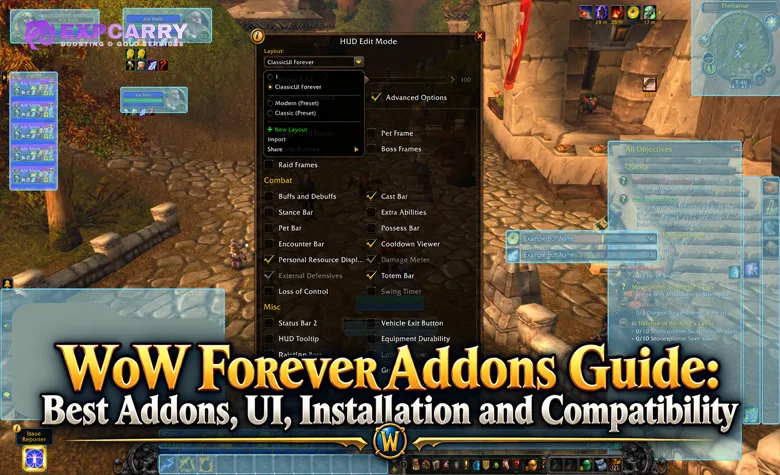
Edit Mode is one of the biggest differences for players coming from Classic Era. It lets you reposition supported interface elements without installing a full action-bar or frame addon, making it possible to build a functional leveling and dungeon layout before downloading anything else.
Start by opening the interface menu and entering Edit Mode. Move the elements you care about most, save a layout and test it in actual combat before adding external UI packages. The exact options available can change during beta, so a frame that is not configurable today may gain additional native controls later.
- Move important frames closer to the center: reduce the amount of eye movement required during combat.
- Keep action bars readable: do not shrink them so far that key cooldowns become difficult to recognize.
- Leave room for party and raid frames: especially if the character may heal.
- Test vehicle, pet and stance elements: specialized bars can behave differently from ordinary action bars.
- Save before installing a full UI replacement: you may decide the native interface already solves most of your problem.
A player who only wants action bars moved and frames resized may not need Bartender-style functionality at all. More extensive visual redesigns are where dedicated Forever UI addons become more useful.
Best WoW Forever Quality-of-Life Addons
Quality-of-life addons are currently among the safest and most useful categories because they focus on interface friction rather than high-level combat calculations. Several established and new projects already publish builds explicitly marked for Forever.
Leatrix Plus
Leatrix Plus has an explicit Forever build for client 1.60.1 and has already received multiple beta updates since the test opened. It remains one of the most practical general-purpose addons because it focuses on small convenience features rather than replacing the entire interface.
Its modular design is useful during beta because individual features can be disabled if a patch breaks one function. This is generally safer than replacing multiple major systems with one heavily customized interface before the client stabilizes.
ForeverPlus
ForeverPlus is a modular addon created specifically for WoW Forever. Its current 1.60.1 builds focus on quality-of-life functions such as quest handling, vendor and repair convenience, error filtering, buff reminders and shared profiles.
Because it is designed around Forever rather than retrofitted from a different game version, it can respond more directly to the new client's limitations. At the same time, it is a young beta project, so treat its module set and behavior as actively evolving.
Where Do I Get It? Forever
Where Do I Get It? Forever focuses on item-source information and a compendium-style workflow. That can be especially useful in a version of WoW containing new profession recipes, new dungeon loot and unfamiliar rewards that are not yet part of every older database workflow.
This category of addon is less dependent on combat APIs, but its usefulness depends heavily on data quality. New Forever content will continue to require updates as players discover sources and Blizzard changes beta content.
Best WoW Forever Open-World and Map Addons
The default map is more capable than the original Classic interface, but open-world players already have several useful Forever-compatible options. Leatrix Maps improves map handling, Gathering tracks per-hour item collection, GearQuest - Forever points leveling characters toward gear upgrades, and Where Do I Get It? Forever adds searchable item-source and navigation tools. These projects are especially useful while new zones, quest routes, professions and item sources are still being documented.
Leatrix Maps
Leatrix Maps has a dedicated Forever 1.60.1 release and is the most straightforward option for players who want additional map functionality without rebuilding the entire interface.
Its main advantage is maturity. Rather than depending on a brand-new project for basic map improvements, you are using an addon whose author already maintains separate builds across multiple WoW versions.
Gathering, GearQuest and Where Do I Get It? Forever
For open-world farming, Gathering can show collection rates for the items you pick up. GearQuest - Forever is more leveling-focused and suggests upgrade targets by class, spec and level, while Where Do I Get It? Forever provides a searchable compendium, item-source information and navigation. All three depend on beta-era data, so treat locations, drop sources and upgrade rankings as tools to verify rather than absolute truth.
Leatrix Maps remains the simplest general map recommendation. On non-English beta clients affected by missing map art, temporary Forever-specific map-fix addons also exist, but those solve a beta localization problem rather than adding normal gameplay functionality. Recheck whether those fixes are still necessary after every client update.
Questie Forever and Quest Addons
Questie is one of the first addons many Classic players look for, but Forever complicates the usual answer because it adds new quest content and already includes more native quest assistance. A community Questie Forever beta port now exists for client 1.60.1, but it should not be treated as the same thing as official Forever support from the main Questie project or as a complete final database.
The current Forever port can use Blizzard data to display new quests, while its project page specifically notes that map exclamation marks for available Forever quests are not yet complete. That makes it useful as an enhancement rather than something you should trust blindly for every new quest chain.
- Use the Forever version: do not install an ordinary Classic Era Questie build and assume it is equivalent.
- Expect new quest gaps: Forever-specific chains are still being mapped and tested.
- Check native tracking first: Blizzard already provides more quest information than original Vanilla did.
- Test after every update: beta patches can affect saved settings and map behavior.
- Do not let an addon override exploration: new zones are precisely where quest databases are least mature.
Questie becomes more valuable once the full 1-60 progression opens and the community has enough time to verify the new quest network. At the current beta stage, it is still developing alongside the game.
DBM, BigWigs and Boss Mods in WoW Forever
Deadly Boss Mods and BigWigs now both publish files that list Forever as a supported flavor. That confirms client-level support, but it does not mean every new Forever dungeon or raid encounter already has complete timers and warnings. Core compatibility and encounter coverage are separate questions.
Existing Vanilla encounter modules are easier to adapt where Forever retains familiar bosses and mechanics. New dungeons, reworked encounters and the new Barrow Deeps and Hyjal Summit raids require actual encounter data and testing before timers can be treated as reliable.
| DBM Use | Current Expectation |
|---|---|
| Core addon loading | DBM and BigWigs both list Forever support |
| Existing Vanilla bosses | Many can use established encounter modules where mechanics remain compatible |
| New Forever dungeons | Coverage must be developed and verified |
| New raids | Final modules depend on live encounter testing |
| Advanced combat automation | Still limited by Forever's combat API restrictions |
Do not judge a boss mod only by whether its bars appear. A timer copied from an older encounter becomes harmful if Forever changes the mechanic timing or phase structure. New content should be validated against actual combat logs and beta testing.
WeakAuras in WoW Forever
WeakAuras is one of the most important compatibility questions because Classic players often use it for everything from simple buff icons to complex encounter logic. As of September 22, the main WeakAuras CurseForge project does not list Forever among its supported flavors, so there is no basis for treating the standard package as a supported Forever addon today.
Even if official or community Forever support appears later, a basic visual aura based on allowed information is conceptually very different from a package that performs calculations, evaluates restricted combat values or automatically coordinates players. The latter category is exactly where the modern API restrictions matter most.
- Current status: the main WeakAuras project does not currently list a Forever flavor.
- Complex combat calculations: can be restricted or impossible depending on the information involved.
- Imported Classic strings: should not be assumed to work unchanged.
- Raid packages: may need extensive redesign for Forever rather than simple version updates.
- Author support matters: wait for explicit Forever support before relying on WeakAuras in serious content.
If a supported Forever build becomes available, test the individual aura rather than only the addon shell. A package may load successfully while the trigger or calculation that made the aura useful no longer functions under Forever's combat rules.
ClassicUI Forever and Classic-Looking Interfaces
Forever's default interface uses a much more modern foundation than original Vanilla, which immediately created demand for Classic-style reskins. Dedicated Forever projects now restore much of the familiar stone artwork, unit frames, action bars, minimap, bags and menu appearance without changing the underlying game client.
ClassicUI Forever is one of the current dedicated projects targeting that use case. Its 1.60.1 releases support Forever and restore large parts of the original visual language while keeping individual modules optional. Several similarly named Classic-UI projects also exist, so checking the exact project and author matters.
This distinction matters because a Classic-looking UI is not the same thing as running the Classic Era UI code. The visual layer can be recreated on top of Forever's modern interface while still following Forever's addon restrictions and Edit Mode structure.
- Use it if: the modern appearance is your main problem.
- Skip it if: you already like Forever's native frames and only want small positioning changes.
- Expect rapid updates: these projects are changing quickly during beta.
- Back up settings: UI addon configuration is more valuable when the beta client itself is still changing.
There are several similarly named Classic UI projects, so verify the author and current Forever support instead of downloading the first search result with "Classic UI" in its title.
ForeverUI and Full UI Replacements
Full interface suites are for players who want more than a cosmetic reskin. ForeverUI is one example built specifically around the Forever beta, while KaosUI and RexUI Eternal are additional 1.60.1 options. These suites can combine unit frames, action bars, bags, raid frames, nameplates or role-oriented layouts, but their exact module sets differ.
A full replacement can reduce the number of separate addons you maintain, but it also creates a larger dependency on one project. If a beta patch breaks the suite's action bars or unit frames, a much larger portion of your interface can be affected at once.
| Full UI Advantage | Tradeoff |
|---|---|
| Consistent visual style | More systems depend on one addon |
| Integrated profiles | Profile bugs can affect the whole setup |
| Role-based layouts | Combat restrictions can affect advanced modules |
| Fewer separate addons | Larger update impact when something breaks |
| Unified configuration | More setup time than using native Edit Mode |
For beta, the safest strategy is to build the smallest interface that solves your actual problems. Full suites are valuable when you genuinely need their integrated functionality, not simply because a large addon package looks more complete.
Do You Need Details in WoW Forever?
Forever's built-in damage meter changes the role of third-party meters. You no longer need to install a separate addon solely to answer basic questions such as how much damage a player dealt during a fight.
That does not mean every analytical feature associated with historical damage-meter addons will exist natively. Detailed breakdowns, custom windows, historical data, plugin ecosystems and specialized analysis can differ. Forever-compatible projects such as Epic Damage Meter Forever and ForeverMeter exist, but they work within the data Blizzard exposes and should not be assumed to reproduce old Classic-era combat logging.
Start with the built-in meter. Add an external tool only if you can identify a specific feature you need and a current Forever-compatible addon actually provides it.
WoW Forever Cooldown Manager
Blizzard has included a native Cooldown Manager as another way to reduce dependence on mandatory addons. Its purpose is to display important ability cooldowns and related information closer to the player's focus area rather than forcing players to watch small action-bar icons.
The important beta caveat is official: Blizzard's current known-issues list says the Cooldown Manager is a work in progress and that complete implementation varies by class. If it is empty or incomplete for your class, Forever Cooldown Manager and the Forever-compatible OmniCC GODMODE build are current alternatives, but they are also beta software.
- Use the native tool first: if it tracks everything important for your class, an additional cooldown addon may be unnecessary.
- Test every major ability: class-specific tracking can expose beta gaps.
- Do not recreate WeakAuras automatically: start with essential cooldowns rather than rebuilding a giant combat HUD.
- Recheck at launch: native UI functionality may improve significantly between beta and the November 4 global launch.
The long-term direction is clear even if individual beta details are unfinished: Blizzard wants important combat information to be usable without requiring players to install a large addon package before they can participate normally.
How to Install WoW Forever Addons
Addon installation follows the familiar World of Warcraft folder structure, but the most important step is making sure you are editing the Forever client rather than Retail, Classic Era or another beta installation. During beta, addon authors commonly identify the Forever installation through the current beta client folder, while the launch path may differ.
- Close WoW Forever before changing addon files.
- Open Battle.net and select the WoW Forever client.
- Use the client options to open or locate its installation directory.
- Open Interface and then AddOns.
- Extract the addon so its main folder sits directly inside AddOns.
- Make sure there is not an extra nested folder created by the ZIP file.
- Launch Forever and open the AddOns menu on the character screen.
- Enable the addon and verify that it identifies the Forever version.
- Log in and test the addon before installing the next one.
The one-addon-at-a-time approach is important during beta. Installing fifteen packages simultaneously makes it much harder to determine which addon causes a Lua error, frame problem or settings conflict.
How to Check Whether an Addon Is Really a Forever Build
A compatible-looking addon name is not enough. Forever is new enough that unofficial forks, old packages and similarly named projects can appear quickly. Verify the actual game flavor and version before installing anything.
- Look for Forever as a supported flavor.
- Check for client 1.60.1 and Interface 16001 during the current beta.
- Read the latest changelog instead of the addon description alone.
- Check the upload date: an addon untouched since before Forever's beta is less likely to have real support.
- Prefer the original author's Forever build when available.
- Do not assume a Retail file is automatically identical: shared architecture does not mean every feature or content database matches.
The interface number currently used by beta addon developers is 16001, but authors should handle that detail inside their packages. Normal players should primarily look for the explicit Forever flavor and current supported game version rather than manually editing addon metadata unless they understand what they are changing.
What to Do If an Addon Says Out of Date
An "out of date" message only tells you that the addon has not declared the current interface version. It does not prove that the addon is safe, compatible or incompatible. Loading an outdated addon can be useful for testing, but it should not be your default solution for an important interface dependency.
If a dedicated Forever release exists, install that version instead of forcing an old Classic package to load. If no Forever release exists, check the author's current notes before enabling Load out of date AddOns.
Forcing an addon to load cannot repair missing APIs, restricted combat information or an incompatible content database. It only bypasses the version check.
SavedVariables and Beta Settings Problems
Current beta users and addon authors have repeatedly reported a 1.60.1 problem in which SavedVariables are written to disk but are not reliably restored after a reload, relog or client restart. This behavior has been reproduced across multiple addons, so settings loss should be treated as a beta-client troubleshooting issue before assuming one addon is fundamentally broken.
- Test a fresh profile: old settings copied from another beta can cause unexpected behavior.
- Disable previous beta addons: Forever can inherit configuration from other test installations.
- Test reload, relog and a full restart: persistence can fail differently between those cases.
- Back up important profiles: especially before major beta patches.
- Report reproducible bugs: include the client build, addon version and exact steps.
Beta client bugs can affect several unrelated addons at once. When multiple addons suddenly lose settings after the same patch, investigate the client behavior before reinstalling every addon individually.
How to Troubleshoot Lua Errors and Broken UI
Addon troubleshooting is fastest when you reduce the problem to the smallest possible setup. Randomly reinstalling every package or deleting all settings at once can remove useful evidence and make the original conflict impossible to identify.
- Disable every addon.
- Confirm that the native Forever UI works correctly.
- Enable the suspected addon alone.
- Reproduce the error.
- Check whether the addon is the correct Forever build.
- Enable additional addons one at a time until the conflict returns.
- Reset the specific addon profile only if configuration corruption is likely.
- Report the error with the exact client and addon versions.
If the problem only appears in combat, it may involve protected or restricted API behavior rather than ordinary frame positioning. That distinction is useful when reporting bugs because the addon author needs to know whether the problem happens during a secure combat state.
Best Addon Setup for Leveling
A leveling interface should reduce travel and menu friction without covering the world in alerts. Forever places much more emphasis on the 1-60 journey than modern Retail progression, so map clarity, quest information and inventory convenience matter more than building a raid-style combat dashboard at level 10. For route planning, use our Alliance 1-60 leveling guide or Horde 1-60 leveling guide; if you want full or partial progression handled after launch, the WoW Forever Leveling Boost 1-60 is the matching service.
| Need | Recommended Approach |
|---|---|
| Quest information | Native quest tools first; Questie Forever for extra map data, with beta-data caveats |
| Map improvements | Leatrix Maps; use a temporary map-fix addon only if your localized beta client has missing map art |
| General convenience | Leatrix Plus or ForeverPlus |
| Gear upgrade targets | GearQuest - Forever, with rankings treated as beta data |
| Cooldown visibility | Native Cooldown Manager first; Forever Cooldown Manager or OmniCC GODMODE if your class support is incomplete |
| Open-world farming | Gathering for collection rates; Where Do I Get It? Forever for item-source searches and navigation |
For leveling, the most useful stack is therefore small: Leatrix Plus, Leatrix Maps, optional Questie Forever, GearQuest - Forever if you want upgrade targets, and Gathering or Where Do I Get It? Forever for open-world farming. Do not overload a first character with raid modules or overlapping UI suites, because every additional addon adds another variable when a beta patch changes the client.
Best Addon Setup for Dungeons and Raids
Group content requires clearer combat information, but Forever's simpler encounter philosophy and native tools mean the addon stack can still remain smaller than many Classic raid setups. Build around information that directly helps you react rather than duplicating every native display.
- Damage analysis: begin with the built-in damage meter; use a Forever-compatible third-party meter only for a specific extra feature.
- Encounter warnings: DBM and BigWigs both have Forever flavors, but use only modules that actually cover the encounter you are running.
- Threat: Forever Threat is a dedicated 1.60.1 option that presents target threat in a window styled after Blizzard's damage meter.
- Cooldown tracking: test the native Cooldown Manager first; Forever Cooldown Manager or OmniCC GODMODE can fill current beta gaps.
- Party and raid frames: use native frames or one dedicated suite such as ForeverUI, KaosUI or RexUI Eternal rather than stacking multiple frame replacements.
New Forever encounters should be treated as new content even when they reuse familiar assets or dungeon names. Boss-mod timers and alert priorities need real testing rather than assumptions based on old Vanilla encounters.
Best Addon Setup for Healers
Healers depend more heavily on clear party information than most leveling characters, so raid-frame choice matters. Forever's combat restrictions also mean healing addons must operate within the modern secure-action model rather than recreating every older click-casting or calculation workflow.
Start with the native group frames and test whether they expose enough information for the current content. If you need more, ForeverUI, KaosUI and RexUI Eternal are current 1.60.1 frame-suite options. For role-specific builds, talents and leveling paths, use our WoW Forever class guides. FiveSecondRule also has a Forever build for mana-regeneration timing. Verify dispel indicators, incoming-heal behavior, click casting and combat-state restrictions separately because secure actions can behave differently from older Classic setups.
A visually impressive healer UI is not useful if one beta patch breaks protected clicks. Reliability should come before the number of indicators on each frame.
Best Addon Setup for PvP
PvP benefits from readable nameplates, debuffs, cooldown information and a clean battlefield view, but Forever's restricted combat API changes what PvP addons can detect. Darkspear Islands and world PvP should be tested with a minimal UI first, then supplemented only with addons that explicitly support 1.60.1.
- Nameplates: RyoUI has a Forever flavor and a nameplate-focused layout; Dino Nameplates Forever is another dedicated 1.60.1 beta option.
- Your cooldowns and auras: use the native Cooldown Manager first, with OmniCC GODMODE as a current Forever-compatible option for cooldown and aura timers.
- Enemy-player awareness: Spy (Forever) has been adapted for 1.60.1, but because Forever closes the old combat-log route it detects enemies through visible nameplates, target, focus or mouseover instead of the long-range Classic behavior.
- Interrupt visibility: kickAlert Forever is an experimental 1.60.1 option for an interruptible target cast when your kick is ready; treat it as beta tooling rather than a mandatory PvP addon.
- Preserve screen space: objective-based PvP requires awareness beyond your current target, so do not stack several alert and nameplate packages together.
For world PvP on the PvP ruleset, Spy (Forever) is the most directly specialized option in the current addon pool, while RyoUI and OmniCC GODMODE improve local combat readability. Their current support does not override Blizzard's API limits, and beta behavior can still change before launch. If your goal is Honor progression rather than UI setup, the WoW Forever Honor Farm is the relevant ExpCarry service.
Native UI vs Addons: What Should You Use?
The correct answer is usually a combination. Forever's native interface handles more jobs than original Classic, while addons remain valuable for visual preference, data presentation and convenience. Installing an addon should solve a specific limitation instead of simply recreating your old Classic folder.
| Need | Try Native UI First? | Addon Worth Considering? |
|---|---|---|
| Move frames and bars | Yes | Only if Edit Mode lacks the control you need |
| Damage meter | Yes | Only for additional analysis |
| Cooldown display | Yes | Only when native tracking is insufficient |
| Classic visual appearance | No complete native replacement | Yes |
| Extra map controls | Yes | Often useful |
| Expanded quest or leveling data | Yes | Questie Forever and GearQuest - Forever can help, but both depend on beta-era data |
| Boss timers | Partially | DBM or BigWigs can help when reliable Forever encounter modules exist |
| Complex combat calculations | Use native information | Restricted by design |
This approach also makes troubleshooting easier. A character running five focused addons is far easier to maintain through beta patches than one running forty overlapping packages inherited from Classic Era.
WoW Forever Addon Mistakes to Avoid
Most addon problems in Forever come from treating the client as if it were simply another Classic Era patch. The game looks familiar, but its UI architecture, combat restrictions and native tools make addon selection a separate process.
- Do not copy the entire Classic Era AddOns folder: install dedicated Forever versions instead.
- Do not assume loading means working: test the exact feature you need.
- Do not install a damage meter automatically: Forever already includes one.
- Do not build around WeakAuras today: the main project does not currently list a Forever flavor, and old combat logic may be invalid under the modern API.
- Do not install several full UI replacements together: overlapping frame ownership creates avoidable conflicts.
- Do not ignore Edit Mode: the native interface may already solve basic layout problems.
- Do not force outdated addons when a Forever build exists: version bypasses do not fix incompatible APIs.
- Do not trust every similarly named Classic UI addon: verify author, version and Forever support.
- Do not blame the addon immediately for SavedVariables bugs: current beta client behavior can affect persistence.
- Do not install twenty addons at once: add them one at a time and test after each change.
- Do not assume beta compatibility is permanent: recheck status after major client builds, at the end of beta on October 21 and again at launch.
WoW Forever Addons FAQ
The questions below cover the main compatibility, installation and UI concerns for players moving into Forever from Classic Era or Retail. Because the addon ecosystem is developing during beta, individual project status should always be rechecked after major client updates.
Are addons allowed in WoW Forever?
Yes. Blizzard supports addon-based UI customization, but Forever uses the modern restricted combat API direction rather than Classic Era's older model.
Do Classic Era addons work in WoW Forever?
Some can be ported, but you should not assume direct compatibility. Use a release explicitly marked for Forever whenever possible.
What game version should a Forever addon support?
The current beta client is 1.60.1. Addon pages that explicitly list Forever and the current client version are safer than packages built only for Classic Era.
Does Questie work in WoW Forever?
A community Questie Forever beta port exists for 1.60.1. It can display new quests using Blizzard data, but its project page notes that available-quest map markers for Forever content are still incomplete, so do not treat it as a final complete database.
Do DBM and BigWigs work in WoW Forever?
Both DBM and BigWigs currently publish files that list Forever among their supported flavors. Encounter coverage still depends on the specific module and whether a new Forever boss has actually been implemented and tested.
Does WeakAuras work in WoW Forever?
As of September 22, the main WeakAuras CurseForge project does not list a Forever flavor. Forever's combat restrictions would also affect many advanced WeakAura-style use cases, so do not assume Classic strings or complex combat packages will function unchanged if support is added later.
Does Details work in WoW Forever?
You do not need Details for basic damage tracking because Forever includes a native damage meter. For extra analysis, use only a meter that explicitly lists Forever 1.60.1 support; Forever-compatible alternatives already exist, but all are limited by the modern combat API.
Can I get the old Classic UI in Forever?
Yes through dedicated UI addons. Current projects such as ClassicUI Forever recreate much of the original visual style on top of Forever's modern interface architecture.
Does Forever have Edit Mode?
Yes. The modernized interface includes Edit Mode for moving and configuring supported HUD elements without requiring a separate layout addon.
Where do I install Forever addons?
Use the Interface/AddOns folder belonging to the selected Forever client. During beta, verify the exact installation through Battle.net because the beta folder structure can differ from the final launch client.
Why do my addon settings reset?
The current beta has had settings and SavedVariables issues reported by addon authors and players. Test a clean profile and verify the behavior before assuming only one addon is responsible.
Should I use Load out of date AddOns?
Only for controlled testing when no current Forever release exists. The option bypasses a version warning but cannot repair removed APIs, restricted combat functionality or outdated content data.
What are the best addons for leveling?
A lightweight setup with map improvements, optional quest assistance and small quality-of-life changes is usually enough. Native Edit Mode and the built-in tools reduce the need for a large addon pack.
Will addon compatibility change before launch?
Yes. WoW Forever's beta runs through October 21, addon authors are releasing new builds rapidly and Blizzard can change UI behavior before the November 4 global launch. Recheck every important addon after major beta builds and again at launch.
Conclusion
WoW Forever does not remove addons, but it changes what players should expect from them. The modern interface foundation gives Blizzard enough native tools to cover several jobs that once made addons mandatory, while the restricted combat API pushes third-party development toward customization, information presentation and quality of life rather than automated combat analysis.
The most reliable setup is therefore a small, deliberate one. Configure the native UI first, then add only the functions you are actually missing: Leatrix and Questie/GearQuest-style tools for leveling and open-world play, DBM or BigWigs plus optional threat/cooldown tools for PvE, and focused nameplate/cooldown/enemy-awareness addons for PvP. Use builds created or explicitly updated for Forever 1.60.1, and judge compatibility by current beta functionality rather than an addon's reputation in Classic or Retail.


![WoW Forever Gold [Beta]](https://expcarry.com/image/cache/catalog/products/wow-forever/wow-forever-gold-120x120.jpg)


![WoW Forever Gold [Beta] WoW Forever Gold [Beta]](https://expcarry.com/image/cache/catalog/products/wow-forever/wow-forever-gold-800x800.jpg)