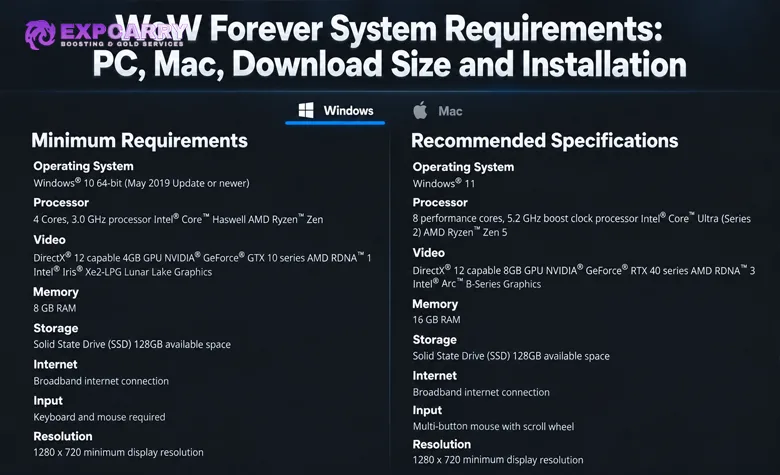
World of Warcraft: Forever has its own PC and Mac system requirements, and they are considerably higher than what players may associate with older Classic clients. On Windows, Blizzard currently requires Windows 10 64-bit, a four-core 3.0 GHz processor, 8 GB of RAM, a DirectX 12-capable 4 GB GPU and 128 GB of available SSD space. The recommended configuration moves to Windows 11, 16 GB RAM and a DirectX 12-capable 8 GB GPU from the hardware families listed by Blizzard. As of October 9, 2026, the beta is playable up to level 30 following the October 1 update, and October 21 remains the last full day of testing. The full game launches globally on November 4, 2026 at 3:00 p.m. PST. Forever is installed through the Battle.net desktop app, where you can also switch between Forever, modern World of Warcraft and Classic clients.
How much storage does WoW Forever require?
Blizzard lists 128 GB of available SSD space for both minimum and recommended PC and Mac configurations. This is a free-space requirement, not the number of gigabytes every player must download. Blizzard has also listed the beta installation being larger than intended as a known issue; a smaller target size has not been announced.
Does WoW Forever support Mac?
Yes. Blizzard lists separate macOS minimum and recommended requirements. The minimum processor specification names Apple M2 or a 9th-generation Intel Core Coffee Lake processor, together with the graphics and memory requirements listed below.
Does WoW Forever require an SSD?
Yes. The current Forever requirements specify an SSD with 128 GB of available space.
Can you use Classic graphics in WoW Forever?
Yes. Blizzard has announced modern and Classic visual presets together with High-Definition (HD) and Standard-Definition (SD) character-model options. Blizzard has not published separate system requirements for the different visual choices.
WoW Forever System Requirements
Blizzard publishes separate minimum and recommended specifications for Windows and macOS. The minimum configuration represents the supported hardware floor, while the recommended specification provides substantially more CPU, GPU and memory headroom. The tables below reflect Blizzard's published Forever specifications. They are not an FPS benchmark or a promise of maximum graphics settings, and Blizzard may revise them as development continues. Check the operating system, CPU, graphics architecture, graphics memory and storage together; meeting only the RAM or GPU-memory figure is insufficient.
Windows Minimum and Recommended Requirements
| Component | Minimum | Recommended |
|---|---|---|
| Operating System | Windows 10 64-bit, May 2019 Update or newer | Windows 11 |
| Processor | 4 cores, 3.0 GHz — Intel Core Haswell / AMD Ryzen Zen | 8 performance cores, 5.2 GHz boost clock — Intel Core Ultra Series 2 / AMD Ryzen Zen 5 |
| Graphics | DirectX 12-capable 4 GB GPU — NVIDIA GeForce GTX 10 series / AMD RDNA 1 / Intel Iris Xe2-LPG Lunar Lake Graphics | DirectX 12-capable 8 GB GPU — NVIDIA GeForce RTX 40 series / AMD RDNA 3 / Intel Arc B-Series |
| Memory | 8 GB RAM | 16 GB RAM |
| Storage | SSD with 128 GB available space | SSD with 128 GB available space |
| Internet | Broadband internet connection | Broadband internet connection |
| Input | Keyboard and mouse | Multi-button mouse with scroll wheel |
| Resolution | 1280 × 720 minimum | 1280 × 720 minimum |
Blizzard also specifies a separate GPU architecture compatibility floor for Forever. Graphics hardware must use AMD Graphics Core Next 1, NVIDIA Maxwell, Intel Skylake or a newer architecture. This architecture requirement is separate from the game's performance-based minimum specification: Blizzard explicitly notes that some GPUs based on supported architectures, including examples such as the GeForce GTX 750/750 Ti and Intel HD Graphics 530, remain well below the actual minimum requirements. Conversely, the GTX 760, 770 and 780 are among Blizzard's unsupported examples despite their larger model numbers. On Windows, use Device Manager and expand Display adapters to identify the GPU before comparing it with both requirements.
Mac Minimum and Recommended Requirements
| Component | Minimum | Recommended |
|---|---|---|
| Operating System | macOS 12 | macOS 15 |
| Processor | Apple M2 / 9th-generation Intel Core Coffee Lake | Apple M4 |
| Graphics | Metal-capable 4 GB GPU / Apple M2 8 GB configuration | Apple M4 16 GB configuration |
| Memory | 8 GB RAM | 16 GB RAM |
| Storage | SSD with 128 GB available space | SSD with 128 GB available space |
| Internet | Broadband internet connection | Broadband internet connection |
| Input | Keyboard and mouse | Multi-button mouse with scroll wheel |
| Resolution | 1280 × 720 minimum | 1280 × 720 minimum |
Apple Silicon uses unified memory, so the M2 8 GB and M4 16 GB configurations should not be read as requiring that much dedicated VRAM in addition to system RAM. Blizzard's minimum processor row also names ninth-generation Intel Coffee Lake, but CPU compatibility alone does not establish that an Intel Mac meets the Metal graphics requirement. Apple M1 is not named in the published minimum specification; do not present M1 support as guaranteed.
WoW Forever Download Size and Storage Space
The official figure players should plan around is 128 GB of available SSD space. Blizzard currently lists the same storage requirement for minimum and recommended configurations on both Windows and Mac.
That 128 GB figure should not be described as the exact WoW Forever download size. Blizzard's published specification defines required free storage, while the amount transferred by Battle.net and the space occupied after installation are separate measurements. The download shown by the launcher can change with the client build and installation state. Use the figures shown for your own installation rather than treating an earlier tester's download as a universal size.
| Storage Question | Current Answer |
|---|---|
| Official free-space requirement | 128 GB |
| Required storage type | SSD |
| Exact fixed download size published by Blizzard | No single fixed figure is provided in the published system requirements |
| Where to check the current download | Battle.net installation screen and download progress for the selected Forever client |
Blizzard's October 1 known-issues update says that the total beta installation is larger than intended and that a future beta update is planned to reduce it. The known-issues thread still contains that entry as of this review, without a final size or a delivery date. Keep at least the published 128 GB free on the installation SSD and leave additional room for updates when possible; no specific extra-space amount is officially stated.
WoW Forever HD vs SD Graphics
Forever gives players several visual choices. Blizzard has officially announced modern and Classic visual presets, High-Definition and Standard-Definition character-model options, and restored Classic animations for HD character models.
| Option | What It Changes |
|---|---|
| HD Character Models | Uses the higher-definition character models |
| SD Character Models | Uses the standard-definition, classic-style character models |
| Modern Visual Preset | Uses the modern visual preset available in Forever |
| Classic Visual Preset | Uses the Classic visual preset available in Forever |
Blizzard has restored Classic animations for HD character models, allowing the higher-detail models to retain the animation style associated with Classic. Blizzard has not described this as a separate modern-versus-Classic animation toggle, so the model and animation options should not be presented as independently configurable unless that is confirmed later. Forever also includes rendering updates such as flowing rivers in Elwynn Forest, mist over the waters of Darkshore and moonlight breaking through the trees in Ashenvale. The complete visual differences are covered separately in the WoW Forever Graphics guide.
Blizzard has not published separate hardware requirements or download sizes for HD and SD models. Choosing SD does not establish compatibility with an unsupported GPU or reduce the official storage requirement. The October 1 beta notes also removed the Ray Traced Shadows setting until its functionality is fixed; an absent setting in that build should not be confused with a missing installation component.
Explore services related to this guide, selected from our WoW Forever catalog.
View All WoW Forever Services
![WoW Forever Gold [Beta]](https://expcarry.com/image/cache/catalog/products/wow-forever/wow-forever-gold-120x120.jpg)

How to Install WoW Forever
WoW Forever is installed through Blizzard's Battle.net desktop application. During the current beta, eligible accounts can find the Forever client in the World of Warcraft Game Version selector under the In Development section. The beta runs through October 21, 2026; these beta-specific launcher labels may change when the full game launches on November 4.
- Install or open the Battle.net desktop app and let the launcher update.
- Log in to the Battle.net account that has WoW Forever beta access.
- Select World of Warcraft.
- Open the Game Version menu above the Play button.
- Select World of Warcraft: Forever Beta under In Development.
- Click Install.
- Select an SSD with at least 128 GB of available space and review the installation figures shown by Battle.net.
- Allow Battle.net to finish the installation.
- Click Play and select an available test realm.
Update graphics drivers before launching. Selected opt-in accounts receive beta access directly; the Skyborne Epic Pack and Warcraft Forever Collection also include access. Blizzard advises that eligible digital purchases can take up to 30 minutes to appear and may require restarting Battle.net. If the beta is missing or Install is unavailable, verify the beta license under Your Game Accounts on the same Battle.net account, then restart the updated launcher. A completed installation does not grant beta access by itself. For access routes, the level-30 test phase and further troubleshooting, use the WoW Forever Beta Guide.
How to Switch Between WoW Forever, Retail and Classic
You do not need a separate Battle.net application for each version of World of Warcraft. The launcher uses the Game Version selector to determine which installed WoW client starts when you press Play.
- Open Battle.net and select World of Warcraft.
- Open the Game Version menu above the Play button.
- Select the WoW client you want to use.
- Choose Forever when you want to play WoW Forever.
- Select the relevant modern WoW or Classic client when switching back.
- Click Play.
Check the selected version before installing, updating or launching a client. Forever, modern WoW and Classic remain separate game environments; selecting another launcher entry does not transfer your character, inventory or progression between them.
Conclusion
WoW Forever requires substantially more modern hardware than older Classic clients, with Windows 10 64-bit, 8 GB RAM, a DirectX 12-capable 4 GB GPU and 128 GB of available SSD space forming the main Windows minimums. Mac is officially supported as well, beginning with macOS 12 and the processor, graphics and memory combinations listed in Blizzard's current specification.
Use Battle.net to install the client on the account that holds beta access, and check both the full hardware specification and the separate GPU architecture requirement. Plan around 128 GB of available SSD space rather than an unofficial download figure. The beta installation-size issue is acknowledged by Blizzard, but a final reduced size has not been announced; HD and SD choices do not carry separate published hardware or storage requirements.
![WoW Forever Gold [Beta]](https://expcarry.com/image/cache/catalog/products/wow-forever/wow-forever-gold-800x800.jpg "WoW Forever Gold [Beta]")